
Skip to content
View in the app

A better way to browse. Learn more.

LCPDFR.com

A full-screen app on your home screen with push notifications, badges and more.

To install this app on iOS and iPadOS
  1. Tap the Share icon in Safari
  2. Scroll the menu and tap Add to Home Screen.
  3. Tap Add in the top-right corner.
To install this app on Android
  1. Tap the 3-dot menu (⋮) in the top-right corner of the browser.
  2. Tap Add to Home screen or Install app.
  3. Confirm by tapping Install.

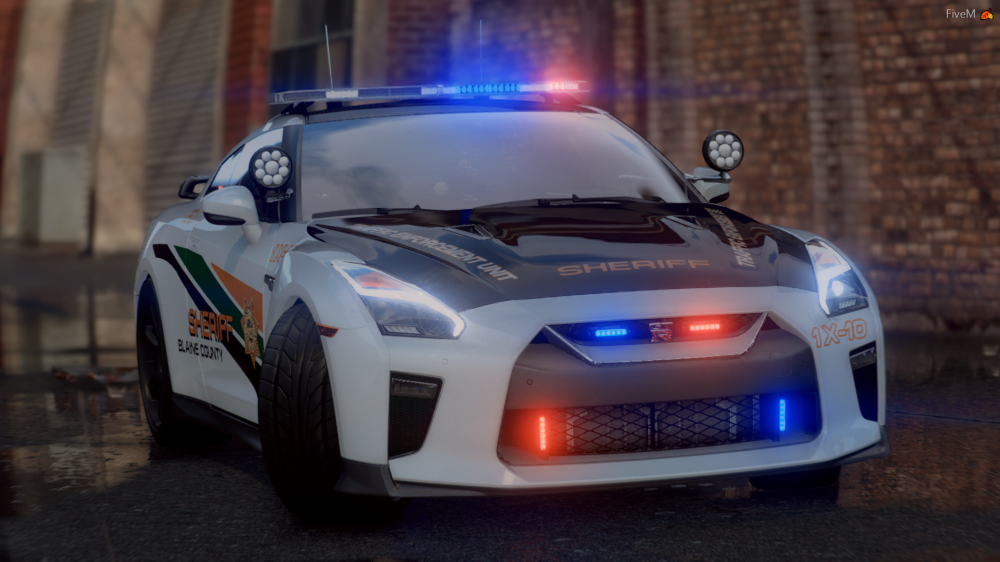
[ELS] 2018 Nissan GTR R35 T.E.U 2.0.0

(9 reviews)

15 Screenshots

R35 Lspdfr Banner.png


Join My Discord & Have A Chat

https://discord.gg/3vmwf9e


THE NON ELS VERSION OF THIS VEHICLE IS AVAILABLE IN MY DISCORD


If you use this in a video, please credit it properly 


Known Issues: 


-Minor L0D Problems


Disclaimer:
DO NOT distribute this content without my permission! This includes liveries, models or the screenshots. 


DO NOT use the vehicles in a clan or group without my express permission. THIS APPLIES TO FIVEM TOO. Just ask me.
Please do not upload this file or a part of it to any other website without permission from me
I accept no responsibility for any damage caused to your PC, game, or anything else. 


DO NOT rip, dismantle or change the vehicle in any way (except for texture files). Vehicles are LOCKED for a reason. 


 Kinda Copied Ripples Description Layout Cause Its Fire So Credits To Ripple, I Have Permission To Use It


What's New in Version 2.0.0

Released

Added A Unmarked Version Without Spotlights

Edited Vehicles.meta File

User Feedback

Recommended Comments

Dora0404

Members

On 5/9/2020 at 9:10 AM, EssentialDesigns said:

There is multiple livery's on the car, go into a mod menu and change it 😅

sir,sorry to disturb u, i'm having a problem ,i enter the game and call this mod many times,but it still have "sheriff" livery's ,can not call clean car like your video ,is something wrong in my installation step?can you help me ? thank you so much!!!!( my EN is not well , i'm very sorry about that😅)

Dora0404

Members

1 hour ago, Dora0404 said:

sir,sorry to disturb u, i'm having a problem ,i enter the game and call this mod many times,but it still have "sheriff" livery's ,can not call clean car like your video ,is something wrong in my installation step?can you help me ? thank you so much!!!!( my EN is not well , i'm very sorry about that😅)

SO SORRY!!!!!!!i figger out what;s happend!!!!!

obito bl4ckout

Members

how do you spawn the vehicle in i have els and it says its in game


BrianD127

Members

On 5/8/2020 at 6:10 PM, EssentialDesigns said:

There is multiple livery's on the car, go into a mod menu and change it 🙂

tried to change the livery with simple trainer but the livery doesn't change even if i try to swap the livery.

teajay83

Members

best car i have put into the game yet. detail is crazy good. keep up the great work. 

Jeffdadawg

Members

Nice stuff. Can't seem to switch skins though using the trainer

Brawlrus

Members

It says the discord is invalid can you post a new link please.

EssentialMods

Members Author

11 hours ago, Brawlrus said:

It says the discord is invalid can you post a new link please.

All done 🙂

WMFong

Members

(edited)

Nice Vehicle. I hope you can make an add on version for this vehicle

Edited by WMFong

mr DEMON

Members

is there a non els version to this car thats free?

Deactivated Member

Deactivated

why i install the unmarked ver, the car is still marked, how to solve this?


HanzEirolTzy

Members

Can i change the slot to policeold?


Sai Charan CV

Members

yo guys. i dont know whether is this only me who is facing with this problem but my compulite and pull over feature is not working in this vehicle. I tried everything( even reinstalling this vehicle) I dont think its a problem with the compulite or with with lspdfr as it works fine with other vehicles. If anyone know how to fix this issue, pls let me know...

BMBOY5421

Members

Can you get the hands on the steering wheel? 

BMBOY5421

Members

(edited)


Edited by BMBOY5421

EmporosThanatou

Members

For anyone who has issues with this GTR's livery, I give credit to cats9142430 on the Reddit chat for Essential Mods. I will use police4 as an example.


* General rule of thumb, make copies of the original files. I cannot stress this enough, always make duplicates before you mess with them incase of error or rollback to. *

  1. Open OpenIV.
  2. Right-click the YTD file associated with this car (your vehicles.rpf file path).
  3. Export the following files:
    • gtr_sign1.dds
    • gtr_sign2.dds
    • gtr_sign3.dds
  4. Make a copy/duplicate of these 3 original files.
  5. Save the copy of the 3 original files separate as to not confuse yourself later on, whether rename them or put in a secondary folder.
  6. Open the files in Paint.net, Photoshop, etc.
  7. Make the liveries transparent, meaning hide/remove/delete the layer with the sheriff and/or police livery, then overwrite the files.
  8. Go back to OpenIV and replace those 3 files in the YTD file, then save.

Next time you run GTAV, it should appear without the liveries. It if helps any, I'm using the unmarked w/o spotlights. I'm able to change the paint color without issues, I used Simple Trainer.

niksek25

Members

Can you guys make an addon for this vehicle?

Beau77

Members

Hi, I am decently new to this stuff. Is there a way to make this an additional vehicle or is it only a Replace vehicle for Police1 etc.???

lilpAx

Members

is there a addon version of this?????


NightLight

Members

On 7/2/2024 at 9:44 AM, lilpAx said:

is there a addon version of this?????


I simply made an addon out of it by looking for another addon that would fit the car and then installing it normally and then I took the GTR and swapped the names of the addon and the GTR and that was it (I hope you could understand)

Create an account or sign in to comment

Account

Navigation

Search

Search

Configure browser push notifications

Chrome (Android)
  1. Tap the lock icon next to the address bar.
  2. Tap Permissions → Notifications.
  3. Adjust your preference.
Chrome (Desktop)
  1. Click the padlock icon in the address bar.
  2. Select Site settings.
  3. Find Notifications and adjust your preference.








