Skip to content
View in the app

A better way to browse. Learn more.

LCPDFR.com

A full-screen app on your home screen with push notifications, badges and more.

To install this app on iOS and iPadOS
  1. Tap the Share icon in Safari
  2. Scroll the menu and tap Add to Home Screen.
  3. Tap Add in the top-right corner.
To install this app on Android
  1. Tap the 3-dot menu (⋮) in the top-right corner of the browser.
  2. Tap Add to Home screen or Install app.
  3. Confirm by tapping Install.

ExternalPoliceComputer 2.0.1.0

(22 reviews)

8 Screenshots

Welcome To ExternalPoliceComputer

  • Thank you for downloading ExternalPoliceComputer

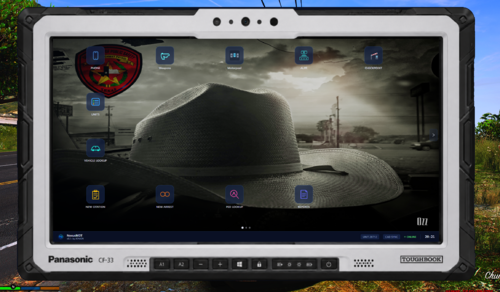
  • EPC allows you to use any device in your home network (e.g. a laptop, your mobile or just the same device you're playing LSPDFR on) as a modern MDT

  • Important notices: STP is no longer supported as PolicingRedefined is the new standard (you can still use STP, it just doesn't sync like PR does); Your old configuration files will no longer work - remove them; Node.js is no longer required because the server is now integrated into the LSPDFR plugin


Features

  • New desktop like experience with modern UI and live in-game data

  • Ped and vehicle lookup

  • In-depth report system (more to come :))

  • Simple court system

  • Seamless integration and synchronization with PolicingRedefined and Callout Interface

  • In-depth customization and localization options


Requirements


Installation

  • Move all files and folders from the ZIP file into your GTA main directory


Setup

  • When going on duty using LSPDFR, ExternalPoliceComputer will display notifications in-game containing the addresses, used to access EPC

  • If you missed them, ExternalPoliceComputer also generates a file including the addresses: GTAV/EPC/ipAddresses.txt

  • You can access EPC using any browser of your choice (however I recommend a Chromium based browser, e.g. Chrome, Brave, etc.) by entering one of the addresses (if one doesn't work, try the other)

  • For more information on usage, check out the GitHub README

Setup using Steam

  • In Steam go to Steam → Settings → In Game

  • Make sure Enable the Steam Overlay while in-game is enabled

  • Set Overlay shortcut key(s) to whatever key you want to use to open ExternalPoliceComputer

  • Set Web browser home page to http://127.0.0.1:8080 (or the url provided by EPC)


Customization

  • You can customize your config.json, language.json, arrestOptions.json and citationOptions.json; all located in the EPC folder of your GTA main directory

  • The config can be customized on the customization page to avoid having to reload LSPDFR

  • Check out the GitHub README to learn more about Plugins for EPC

  • I highly recommend installing these arrest and citations charges by @unitedOrange66


Issues And Enhancements

  • Join The Discord Server for support, suggestion, and upcoming versions: https://discord.gg/RW9uy3spVb

  • This is my first LSDPFR Plugin or C# project for that matter; So please don't be too hard on me if you find out that my code is shit


Source Code

  • The code can be found on GitHub

  • Do not upload the code anywhere else and claim it as your own


Video by @Armouredivision


Edited by HeyPalu

What's New in Version 2.0.1.0

Released

2.0.1.0

Minor Changes:

  • Bug fix: game crashing if server couldn't start

  • Bug fix: date and time parsing in reports still didn't work sometimes

  • Minor styles changes on court page

Major Changes:

  • Addition of plugins and the customization page


Spoiler

2.0.0.6

Minor Changes:

  • Bug fix: URL ACL adding wasn't working for usernames with spaces

  • Bug fix: date parsing in reports didn't work for some locales

2.0.0.5

Major Changes:

  • Entire rework of ExternalPoliceComputer 


Short Description

ExternalPoliceComputer is the first Plugin for LSPDFR turning any device in your home network into a Police Computer.

AI disclosure

The author has disclosed that AI tools were used in creating the following aspects of this file:

  • Mod and Mod Content (Minor)

I use GitHub Copilot's inline suggestions for VS and VS Code (mostly for repetitive code snippets). AI also helped upgrading the arrest and citation options from 1.x to 2.x. The plugin was not created by AI, AI merely improved the workflow.

User Feedback

Recommended Comments

249Xeno

Members

(edited)

7 hours ago, legendzeox said:

i mean you guys are killing it this is amazing 🙂  quick question is there a way to implement giving a citation to the ped on a traffic stop?

yeah, I know, and that's what I did... 

Also, when we do the arrestOptions or citationOptions. Does it go through the default folder within the EPC or the one that is in the EPC folder, but not in the default? because I don't want to make changes to the arrestOptions and add to the wrong one.

I also wanted to know if I can add new charges in the “ArrestOptions?” I attempted to do that but it gave me errors regardless after I look over everything to make sure it is correct. Is this a set where I could not do any changes to it or add new charges?

Edited by Parzival.Zio

Sinister09

Members

10 hours ago, legendzeox said:

i mean you guys are killing it this is amazing 🙂  quick question is there a way to implement giving  a citation to the ped on a traffic stop?

Ran into that as well. Been using EPC for arrests and still using the compulite tablet for tickets for now so I don't miss out on the ticket animation. I can't wait to see this one develop. So many implementation options become available because of this. I can imagine in the future we will see integrations with other mods.

legendzeox

Members

3 hours ago, Sinister09 said:

Ran into that as well. Been using EPC for arrests and still using the compulite tablet for tickets for now so I don't miss out on the ticket animation. I can't wait to see this one develop. So many implementation options become available because of this. I can imagine in the future we will see integrations with other mods.

it would be nuts!! even if EPC couldn't have that implemented maybe other modders try to make it work like the charges reborn mod above !🤞

HeyPalu

Members Author

(edited)

9 minutes ago, legendzeox said:

it would be nuts!! even if EPC couldn't have that implemented maybe other modders try to make it work like the charges reborn mod above !🤞

Okay guys relax 😂. I have a vague idea on how to implement this. I do have some other features I want to implement first though. I'll also need to do some digging into animations and stuff. 


Edit: This doesn't mean that it will definitely work. So there is a slim chance it won't be implemented

Edited by HeyPalu

249Xeno

Members

Also. For the Map part within the external police computer, will it show you where the player is located? Because couldn't see my location in there.

I think it would be a great idea if the map could show where all the AI officers are as well as yourself. It would be cool too if the AI near you would be the one that comes to assist you rather them porting to you. Especially when they are porting and hitting Ai drivers.

HeyPalu

Members Author

22 minutes ago, Parzival.Zio said:

. For the Map part within the external police computer, will it show you where the player is located?

No it's just an image.

22 minutes ago, Parzival.Zio said:

I think it would be a great idea if the map could show where all the AI officers are as well as yourself

Again, quite difficult and I don't know if showing the location of others is very realistic. 

23 minutes ago, Parzival.Zio said:

It would be cool too if the AI near you would be the one that comes to assist you rather them porting to you. Especially when they are porting and hitting Ai drivers.

EPC doesn't control AI spawning. That's an issue within LSPDFR or STP/UB 

249Xeno

Members

21 minutes ago, HeyPalu said:

No it's just an image.

Again, quite difficult and I don't know if showing the location of others is very realistic. 

EPC doesn't control AI spawning. That's an issue within LSPDFR or STP/UB 

I can tell it is just an image, but it can be useful.
Again, quite difficult and I don't know if showing the location of others is very realistic.  <<--- Yes, it is realistic. Before I left my department, our laptop showed where the officers were at in distance and who was the closest to assist us and I believe the department is still using it too, to this current day. It's fine if you can't do it. It was just a suggestion.
I know LSPDFR controls the spawning point of AI, but there are loops around everything.

Offtopic... Am I able to add more charges to the "ArrestOptions" because when I did it last night, it kept telling me an error until removed? I checked the coding and placement of everything and it was corrected. Do we have an option to add in?

legendzeox

Members

13 hours ago, HeyPalu said:

Okay guys relax 😂. I have a vague idea on how to implement this. I do have some other features I want to implement first though. I'll also need to do some digging into animations and stuff. 


Edit: This doesn't mean that it will definitely work. So there is a slim chance it won't be implemented

Brotha you just opened the gates of excitement 😂 lets goooooo 

HeyPalu

Members Author

12 hours ago, Parzival.Zio said:

I know LSPDFR controls the spawning point of AI, but there are loops around everything.

EPC is a police computer. Not more. That won’t be added. And I wouldn’t even know how to. 


12 hours ago, Parzival.Zio said:

Offtopic... Am I able to add more charges to the "ArrestOptions" because when I did it last night, it kept telling me an error until removed? I checked the coding and placement of everything and it was corrected. Do we have an option to add in?

In version 1.3.2, I added an UI to customize EPC, including arrest and citation options. 
 

also if you have further questions or suggestions, please join the Discord as this will make communication easier. 

Fendy27

Members

i wished it had auto-fill stopped ped's name and vehicle's plate number .

Gary Connor

Members

Why I'm enter XAMPP webpage or "This page isn’t working" after I used the link??? The game is opened and I opened the cmd too, I am also installed Node.js

HeyPalu

Members Author

6 hours ago, Gary Connor said:

Why I'm enter XAMPP webpage or "This page isn’t working" after I used the link??? The game is opened and I opened the cmd too, I am also installed Node.js

please join the Discord if you need further support 

Gary Connor

Members

46 minutes ago, HeyPalu said:

please join the Discord if you need further support 

Just stuck on the verification, and see the message like "U don't have permission to view the message history of verify-here"

GravelRoadCop

Members

Love this addon, however It is conflicting with EUP menu, so whenever I press F11 to open menu, it crashes LSPDFR. Please look into this. There was a line in the RPH crash log that indicated it was your script, but I didn't save that log otherwise I would have pasted it here. Other than this, a game changer addon for sure. 

HeyPalu

Members Author

14 hours ago, GravelRoadCop said:

Love this addon, however It is conflicting with EUP menu, so whenever I press F11 to open menu, it crashes LSPDFR. Please look into this. There was a line in the RPH crash log that indicated it was your script, but I didn't save that log otherwise I would have pasted it here. Other than this, a game changer addon for sure. 

this will be fixed in the next version 

Reg23rdr

Members

(edited)

Okay so I'm probably not the smartest guy in the world when it comes to computers. In order for me to actually be able to use this plugin someone will have to guide me through the installation process or make an installation video. I have been at this for 7 hours trying to figure out why I keep getting all kinds of error messages with no progress. I have no clue what I'm doing. SOMEONE PLEASE HELP ME!!!!!!!!

Edited by Reg23rdr

HeyPalu

Members Author

9 hours ago, Reg23rdr said:

Okay so I'm probably not the smartest guy in the world when it comes to computers. In order for me to actually be able to use this plugin someone will have to guide me through the installation process or make an installation video. I have been at this for 7 hours trying to figure out why I keep getting all kinds of error messages with no progress. I have no clue what I'm doing. SOMEONE PLEASE HELP ME!!!!!!!!

for support please join the Discord

ryan060412

Members

Why dont you do tutorial video?

HeyPalu

Members Author

49 minutes ago, ryan060412 said:

Why dont you do tutorial video?

cause my computer is a toaster and obs doesn't work

ryan060412

Members

40 minutes ago, HeyPalu said:

cause my computer is a toaster and obs doesn't work

 Everyone needs this video 

Sinister09

Members

12 minutes ago, ryan060412 said:

 Everyone needs this video 


What are you having trouble with? 

SwimKiller

Members

On 12/1/2023 at 5:52 AM, HeyPalu said:

for support please join the Discord

Can't you just help without having to join Discord???

HeyPalu

Members Author

38 minutes ago, SwimKiller said:

Can't you just help without having to join Discord???

I could, but always remember I do this for free. And I think we can all agree that communication is easier on Discord. 

4ourbelow

Members

awesome mod man thank you so much first and foremost. The only wish/improvement i would want is for it to be intgrated in game somehow just for the sake of being able to capture the terminal via obs and other streaming software. For some reason the steam overlay cant be captured at all but no complaints as far as productivity and the overall purpose of the mod again thanks much for providing this to us!

HeyPalu

Members Author

6 hours ago, 4ourbelow said:

The only wish/improvement i would want is for it to be intgrated in game somehow

Sadly, that's not possible. "External" is in the name for a reason 😉

6 hours ago, 4ourbelow said:

for the sake of being able to capture the terminal via obs and other streaming software

OBS doesn't work on my computer, so I can't really help you with that. But I know it's possible because I've seen it be recorded / live streamed. Maybe you'll find some help on the Discord server.

Create an account or sign in to comment

Account

Navigation

Search

Search

Configure browser push notifications

Chrome (Android)
  1. Tap the lock icon next to the address bar.
  2. Tap Permissions → Notifications.
  3. Adjust your preference.
Chrome (Desktop)
  1. Click the padlock icon in the address bar.
  2. Select Site settings.
  3. Find Notifications and adjust your preference.