Skip to content
View in the app

A better way to browse. Learn more.

LCPDFR.com

A full-screen app on your home screen with push notifications, badges and more.

To install this app on iOS and iPadOS
  1. Tap the Share icon in Safari
  2. Scroll the menu and tap Add to Home Screen.
  3. Tap Add in the top-right corner.
To install this app on Android
  1. Tap the 3-dot menu (⋮) in the top-right corner of the browser.
  2. Tap Add to Home screen or Install app.
  3. Confirm by tapping Install.

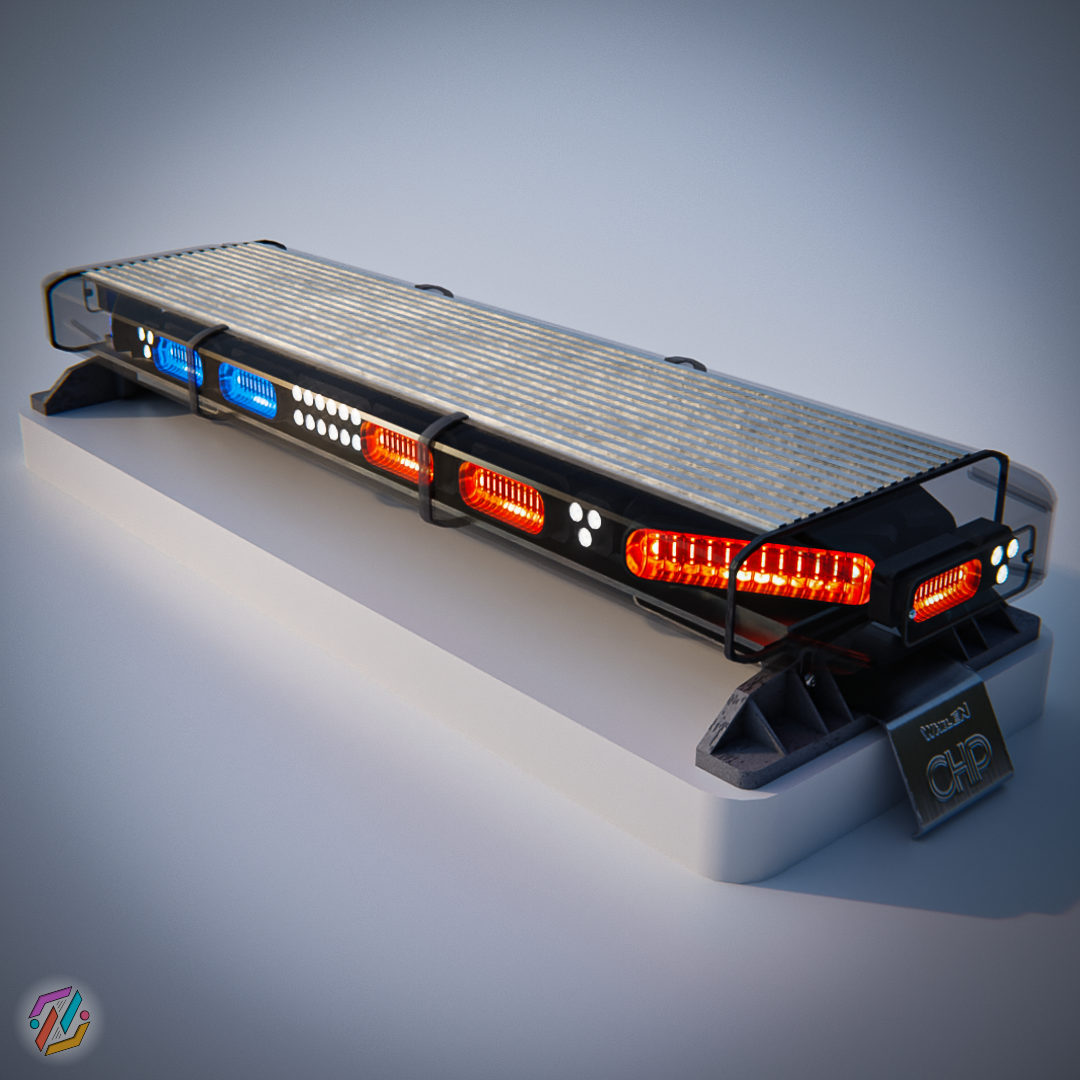
CHP Whelen Liberty I Lightbar [.Z3D/.BLEND] 1.0.0

9 Screenshots

CHP Whelen Liberty I


Lightbar model that comes with the free 3D model of the lightbar in .blend file and a converted and ready to use lightbar in .z3d file.


Content:

Spoiler

.z3d file
.blend file
Textures folder


Technical details:

Spoiler

Nº vertices: 15.170
Nº triangles: 29.178
Nº materials: 5
Texture res: 4K


License:
If you use this lightbar credits will be highly appreciated. Modifications made with this lightbar are authorized for commercial usage.
The redistribution or commercial usage of this lightbar without modification is prohibited.


Remember to comment your thoughts and suggestions below. Have fun and keep modding!!


User Feedback

Recommended Comments

Speeders

Members

Good model but can you use a better EMIS?

1 hour ago, Speeders said:

Good model but can you use a better EMIS?

You can use any editing program to make you own.

zombitt

Members Author

(edited)

7 hours ago, Speeders said:

Good model but can you use a better EMIS?


5 hours ago, GTA 5 Jedi Master said:

You can use any editing program to make you own.

Exactly, feel free to edit and adapt the lightbar to fit it to your projects as much as you want

Edited by zombitt

Kreemerz

Members

(edited)

something is wrong with several of the textures.... when exported from Zmodeler, it appears that 5 of the textures corrupt all the other textures. Still researching 

Something weird happens with the texture files (.png) in your folder. Not sure if it's because you initially created them in blender or what but it really gets screwy when importing those textures into OpenIV. 

Edited by Kreemerz

zombitt

Members Author

On 9/17/2023 at 5:03 AM, Kreemerz said:

something is wrong with several of the textures.... when exported from Zmodeler, it appears that 5 of the textures corrupt all the other textures. Still researching 

Something weird happens with the texture files (.png) in your folder. Not sure if it's because you initially created them in blender or what but it really gets screwy when importing those textures into OpenIV. 

It is weird, can you describe more the problem? It could be the material setup or the error happens when you import the textures into OpenIV only?

M.Scott

Members

Side LINZ mounting bracket is wrong.

Kreemerz

Members

(edited)

On 9/18/2023 at 10:43 AM, zombitt said:

It is weird, can you describe more the problem? It could be the material setup or the error happens when you import the textures into OpenIV only?


Zmodeler handles the import or opens the file with no issues.

The issue occurs when you import the textures into OpenIV. I tried redoing it today and it could not import the following file: CHP_s_Whelen_Liberty_I_DefaultMaterial_Normal


I just skipped the file and tried spawning the model. the model crashed the game when spawning...   still investigating.

Edited by Kreemerz

Kreemerz

Members

So it looks like there are 5 texture files that Zmodeler exports and it nearly quadruples the size of the DDS file. 2 of the files jump from 6mb up to 85mb each. I don't know why Zmodeler is doing that.


And then OpenIV chokes on files that size. 

zombitt

Members Author

14 hours ago, Kreemerz said:

So it looks like there are 5 texture files that Zmodeler exports and it nearly quadruples the size of the DDS file. 2 of the files jump from 6mb up to 85mb each. I don't know why Zmodeler is doing that.


And then OpenIV chokes on files that size. 

I have never seen this happen before, do you emblem the texture to the .ytf of the car? If so, it might cause the size issue. Also, have you tried to downscale the texture size from 4K to 1K?

Kreemerz

Members

23 hours ago, zombitt said:

I have never seen this happen before, do you emblem the texture to the .ytf of the car? If so, it might cause the size issue. Also, have you tried to downscale the texture size from 4K to 1K?

Maybe I'm doing something wrong? 

So when I finish building of the model, the first thing I do is export the 2 yft files. 

Then I export the textures from the screen below or re-save the files. 


Maybe that's not the best way to get the textures from all the other parts/groups?

Could contain: text, screenshot, multimedia software, software, graphics software, computer icon, editing, website, design

zombitt

Members Author

2 hours ago, Kreemerz said:

Maybe I'm doing something wrong? 

So when I finish building of the model, the first thing I do is export the 2 yft files. 

Then I export the textures from the screen below or re-save the files. 


Maybe that's not the best way to get the textures from all the other parts/groups?

Could contain: text, screenshot, multimedia software, software, graphics software, computer icon, editing, website, design

Maybe zmodeler is exporting the textures wrong, try exporting the .ytf files without these 5 textures and then add the original .png textures to the .ytd directly from OpenIV, so OpenIV converts the textures to .dss and not zmodeler. Otherwise, I can provide you with the converted .dss textures and see if it works that way.

Create an account or sign in to comment

Latest Mods

Account

Navigation

Search

Search

Configure browser push notifications

Chrome (Android)
  1. Tap the lock icon next to the address bar.
  2. Tap Permissions → Notifications.
  3. Adjust your preference.
Chrome (Desktop)
  1. Click the padlock icon in the address bar.
  2. Select Site settings.
  3. Find Notifications and adjust your preference.


