




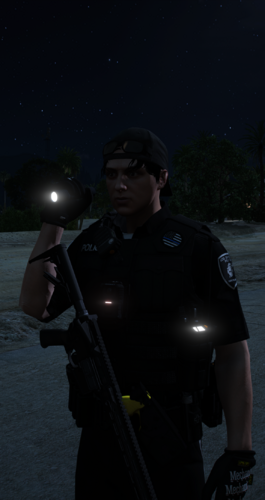
LSPDFR Partners brings a new level of life and teamwork to your LSPDFR patrols by placing autonomous AI officers into the world alongside you.
Instead of every officer existing only when you manually request backup, your partners have a job of their own. They can patrol independently across the map, communicate over the radio, respond to incidents, assist during pursuits, react to dangerous situations, and work alongside you throughout your shift.
Partners aren't simply followers attached to the player. They can operate independently and may be somewhere else in the city handling police work while you're dealing with something completely different. When assistance is needed, available units can respond and become part of the situation.
The mod also features a voice-driven radio system. Using Microsoft Speech recognition, you can communicate with your units using spoken radio commands and callsigns. Officers can respond using individual Windows voices, allowing different partners to have their own identity instead of every unit sounding exactly the same.
Your partners communicate with more than just you. Officers can have their own radio conversations, status exchanges, comments, and occasional banter while you're on patrol, helping the department feel active even when you're not directly interacting with them.
LSPDFR Partners includes support for pursuits, shootings, LSPDFR callouts, traffic-stop assistance, emergency equipment synchronization, independent patrol behavior, partner vehicle following, riding with the player, configurable response rules, world incidents, live partner blips, officer profiles, callsigns, ranks, divisions, individual voices, patrol areas, vehicles, and much more.
Almost every partner can be customized through the configuration file. Create a small two-officer team or build an entire department. Give officers different names, preferred names, callsigns, ranks, patrol areas, vehicles, models, voices, response behavior, and other options.
The goal of LSPDFR Partners is simple: make it feel like you're actually working as part of a police department rather than being the only officer in Los Santos who knows how to do anything.
Start your shift, spawn your units, and let them work.
This mod is currently in Beta. Features and AI behavior will continue to be expanded and improved in future updates.
What's New in Version 0.0.2
Released
🚔 LSPDFR Partners — Beta 0.0.2
📋 FULL CHANGELOG — LATEST BETA
Beta 0.0.2 is the latest Beta release of LSPDFR Partners.
This update is focused on turning the growing Partners feature set into one connected, configurable system. It expands customization, introduces the Custom Content Manager, adds optional Gemini voice and dialogue support alongside the existing Microsoft voice stack, improves radio/dispatch reliability, strengthens cleanup and fallback behavior, and adds a major configuration/documentation pass for users who want to tailor the department to their own setup.
⚠️ LSPDFR Partners is still in Beta. Beta 0.0.2 is the latest version, not a declaration that Beta development is finished. Future Beta versions will be released whenever testing, fixes, or community feedback justify them.
🤖 NEW — OPTIONAL GEMINI VOICE PROVIDER
LSPDFR Partners now supports Gemini as an optional cloud voice provider while keeping the existing Microsoft voice system fully supported.
✨ Provider improvements include:
🤖 Added optional Gemini TTS support.
🪟 Microsoft remains the default, zero-setup voice provider.
🎙️ Dispatcher, Partners, Events, and Banter can use separate voice-provider choices.
👮 Individual Partners can override the global Partner voice provider.
🔊 Individual Partners can use their own Gemini voice selection.
🧪 Added in-game Gemini voice testing.
🔁 Added configurable Microsoft fallback when Gemini is unavailable.
📝 Gameplay and text radio traffic continue even when cloud TTS is unavailable.
🔐 Every user supplies their own Gemini API key; no developer API key is distributed with the mod.
🌐
GEMINI_API_KEYandGOOGLE_API_KEYenvironment variables are supported, with an INI key available as an optional convenience fallback.
Gemini is optional. Players who do not want cloud AI can continue using the Microsoft voice system normally.
🗣️ NEW — DIALOGUE ENGINE / VOICE ENGINE SEPARATION
Beta 0.0.2 separates what is said from what voice says it.
Dialogue can come from:
📄 Built-in editable XML dialogue.
🤖 Optional Gemini-generated dynamic dialogue.
Speech can come from:
🪟 Microsoft voices.
🤖 Gemini voices.
🔇 Disabled TTS / text-only operation.
This means XML dialogue can be spoken with Gemini, while Gemini-generated dialogue can still use the Microsoft voice system when configured that way.
🧠 NEW — EXPERIMENTAL GEMINI DYNAMIC DIALOGUE
An optional dynamic-dialogue system can generate short fictional police-radio lines using current Partners context.
Safety and reliability behavior:
🧪 Dynamic dialogue is optional and can remain disabled.
📄 Built-in XML remains the reliable fallback dialogue source.
⚠️ HTTP 429 quota/rate-limit failures do not repeatedly hammer the API.
⏳ Quota responses activate a cooldown instead of an immediate retry loop.
🌐 Temporary Gemini service failures such as HTTP 503 fall back to XML.
🎮 Cloud dialogue does not receive unrestricted control over GTA gameplay.
🚓 Partner gameplay continues if the cloud service is unavailable.
Dynamic dialogue remains an optional Beta feature because external cloud availability and user quotas are outside the mod's control.
🎙️ IMPROVED — MICROSOFT VOICE ARCHITECTURE
The existing Microsoft voice stack remains an important part of LSPDFR Partners.
📢 Dispatch/Control: dedicated Microsoft Susan voice through Windows Media Speech Synthesis.
👮 Partners: desktop SAPI voices such as Microsoft David and Microsoft Zira.
🎤 Recognition: Microsoft Speech Platform remains the microphone/voice-command recognition engine.
🧵 Partner speech continues on a dedicated background STA speech worker.
🚫 Dispatcher and Partner voice roles remain separated.
Microsoft remains the recommended offline/default path for players who do not want to configure Gemini.
📻 IMPROVED — ORDERED RADIO / DISPATCH AUDIO
Radio playback received additional sequencing work.
📡 Dispatcher/event speech is processed through an ordered voice queue.
🧵 Cloud synthesis work is kept off the normal RAGE gameplay path.
🚨 Important traffic continues to use the shared radio-airtime system.
🔇 Reduced the chance of cloud completion order causing later transmissions to play before earlier ones.
🔁 Gemini failures can cleanly transition to the configured Microsoft/text fallback path.
The goal is simple: the radio should sound like one network, not several unrelated voice systems fighting for airtime.
⏳ NEW — GEMINI QUOTA COOLDOWN & FAILURE PROTECTION
Beta 0.0.2 adds dedicated cloud-failure handling.
🚫 HTTP 429 /
RESOURCE_EXHAUSTEDno longer causes immediate repeated requests.⏱️ Retry-after information is used to establish a temporary cooldown when available.
🎙️ TTS and dynamic-dialogue cooldown handling are separated.
🪟 Microsoft fallback can take over when configured.
📄 Dynamic dialogue falls back to editable XML.
🔐 API keys are redacted from diagnostic errors.
📝 Cloud errors are trimmed into more useful log messages.
A cloud outage or exhausted free-tier quota should not become a gameplay outage.
🔇 NEW — COMPLETE TTS CONTROL
Players now have more control over synthesized speech.
🔇 Master
EnableTTSoption.📢 Dispatcher TTS toggle.
👮 Partner TTS toggle.
🌎 Event TTS toggle.
😂 Banter TTS toggle.
🚫 Microsoft / Gemini / Disabled provider choices by category.
Turning synthesized speech off does not disable the underlying gameplay or text radio system.
🧰 NEW — CUSTOM CONTENT MANAGER
Beta 0.0.2 introduces a dedicated Custom Content Manager separate from the normal operational Partners menu.
Custom content support includes:
👮 Custom ped definitions.
🚔 Custom vehicle definitions.
👕 Custom outfit definitions.
🔗 Assigning custom content to Partners.
👀 Ped, vehicle, and outfit preview tools.
✏️ Rename / duplicate / delete workflows where supported.
♻️ Safe fallback behavior if assigned custom content is removed.
🔄 Runtime Custom XML reload support.
The Custom Content Manager uses its own configurable menu key and keeps content in the dedicated Custom folder.
👕 NEW — OUTFIT CAPTURE SYSTEM
Players can capture compatible freemode clothing directly into LSPDFR Partners custom outfit definitions.
👔 Components 0–11 are supported with drawable, texture, and palette values.
🧢 Props 0–7 are supported with drawable and texture values.
👮 Male and female freemode workflows are supported.
💾 Captured outfits are stored in Partners' own Custom XML format.
👀 Preview tools back up and restore the player's appearance where supported.
This also provides a practical path for players using EUP/freemode uniforms without making EUP a hard dependency.
🚓 NEW — OPTIONAL POLICING REDEFINED IMPORT TOOLS
LSPDFR Partners can optionally read compatible content from supported Policing Redefined configuration files.
📥 Reads compatible ped/vehicle definitions from documented PR XML files.
👕 Can import compatible clothing component/prop information.
🛡️ PR files are treated as read-only by Partners.
🚫 No hard Policing Redefined DLL dependency is required.
♻️ Existing Partners custom content is not intentionally overwritten.
🧰 Manual PR-style outfit import is also available as a fallback tool.
This feature is optional and does not require Policing Redefined to use LSPDFR Partners.
⚙️ MAJOR CONFIGURATION & CUSTOMIZATION PASS
Beta 0.0.2 continues the project's goal of making user-facing behavior configurable instead of requiring users to rebuild the DLL.
Configuration improvements include:
📝 Expanded comments and examples throughout generated INI files.
💾 Existing INI comments are preserved when Partners saves updated values.
🔄 Runtime configuration reload support.
🎮 In-game controls for major runtime settings and radio-provider choices.
📻 Radio-specific configuration remains centralized in
Radio\RadioSettings.ini.🚓 Gameplay, Partner, patrol, vehicle, protection, and general behavior remain in
LSPDFRPartners.ini.📍
Locations.jsonremains extendable and documents supported location data.🧩 Custom peds, vehicles, and outfits remain in their dedicated XML files.
📄 Editable radio content remains in dedicated XML files.
Advanced users should follow the existing Partners file structure and examples when manually editing XML/JSON. Invalid structure can prevent custom entries from loading.
📂 EXPANDED RADIO FILE SYSTEM
The Radio folder now acts as the central home for the editable radio system.
Included/managed radio content includes:
⚙️
RadioSettings.ini🎤
Commands.xml💬
Conversations.xml😂
Banter.xml📢
DispatchCommands.xml🗣️
DispatchPhrases.xml📟
PoliceCodes.xml🔤
Abbreviations.xml📖
CodeSheet.txt📘
RADIO_SYSTEM_GUIDE.txt🤖
GeminiVoices.txt📝
README.txt
Existing editable content files are not intentionally overwritten simply because the plugin updates, allowing user customization to survive normal reloads/updates.
📍 IMPROVED — LOCATIONS.JSON
The generated location catalog continues to provide an expandable reference for supported areas and location data.
🗺️ Patrol areas and zone information remain available outside the DLL.
⛽ Gas/break location information is represented in the location system.
🔄 The file can be regenerated from the in-game menu.
⚠️ Manual editing is intended for users who understand the existing Partners format.
🎛️ IMPROVED — IN-GAME CONFIGURATION
The menus have been expanded so common configuration changes can be made without leaving the game.
🎙️ Voice-provider selection by radio category.
🤖 Gemini voice selection.
🧠 Dynamic-dialogue toggle.
🔁 Gemini fallback selection.
👮 Per-Partner provider/voice overrides.
🚓 World-event and assistance toggles.
🚨 Partner response rules.
🗺️ Assigned patrol areas.
🚔 Patrol modes.
🛡️ Vehicle protection options.
💾 Save Configuration.
🔄 Reload Configuration.
Manual file editing remains available for advanced settings and structured XML/JSON content.
🧹 IMPROVED — CONFIG SAVE / RELOAD BEHAVIOR
Configuration handling has received additional work to make live customization safer.
💾 Saving updates values without intentionally replacing custom/translated INI comments.
🔄 Reload Configuration refreshes INI, XML, JSON, radio settings, and menus.
📻 Radio settings and content can be reloaded without restarting the entire configuration workflow.
👮 Partners are safely dismissed during the full configuration reload and remain manually spawnable afterward.
🚗 FIXED — PARTNER VEHICLE / RETURN-TO-PATROL SAFETY
Additional safeguards were added around Partner driving tasks and vehicle handles.
This targets cases where an incident ended or an entity was cleaned up while a Partner was transitioning back to patrol, reducing the chance of invalid-handle errors during automated release/return behavior.
⌨️ IMPROVED — CONFIGURABLE MENU KEYBINDS
Main and Custom Content menu keys are configuration-driven.
⌨️ Main Partners menu key is configurable.
🧰 Custom Content Manager key is configurable.
🎛️ Control-key requirements are configurable.
📝 Generated configuration explains valid key examples.
🚨 PANIC / CODE 4 / INCIDENT INTEGRATION
The Beta 0.0.1 emergency-response work remains integrated with the newer radio and configuration systems.
🚨 Panic remains the highest-priority Partner response.
📍 Responding units can continue tracking the player's live location.
✅ Code 4 releases units associated with the relevant assignment instead of resetting unrelated officers.
🌎 World Events continue to support player participation.
📞 LSPDFR callout availability is only changed when the player actually joins a Partners incident.
🚔 Unrelated Partners continue their own work.
🛡️ OFFICER-SAFETY SYSTEM
Officer-safety monitoring remains integrated into Dispatch.
⏱️ Busy/committed situations can trigger a status check after the configured timeout.
🚨 A genuine loss of contact can escalate into an emergency response.
⚙️ The timeout is configurable in
RadioSettings.ini.🟢 Quiet normal 10-8 patrol does not automatically mean an officer is in distress.
📊 LOGGING & DIAGNOSTICS
Beta 0.0.2 expands diagnostics for a mod that now has several independent systems working together.
📅 Logs remain organized by year/month/day.
🎤 Speech Platform environment checks are logged.
🔊 Installed Microsoft voice information is logged.
🤖 Effective Gemini/Microsoft Partner voice configuration is logged.
⏳ Gemini cooldown and fallback behavior is logged.
🔐 Gemini API keys are not intentionally written to logs.
📻 Radio loading reports intent and phrase/callsign counts.
These logs are especially useful when reporting Beta issues through the LCPDFR comments section.
🧪 TESTING STATUS / BETA NOTES
Beta 0.0.2 has been developed through repeated in-game testing and community-driven iteration.
Confirmed testing during development has included Microsoft Dispatch/Partner voices, Speech Platform recognition, provider switching, configuration save/reload, Custom Content workflows, Gemini TTS playback, Gemini quota cooldown/fallback behavior, world incidents, Panic responses, and the wider Partners patrol systems.
Gemini Dynamic Dialogue remains optional/experimental. Failure handling and XML fallback have been exercised, while successful cloud generation can still depend on Gemini model availability and the individual user's API quota.
ℹ️ IMPORTANT — WHAT LSPDFR PARTNERS IS
LSPDFR Partners adds autonomous police partners, radio/dispatch interaction, configurable police AI, and a more active police environment to LSPDFR.
It is designed to complement, not replace, the rest of a player's LSPDFR setup.
It is not intended as a replacement for LSPDFR, GrammarPolice, Ultimate Backup, Policing Redefined, Stop The Ped, LSPDFR+, third-party callout packs, or other compatible plugins.
💬 COMMUNITY & SUPPORT
There is currently no official LSPDFR Partners Discord server.
For Beta 0.0.2, the LCPDFR comments section remains the primary place for:
🐛 Bug reports
💡 Feature suggestions
🚓 Partner ideas
🌎 World Event feedback
📻 Radio/voice feedback
🤖 Gemini feedback
🧰 Custom Content feedback
⚙️ Configuration feedback
When reporting a bug, include the relevant Partners log whenever possible.
🧪 BETA VERSIONING
The release history is now:
0.0.0 — Initial Beta release
0.0.1 — Major department / dispatch / World Event expansion
0.0.2 — LATEST BETA — customization, Custom Content, Gemini/multi-provider radio, reliability, integration, and configuration overhaul
LSPDFR Partners has no predetermined final Beta number. Beta development can continue for as long as necessary. A future stable/full release will happen when the project is genuinely considered ready, not simply because a particular version number was reached.
🚔 LSPDFR PARTNERS — BETA 0.0.2
More configurable.
More connected.
More voices.
More control.
One department. One radio network. One Partners system.
Welcome to LSPDFR Partners. 🚔📻
📚 PREVIOUS RELEASE — BETA 0.0.1
The complete Beta 0.0.1 changelog is preserved below for release history.
🚔 LSPDFR Partners — Beta 0.0.1
📋 FULL CHANGELOG
Beta 0.0.1 is the first major update to LSPDFR Partners following its initial Beta release.
This update focuses heavily on making the department feel more alive, improving officer responses, expanding world events, introducing a significantly more advanced dispatch experience, and improving overall stability and performance.
Quote
⚠️ LSPDFR Partners is still in Beta. Features, behaviors, balancing, and systems will continue to change throughout the Beta period.
🎙️ NEW — EXPANDED DISPATCH SYSTEM
The radio and dispatch experience has received a major overhaul in Beta 0.0.1.
Dispatch now plays a much larger role in your patrol instead of simply announcing events.
✨ Improvements include:
🆕 Added a dedicated dispatcher voice.
🗣️ Expanded interactions between the player, partners, and Dispatch.
📻 Improved radio pacing for more natural transmissions.
⏱️ Added realistic delays between radio calls and responses.
🚓 Dispatch can acknowledge units and assignments before additional information is transmitted.
📢 Improved world-event announcements.
🚨 Added dispatch support for emergency backup requests.
📍 Dispatch can work with the player's current location during supported requests.
👮 Expanded officer status communication.
✅ Improved Code 4 handling and scene-clearing radio traffic.
🚔 Expanded unit assignment and response messages.
📡 Improved radio organization so transmissions are less likely to overlap.
🔊 Dispatch and officers now have much clearer roles over the radio.
Dispatch is intended to feel like an actual part of the department rather than simply another officer voice.
📻 IMPROVED RADIO COMMUNICATION
Radio communication has been expanded throughout the mod.
Partners can continue communicating with each other, but the player and Dispatch are now much more involved in the radio network.
Improvements include:
👮 Partner-to-partner communication.
🎮 Player-to-partner communication.
📡 Partner-to-Dispatch communication.
🎙️ Player-to-Dispatch communication.
🚓 More realistic unit acknowledgments.
⏳ Improved timing between transmissions.
🔇 Reduced simultaneous radio chatter.
🗨️ Expanded radio phrases and responses.
🚨 Emergency traffic receives greater priority.
📻 Improved handling of queued radio transmissions.
💤 Normal chatter is less likely to interfere with important police traffic.
Not every officer should be talking at the exact same time anymore. Important transmissions are given priority while other radio traffic waits.
🚨 IMPROVED PANIC SYSTEM
The Panic system has received major improvements.
A Panic activation represents an officer emergency and is treated differently from an ordinary backup request.
When Panic is activated:
🚨 Available responding partners immediately receive the emergency.
🔴 Responding units use an emergency response.
📍 Partners respond toward the player's current location.
🛰️ The player's position can continue updating as the emergency develops.
👮 Partners prioritize reaching and protecting the player.
⚠️ Lower-priority activity can be interrupted during a genuine officer emergency.
📻 Emergency radio traffic receives priority.
🚓 Responding partners transition from normal patrol behavior into an emergency response.
Partners should no longer simply continue normal patrol after receiving a Panic activation.
🚔 EXPANDED BACKUP SYSTEM
Backup requests are becoming a larger part of the Dispatch system.
Supported response levels include:
🟡 Code 2 — Urgent assistance.
🔴 Code 3 — Emergency assistance.
🚨 Panic — Officer emergency / highest-priority assistance.
Different situations can therefore receive different levels of police response instead of every backup request being treated identically.
📍 NEW — LOCATION-AWARE REQUESTS
Supported radio requests can now use the player's location automatically.
For example, a request such as:
Quote
“Dispatch, I need immediate assistance at my location.”
can use the player's current in-game position without requiring the player to memorize the exact street.
Location information can include supported street, area, and nearby location information.
Responding officers receive the actual incident location required to reach the player.
🆕 EXPANDED WORLD EVENTS
The World Event system has been expanded.
Existing events continue to operate, while Beta 0.0.1 introduces additional event possibilities.
🌎 World Event categories now include:
🚗 Pursuits
🔫 Shootings
👊 Fights
💰 Armed Robberies
🚨 Officer Assistance incidents
World Events are designed for the entire police environment, not exclusively AI partners.
The player can respond to them, available partners can respond to them, or an event can continue without the player's involvement.
📏 WORLD EVENT SIZES
Supported World Events can occur at different scales.
Depending on the event, situations may range through sizes such as:
🔹 Tiny
🔹 Small
🔸 Normal
🔶 Large
🔥 Massive
💥 Humongous
Larger events can create significantly larger and more dangerous police situations.
🎮 PLAYER WORLD EVENT PARTICIPATION
World Events are no longer something that only exists for AI officers.
The player can actively join supported LSPDFR Partners incidents.
Once the player joins an event:
🚨 The player becomes part of that incident.
👮 Partners may respond alongside the player.
⚠️ Suspects can react to the player's presence.
🔫 Dangerous suspects may target the player.
📻 Dispatch tracks the player's participation.
🚔 The player is treated as committed to that assignment until properly cleared.
Simply having a World Event somewhere on the map does not automatically assign the player to it.
📞 LSPDFR CALLOUT AVAILABILITY
Beta 0.0.1 improves how LSPDFR Partners interacts with normal callout availability.
When a player joins a LSPDFR Partners World Event, the mod can temporarily treat that officer as committed to the Partners incident.
This means the player should not be accepting unrelated calls while already handling an active Partners assignment.
Important:
🌎 World Event exists, but you don't join it
➡️ Normal LSPDFR/third-party callouts remain available.
🚔 You join the World Event
➡️ You can temporarily become unavailable for other calls.
✅ Your assignment is cleared
➡️ Normal availability can be restored.
This behavior applies to the player who actually joins the event, not simply because an event exists somewhere in Los Santos.
👮 SMARTER PARTNER ASSIGNMENTS
Not every Partner will automatically respond to every incident.
Beta 0.0.1 continues moving toward a department where officers have their own assignments and availability.
A Partner may already be:
🚔 Handling another incident
🚨 Responding somewhere else
🍔 On a meal break
🚬 On a smoke break
⛔ Unavailable
📋 Busy
🚓 Performing normal patrol duties
Dispatch considers officer availability when determining who can handle ordinary events.
This helps prevent every single officer in the department from appearing at every scene.
Panic situations are treated differently because officer emergencies receive much higher priority.
✅ IMPROVED CODE 4 SYSTEM
Code 4 handling has been improved.
Previously, clearing an incident could affect officers who had absolutely nothing to do with that scene.
Beta 0.0.1 changes that behavior.
When an assignment is cleared:
✅ The appropriate incident is cleared.
👮 Officers associated with that assignment can be released.
🚓 Released officers can return to their normal duties.
🌎 Unrelated officers continue what they were already doing.
📻 Dispatch provides appropriate clearance traffic.
The entire department should no longer suddenly reset because one officer reported Code 4.
🚓 IMPROVED RETURN-TO-PATROL BEHAVIOR
Partners have received additional handling for what happens after an incident ends.
Depending on the situation, released officers can:
Leave the scene.
Return toward their patrol vehicle.
Re-enter their vehicle.
Return to service.
Resume independent patrol.
The goal is to make incidents feel like temporary assignments inside a continuing patrol shift rather than permanently breaking an officer's AI after the scene ends.
🔫 IMPROVED OFFICER EQUIPMENT
Partners now receive a more appropriate duty loadout for dangerous incidents.
This helps prevent situations where an officer arrives at an armed confrontation and decides their fists are apparently the best available tactical option. 😭
Partners can have appropriate equipment available when responding to dangerous situations.
🚗 MORE DANGEROUS PURSUITS
Pursuits have received additional variety.
Not every generated pursuit has to involve a single harmless driver anymore.
Certain pursuits can include:
👥 Multiple vehicle occupants.
🔫 Armed occupants.
⚠️ Armed passengers.
🚔 Suspects who become hostile toward responding officers.
🔥 Situations that escalate beyond simply following a fleeing vehicle.
Players should approach unknown pursuits with greater caution.
🛡️ IMPROVED PARTNER PROTECTION BEHAVIOR
Partners are designed to protect one another and assist the player during dangerous assignments.
When the player becomes involved in a dangerous incident, responding partners can prioritize the immediate threat instead of simply behaving as unrelated ambient officers.
The player is still responsible for protecting their partners as well.
Watch their backs, and they'll watch yours.
📡 OFFICER STATUS SYSTEM EXPANSION
Officer status continues to become more important to how the department operates.
Supported statuses and activities can include:
🟢 Available
🔵 Busy
🔴 Unavailable
🚬 Smoke Break
🍔 Meal Break
🚓 Responding
📍 On Scene
🚨 Emergency Response
🌎 World Event Assignment
🚔 Normal Patrol
These states influence whether an officer should be considered for new assignments.
⏱️ OFFICER-SAFETY MONITORING
Beta 0.0.1 introduces additional groundwork for officer-safety monitoring.
During applicable committed situations, extended loss of contact can result in a status check.
If an officer cannot be reached during a situation where contact is expected, the incident can escalate into an emergency response.
This is intended to create another layer of uncertainty and realism during active police work.
⚙️ RADIO CONFIGURATION CLEANUP
Radio configuration has been reorganized.
Radio and Dispatch options are being consolidated into the dedicated radio configuration instead of being scattered throughout unrelated configuration files.
This provides a cleaner foundation for future radio updates.
Configuration files also continue to include comments and examples to help explain available options.
📄 EXPANDED RADIO DATA
The editable Radio system has been expanded to support more:
📻 Commands
🎙️ Dispatch phrases
🚓 Officer responses
📟 Police codes
🗨️ Conversations
😂 Banter
🔤 Abbreviations
🚨 Emergency communication
📍 Status communication
This gives future updates considerably more room to expand the radio experience.
📖 NEW POLICE CODE REFERENCE
A police-code reference is now included with the mod.
It documents the codes and meanings recognized within LSPDFR Partners.
This is intended as an in-game/mod reference and does not claim that every real-world police department uses identical terminology.
⚡ PERFORMANCE & STABILITY IMPROVEMENTS
Beta 0.0.1 includes additional work aimed at keeping the growing Partners system manageable as more features are added.
Improvements include:
⚙️ Better scheduling of recurring systems.
💤 Additional yielding between background operations.
📻 Better radio transmission management.
🚓 Reduced unnecessary repeated AI work.
🌎 Improved World Event management.
🚨 Improved emergency-response handling.
🧹 Additional cleanup behavior.
🛡️ Additional safeguards around ongoing systems.
📉 Reduced chances of multiple heavy systems unnecessarily competing at the same moment.
Performance work will continue throughout the Beta.
🧹 GENERAL FIXES & IMPROVEMENTS
Beta 0.0.1 also includes numerous smaller changes throughout the project:
Fixed old Dispatch traffic incorrectly using Partner voices.
Improved separation between Dispatch and officer radio traffic.
Improved incident assignment handling.
Improved incident-clearing behavior.
Improved Partner response transitions.
Improved Panic response behavior.
Improved radio sequencing.
Improved World Event cleanup.
Improved officer availability handling.
Improved Partner equipment.
Improved event participation logic.
Improved configuration organization.
Expanded logging and diagnostic information.
Various safeguards and Beta fixes.
ℹ️ IMPORTANT — WHAT LSPDFR PARTNERS IS
LSPDFR Partners is designed to add autonomous police partners and a more active police environment to LSPDFR.
It is not intended to replace other major LSPDFR plugins or systems.
LSPDFR Partners does not position itself as a replacement for:
🚓 LSPDFR
📻 GrammarPolice
🚔 Ultimate Backup
👮 Policing Redefined
🛑 Stop The Ped
➕ LSPDFR+
📞 Third-party callout packs
🧩 Other compatible LSPDFR plugins
Players can continue building their own LSPDFR setup around the plugins and features they prefer.
LSPDFR Partners simply brings something different to that setup: autonomous Partners who can patrol, communicate, respond, and operate throughout the world instead of existing exclusively beside the player.
💬 COMMUNITY & SUPPORT
There is currently no official LSPDFR Partners Discord server.
For now, the LCPDFR comments section is the main place for:
🐛 Bug reports
💡 Feature suggestions
🚓 Partner ideas
🌎 World Event suggestions
📻 Radio suggestions
⚙️ Configuration feedback
📝 General feedback
Suggestions are welcome throughout the Beta period.
🧪 BETA VERSIONING
LSPDFR Partners is currently in its Beta development period.
The initial release was:
0.0.0
This update is:
0.0.1
Future Beta releases can continue as:
0.0.2 → 0.0.3 → 0.0.4 → ...
The project does not have to reach 0.9.9 before leaving Beta.
If LSPDFR Partners reaches the required level of stability and completeness earlier, development may move directly from an earlier Beta version to:
1.0.0 — FULL RELEASE
If additional Beta development is necessary, versions can continue further before 1.0.0.
There is no reason to rush through the Beta period. Each update will be used to improve, expand, test, and refine the mod.
🚔 LSPDFR PARTNERS — BETA 0.0.1
A more active department.
A smarter radio.
More dangerous incidents.
More independent officers.
And this is still only Beta.
Short Description
AI disclosure
The author has disclosed that AI tools were used in creating the following aspects of this file:
- Description
- Images
- Mod and Mod Content (Substantial)
it was used for this whole entire mod the description and mod itself and images and the reason was to make a quick mod using ai


.thumb.png.8037129bc2526a9a9c435f4295948c9e.png)








Recommended Comments
Create an account or sign in to comment