KMRICX
Members
-
Joined
-
Last visited
Everything posted by KMRICX
-
Was unsure what section to place this on basing the subject of the section it seems fitting to place it here. My major issue with GTA V and LSPDFR Is the driving of NPCs. While dealing with a call, incident, I'm struck by a panicked driver almost every time! I have keep keep calm and safer chases to make traffic a little more tolerable, is there anyway that I can reduce the speed of vehicles, behaviour of drivers or even make them aware I'm standing there don't run me over!? A mod that I can download to help ease traffic? I've looked but filtering traffic scripts is to messy! I'm not complaining I love LCPDFR and I know GTA is GTA after all but a mod suggestion would be brill!
-
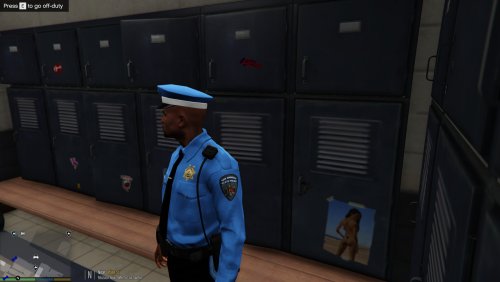 Again amazing work. I'm using all the uniforms and textures for vehicles. Little issue, I'm using these awesome packs but my patrol LSPD cars are still black and white any recommended texture to use with the uniforms? So they go together?
- 1 comment
- 1 review
-
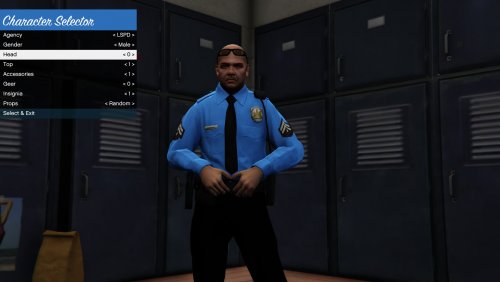 I actually really like these. Takes it away from the LAPD theme which I'm getting tired of! LSPD needs a little a change I think. Great work!
- 2 comments
- 5 reviews
-
-

- 1
-
-
The problem is that the cops IE female and male are different and I've tried all edited mods which have helped but the duty belt just annoys me. The female cops have night sticks on their duty belts and the males don't and vice verse for the LSSD. I am trying to get all cops to have the same duty belt preferably with the night stick or a modern version of it. @Lundy Thank you for your reply. I'll be looking forward to it. I could of of done it myself however if it's impossible without a certain software then I'll leave it to the professionals.
-
I think I got the title right! Anyway, I'm trying to make male cops have the night stick duty belt, I've edited the textures but they don't seem to change. Any info on how to change it so every cop has the same duty belt? I didn't include the help and support template as this isn't a system or game bug. Thank you.
-
DELETE ALL MOD FILES AND START AGAIN PRIOR. Your mod folder, copy all the files from the original directory (your are aiming to edit) and make sure all directories are same as the original. It maybe due to one of the mods being corrupt that GTA wont load it when you try and play, if you like I can teamview you and try and fix it for you?
-
 They're just image files?
 -
Quick question does your GTA update after you've added these textures and mods?
-
Hi I've noticed that the questions and tutorial section is one big section? Wouldn't it benefit users if they were separated into two sections? I think this would filter out unwanted content so someone like myself can quickly navigate through all the tutorials without having to dodge or be slowed down by everday question threads. It'll be a lot simpler, easier to navigate. Questions also would probably benefit the support forum, or even tags so we can filter. Just a suggestion, my PHP development forum had this system and the tutorial section looked snappy and clean. :)
-
I am not any of the above however I have watched police in action this is in real life and on TV. I've also been pulled over myself as I was seen walking out of a hotel early hours so they suspected me to be intoxicated. Anyway back on topic, there is not really a script you can follow. This is mainly down to the officers personality, mood and attitude towards the situation. I'm not really questioning your role as a UK officer or your professional statement but "good chap" "mate" in my experience getting personal with a suspect just makes it harder, it also gets you no where. I'm a loan advisor (collection agent) IE (Taking possession of belongings) and in my opinion; If it counts. Be professional, keep it short and snappy as people don't really respond to "personal comments" and this way you're in control. E.G "Driver pulls over" Officer "Licence and ID?" Officer "Do you own this motor?" Simple questions to help you solve the problem more efficient. Maybe perform a quick arrest; Officer "I'm placing you under arrest, "reason". I'll be placing these cuffs on you for your safety and mine" Easy, hope this helps.
-
Try lowering your settings as your GPU seems to be fine all in all this looks like it could be resolved by lowering your settings. GTA IV requires far less memory, which indicates this could be the problem. Hope this helps, let us know on any updates.
-
Really nice video! Only video that I could actually watch without cringing that something was done wrong. Your driving in pursuits could improve LOL, all in all Ioved it! I would like to see more videos from you!
-
I've noticed there is a lot of RP mods out there to actually enhance the RP experience but I haven't found anything that adds this to current call out mods. I would highly recommend a feature where NPC's stay at the scene until you're finished cleaning up. Ive noticed they would disappear soon as the call out has finished or the perp is deceased. To add a little more realism to LCPDFR, is there anyway we could maybe implement a small feature that makes NPC stay? Maybe write in their note pads or speak to civilians? It's really annoying that they just vanish it's very unrealistic. Just a suggestion!
-
Thank you for all your feed back guys! I have decided to order Nvidia GeForce GTX 750 Ti 2GB see if it boosts performance from the R7 till I can save some money to get a decent graphics card.
-
Thank you very much for your replies. Appreciated xD AMD® Radeon HD8760 2GB Is the graphics card it's a bonus so I'll try it first.
-
Thank you for the reply I don't see how it helps though as I don't have the PC just yet and what is recommended by the site is NVIDIA GeForce 9800 GT 1GB / AMD Radeon HD 4870 1GB (DX 10, 10.1, 11) which my computer will most likely not have. Question is will it run at all, even though it's under the specs?
-
Hello everyone I'm new to the community and PC gaming I'm normally on the PS4. I've recently just purchased the Asus M32BF series and I am unsure what to expect when running GTA. The current laptop I have is mainly for website development I tried to run GTA 4 and LCPDFR and with low graphics I was able to however this only has 2GB worth of RAM. My new PC (On it's way) is; AMD A10 processor 8Gb RAM 1Tb (1000Gb) storage Windows 8.1 DVD-RW writer 7.1 Channel Audio with SonicMaster technology 6x USB 2.0, 2x USB 3.0, 1x HDMI, 6-in-1 card reader SuperSpeed USB 3.0 with Ai Charger Keyboard and mouse included Monitor available separately Dimensions: 176 x 408.5 x 380 mm Asus M32BF desktop PC base unit I've copied all specs in there, I've already purchased the PC hopefully it's enough. Thanks.
-
The only patrol car what works for me is the main LCPD. Port authority and Sate trooper do not show?
- 19 comments
- 12 reviews
-
Hi, I'm having trouble downloading car packs into winrar. I seem to be experiencing an error I've never had a problem with before its just started tonight Error "unexpected end of archive" I do not get this error with ped packs or scripts I only get it with car mods? I'm after the london pack from ddoppler. *Ive used these mods before and they've worked perfectly for me *I've downloaded every car pack and i get the same error *I've also tried on 2 friends laptops and they are exactly the same. I've also looked on other threads with the same error but they haven't really answered my question. Thank you.