




ineseri
Friends of LSPDFR
-
Joined
Everything posted by ineseri
-
Haha, were your post the best answer? :P
-
MODERATOR NOTICE Moving to GTA IV Support Requests. The Gaming section is for all games EXCEPT GTA IV, EFLC or LCPDFR. Please make sure to post in the correct section in the future. You can use a trainer (Simple Native Trainer is my recommendation) or look up the ScriptHook console command for reparing a car. I don't have it at the moment, otherwise I'd list it.
-
There's nothing called a steam launcher really, when you download the game from steam, you use steam + the normal launcher to launch the game. When you buy it retail (DVD) or Amazon digital download, for example, you use the normal launcher to launch the game. I would recommend reinstalling your game, as I have no idea what you have been using.
-
Um yes. The Steam launcher comes with Steam. What you downloaded was a crack.
-
You can just disable the trainer keys, be that in the trainer itself or in the trainer configuration file. Read the readme for instructions.
-
A bit of advice: If shit ain't broke, don't fix it. You can play the game. I'd be happy that far :P It's probably your mods causing the issue though, but start tinkering around and you might just break it further.
-
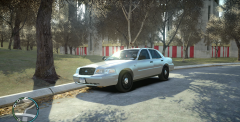 Not sure what the difference is, I'd say it's an unmarked car since it doesn't have any decals etc. It's also slicktop since it doesn't have a lightbar stuck to the roof.
 -
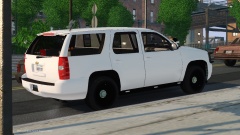 MODERATOR NOTICE Personal attacks, discussions not relating to the image can be taken elsewhere.
 -
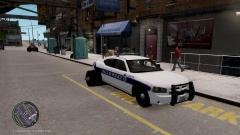 Please post support requests in the thread that CrossFire linked.
 -
So to be honest, there isn't a real issue here? If the crash only happens when you leave the game, I don't see the issue.
-
Hello there -- welcome to LCPDFR.com and thanks for trying out LCPDFR. You failed to read the instructions before posting in this forum. So we'll remind you of them. Please do the following: Make sure you aren't using a crack - We don't support cracks Update GTA IV to 1.0.7.0 (the latest version of the game, or 1.1.2.0 for EFLC) - This sometimes fixes a wide variety of issues Make sure that you run the game as an administrator. Make sure that your GTA IV root folder (and every subdirectory) is not set to "read-only" Ensure that ScriptHook.dll, ScriptHookDotNet.asi and Dsound.dll OR Xlive.dll are in the GTA IV ROOT folder Ensure that there is a folder titled 'LCPDFR' in the ROOT GTA IV folder. Check that all the above files exist, if they do not, reinstall LCPDFR with the MANUAL installation. Ensure that you are using up to date versions of every LCPDFR dependency and LCPDFR itself. Install these: .Net Framework 4.5, Microsoft Visual C++ Redist 2012 If your problem has been solved after following these basic instructions, hit 'Mark Solved' next to this post. If not, please now reply to this thread, and make sure that you do the following: Give a clear, detailed description of the problem. Explain any circumstances surrounding the problem. State what solutions you have tried. Post ALL relevant logs (LCPDFR.log, Scripthook.log, ScriptHookDotNet.log, AdvancedHook.log). Include as much information as possible. Post your system specifications. Post what other mods you are using. This includes car and script mods. Please note that failure to follow these instructions may cause this thread to be closed.
-
No need to be smug about it. OP; Have you installed ELS enabled cars? If not; You need to, otherwise ELS won't work properly.
-
The crash only happens when you leave the game?
-
MODERATOR NOTICE Can you please post your videos in spoiler tags next time?
-
Excuse me?
-
The save files are located in 2 different places. X:Users%username%AppDataLocalRockstar GamesGTA IVsavegames X:Users%username%DocumentsRockstar GamesGTA IVsavegamesNote: The AppData-folder is usually hidden, make sure that you can see hidden files.Note 2: “X” is the drive where you have installed GTA IV, and %username% is replaced by your username
-
MODERATOR NOTICE Please don't bump your threads, use the edit button instead. Your posts has been merged.
-
Just the problematic one.
-
What do you mean with Steam launcher?
-
It has never been up yet, so I am not sure what you are talking about. You can still play GTA IV MP + LCPDFR, the normal way. All I am saying is that it isn't supported.
-
Use Chrome or Firefox to paste text. Also, do not save when using mods. Delete your saves and start over. They're in the My Documents folder or the AppData folder.
-
I'm not sure many would want to look through my phone, and if they do, they wouldn't return the same person they once were. Seriously though, if there is probable cause I see no issue.
-
MODERATOR NOTICE Thread moved to GTA IV Development Suggestions and Requests. Please read the pinned "About This Section" thread before posting in the showroom forums: '?do=embed' frameborder='0' data-embedContent>>
-
The LCPDFR Master Server isn't up. Please use the standard GTA IV for Multiplayer. Please note that multiplayer isn't supported.
-
Hello there -- welcome to LCPDFR.com and thanks for trying out LCPDFR. You failed to read the instructions before posting in this forum. So we'll remind you of them. Please do the following: Make sure you aren't using a crack - We don't support cracks Update GTA IV to 1.0.7.0 (the latest version of the game, or 1.1.2.0 for EFLC) - This sometimes fixes a wide variety of issues Make sure that you run the game as an administrator. Make sure that your GTA IV root folder (and every subdirectory) is not set to "read-only" Ensure that ScriptHook.dll, ScriptHookDotNet.asi and Dsound.dll OR Xlive.dll are in the GTA IV ROOT folder Ensure that there is a folder titled 'LCPDFR' in the ROOT GTA IV folder. Check that all the above files exist, if they do not, reinstall LCPDFR with the MANUAL installation. Ensure that you are using up to date versions of every LCPDFR dependency and LCPDFR itself. Install these: .Net Framework 4.5, Microsoft Visual C++ Redist 2012 If your problem has been solved after following these basic instructions, hit 'Mark Solved' next to this post. If not, please now reply to this thread, and make sure that you do the following: Give a clear, detailed description of the problem. Explain any circumstances surrounding the problem. State what solutions you have tried. Post ALL relevant logs (LCPDFR.log, Scripthook.log, ScriptHookDotNet.log, AdvancedHook.log). Include as much information as possible. Post your system specifications. Post what other mods you are using. This includes car and script mods. Please note that failure to follow these instructions may cause this thread to be closed.


