




ineseri
Friends of LSPDFR
-
Joined
Everything posted by ineseri
-
It is no problem. The error you are getting is fairly common sadly.
-
It might be easier to use the manual installation package. That is my opinion though.
-
Whichever files came with the LCPDFR Installation. Easiest to check with the manual installation package.
-
I'm not too well versed with the logs, but I do know that third-party mods (especially those made for LCPDFR 0.95RC2) are extremely unstable when running in conjunction with LCPDFR 1.0.
-
G17 Media is the developer of LCPDFR, we host a various amounts of mods, but we do not develop all of them. I'd recommend removing all mods except LCPDFR and try again. If that doesn't work, reinstall the game with a clean copy (i.e uninstall the game, delete all left-over game files and install the game again).
-
That would probably be ELS. MODERATOR NOTICE Moving to GTA IV Support Requests as this isn't relevant to the functionality of the LCPDFR Mod itself, which is what the LCPDFR Support Requests section is for.
-
Does it work without the car mods?
-
Does it still do the same thing without any other mods? I know that LCPDFR can be whacky with third-party mods.
-
It has been up for discussion so many times, to make stand-alone games, contact R* etc. It simply won't happen. I think LCPDFR is best realised as a mod, not a game.
-
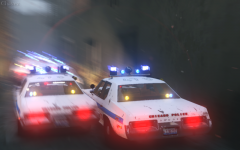 Add the Bluesmobile in your next shot, and it will be my new wallpaper.
 -
MODERATOR NOTICE Moving to LCPDFR Discussion as this isn't a problem or a support request for the website at all... LCPDFR is a free, independent modification and I think we wish to remain that way.
-
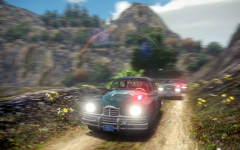 Really nice cars and a really nice setting!
 -
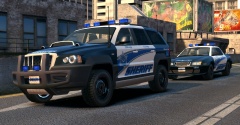 Oh nice, Need for Speed stuff! I've always liked the cruiser from those games.
 -
MODERATOR NOTICE Moving to GTA IV Development Tutorials & Questions. The General & Miscellaneous Discussion section is a general purpose forum for all forms of miscellaneous discussion not catered for by any subject-specific forum.
-
MODERATOR NOTICE Moving topic to GTA IV Discussion & Media. The General & Miscellaneous Discussion section is a general purpose forum for all forms of miscellaneous discussion not catered for by any subject-specific forum.
-
Have you reviewed the LCPDFR Manual?
-
Hello there -- welcome to LCPDFR.com and thanks for trying out LCPDFR. You failed to read the instructions before posting in this forum. So we'll remind you of them. Please do the following: Make sure you aren't using a crack - We don't support cracks Update GTA IV to 1.0.7.0 (the latest version of the game, or 1.1.2.0 for EFLC) - This sometimes fixes a wide variety of issues Make sure that you run the game as an administrator. Make sure that your GTA IV root folder (and every subdirectory) is not set to "read-only" Ensure that ScriptHook.dll, ScriptHookDotNet.asi and Dsound.dll OR Xlive.dll are in the GTA IV ROOT folder Ensure that there is a folder titled 'LCPDFR' in the ROOT GTA IV folder. Check that all the above files exist, if they do not, reinstall LCPDFR with the MANUAL installation. Ensure that you are using up to date versions of every LCPDFR dependency and LCPDFR itself. Install these: .Net Framework 4.5, Microsoft Visual C++ Redist 2012 If your problem has been solved after following these basic instructions, hit 'Mark Solved' next to this post. If not, please now reply to this thread, and make sure that you do the following: Give a clear, detailed description of the problem. Explain any circumstances surrounding the problem. State what solutions you have tried. Post ALL relevant logs (LCPDFR.log, Scripthook.log, ScriptHookDotNet.log, AdvancedHook.log). Include as much information as possible. Post your system specifications. Post what other mods you are using. This includes car and script mods. Please note that failure to follow these instructions may cause this thread to be closed.
-
You can check the event viewer to see what the previous errors has been.
-
Is it a legal copy of the game?
-
LCPDFR is not supported in any form of online play as outlined in the manual.
-
I wouldn't recommend downloading files off the internet, could contain anything. Better safe than sorry :)
-
You get the url when you upload it.
-
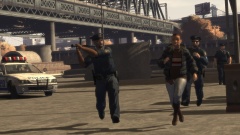 Looks better this way :D
 -
You can buy whichever version you prefer. Complete has all the DLCs.
-
MODERATOR NOTICE A reminder: Personal attacks are not allowed. I understand that this is a discussion and heated arguments will arise, but please, keep it civil against other people. Further: Please keep on topic.


