TheWhiteEagle
Members
-
Joined
Everything posted by TheWhiteEagle
-
-
You need to rescale 'PARAMEDIC' because it doesn't fit model
-
Agree. CHP has similiar setup.
-
-
-
-
-
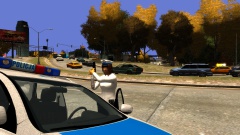 Dat asshole is behind Cee'd.
 -
Click at the screenshot for better resolution please ;) TheWhiteEagle
-
From the album: Polish Emergency Services
- Hey, you, are you looking at my tits motherf****r? - No, miss officer. - If you'll try again I'll shoot your f*cking balls! -
*Nevermind I haven't noticed that in description, btw. snit has released long time ago Victoria Police Holden which looks real I don't that think they use Taurus. I think that they use Holdens
- 7 comments
- 2 reviews
-
-
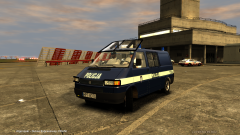
From the album: Polish Emergency Services
Police with their VW Transporter T4 at the Airport. "-T794, over. You can have a break. -Hehehe so we can check top speed of this van :3" I've fixed fu**ing RC20 and get it to work correctly! -
-
-
Flashpoint.
-
I think it's RX2700 with MX7000 stands.
-
-
Hey could you make handling line for my Kia Cee'd SW?
-
Emergency 4 (It's not free, but good)
-
I had the same problem. Is your vehicles.img over 200mb?
-
Nice game!
-
Auto turning off lights in cop cars after shoot-out.
-
If I'm you I would buy Intel i5 or i7
-
Poor guy :(