TheWhiteEagle
Members
-
Joined
Everything posted by TheWhiteEagle
-
Do you use any ENB? btw. nice videos ;P
-
LOL, really? JCPD:FR?
-
I'm gonna make models for these skins! I'm waiting for release!
-
http://www.gta-modding-chest.com/database/219-2013-ford-police-interceptor-liberty-city-police-department-slicktop-unmarked-els7/index.html This vehicle is great!
-
Skins are great buddy!
-
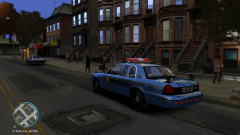
From the album: American Emergency Vehicles
ALPR Equipped CVPI with Code 3 MX7000 Lightbar -
heh I agree with you
-
-
I hope this is better day in year for you! Happy birthday again!
-
Oh, ok. But you know that f***ing shit crashes my game!It crashes my game too. I have no idea how my friend run this shit :(I like both versions, but skin with black bonnet is better :PI can help youHey, it's nice but you know, it's only advisor, so you should write: Back: Lt.Caine's Traffic Advisor and Whelen Dual Avenger
- 3 comments
- 4 reviews
Hi man, make perfect screenshots of my PL Police BoraIt's GrEaT!Maybe you have asi loader or something. Have you changed cars?Royal Liberty Provincial Police? Why not Liberty Provincial Police or Royal Liberty Mounted Police?- 6 comments
- 5 reviews