


Ridgerunner
Members
-
Joined
-
Last visited
Everything posted by Ridgerunner
-
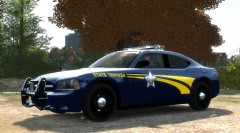 I saw the radian and it just looked too rounded to me. Oregon does use the charger with the above setup but I came across more pictures of the full wrap around. With as many charger models out there I suspected that I may have over looked one, but it's not that serious. This model works for me. Oregon's graphics are very simple so this should be a quick project.
 -
From the album: Ridgerunner Designs
Trying out a brand new WIP texture. Any know of a charger model that uses the wrap around push bumper and similar roof mounted lightbar? -
** PLEASE REFER TO README FILE INCLUDED WITH THIS FILE FOR INSTALLATION INSTRUCTIONS** Wichita Police Texture Pack includes black and white versions as well as the older white versions. 10 textures for the Charger, CVPI and Tahoe, which include K-9 textures for both CVPI and Tahoe models. ***MANY HOURS WERE SPENT RESEARCHING, CREATING AND TESTING THESE SKINS. PLEASE DO NOT EDIT/ALTER OR POST THESE FILES ANYWHERE ELSE WITHOUT PERMISSION FROM THE AUTHOR*** If you have any questions, complaints, or general feedback you can contact me via lcpdfr.com my username is: Ridgerunner
- 7 comments
- 4 reviews
-
** PLEASE REFER TO README FILE INCLUDED WITH THIS FILE FOR INSTALLATION INSTRUCTIONS** West Virgina State Police Texture Pack from Ridgerunner Designs, includes textures for the Charger, CVPI, Expedition, Impala and Trailblazer models, includes CVPI K-9 unit texture. Note: The Charger texture is based off an image from a graphical artist's rendition. All other vehicles are based off actual vehicles used by the West Virginia State Police. ***MANY HOURS WERE SPENT RESEARCHING, CREATING AND TESTING THESE SKINS. PLEASE DO NOT EDIT/ALTER OR POST THESE FILES ANYWHERE ELSE WITHOUT PERMISSION FROM THE AUTHOR*** If you have any questions, complaints, or general feedback you can contact me via lcpdfr.com my username is: Ridgerunner
- 14 comments
- 3 reviews
-
-

- 1
-
-
** PLEASE REFER TO README FILE INCLUDED WITH THIS FILE FOR INSTALLATION INSTRUCTIONS** Delaware State Police Texture Pack from Ridgerunner Designs, includes 6 textures for the Charger, CVPI, Harley Davidson Motorcycle and Tahoe models, including K-9 units for the CVPI and Tahoe models. ***MANY HOURS WERE SPENT RESEARCHING, CREATING AND TESTING THESE SKINS. PLEASE DO NOT EDIT/ALTER OR POST THESE FILES ANYWHERE ELSE WITHOUT PERMISSION FROM THE AUTHOR*** If you have any questions, complaints, or general feedback you can contact me via lcpdfr.com my username is: Ridgerunner
- 4 comments
- 5 reviews
-
What do you mean? Is it tracking slowly? Is it "skipping" around? Have you tried adjusting the mouse sensitivity in the options?
-
1. Open Spark IV 2. Scroll down to the bottom and click on "cdimages" (located under models) 3. Click on "vehicles.img" and click "Edit" 4. Find the vehicle model you are editing (ie; police, police2, polpatriot, etc ) and click the ".wtd" file of that vehicle and click "Edit" 5. Click on the "police_sign" files (there are usually 4; police_sign_1, police_sign_2, etc), click import, and replace it with the png file 6. Click "Save and Close", then click "Save", close that window and one final time click "save" and you're finished
-
You're right it's a small change, but for anyone reading this if you find the normal clipboard annoying (like I once did) then this is the perfect mod for you.
- 9 comments
- 14 reviews
-
Like the taser!
-
I love this model! It's always nice to see a modeler create something "outside the box". Will definitely be following updates on this model. Now if we could only figure out a way to have a SWAT team hanging on the sides.... Keep up the good work!
-
I believe they're using the paramedic mod by Team NeO http://www.policemod.com/paramedic/
-
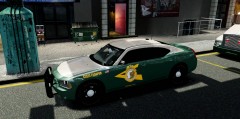 I knew someone would ask that! LOL Ah, I believe it was Yakadafi's Charger, this one http://www.youtube.com/watch?v=H2atk70xIRs&list=UUqiHv4TNeaaUx5420N0gidQ&index=64&feature=plpp_video
 -
I seem to remember reading that this is a common issue with ELS. I refrain from calling noose units in my game as this was the consensus. I would think a non-ELS vehicle in the Noose slot would work also, but haven't tried it. I like having the regular backup units using ELS and enjoy seeing them driving around over the ugly original police models. If that means I spend an hour playing before ELS crashes I'm fine with it. ELS isn't perfect, but it's not something that will be fixed anytime soon.
-
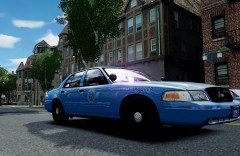
From the album: Ridgerunner Designs
Maine State Police CVPI displaying 90th anniversary plates. Texture by Ridgerunner Designs part of a New England State Police Texture Pack WIP -
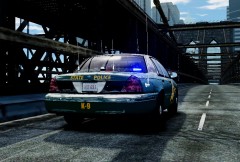 Yes, I can put together a pack. When I started working on them I was thinking of doing a New England State Police Pack. I had trouble though finding the Highway Patrol version door decal. It appears to be their badge, but I can't seem to get a clear picture of it. Also do you know where I can find a picture of one of their new model Chargers?
 -
From the album: Ridgerunner Designs
New England State Police Texture Pack WIP by Ridgerunner Designs -
From the album: Ridgerunner Designs
Texture by Ridgerunner Designs Model: CVPI-V7.1S-K9 by Bxbugs123 (This might be my favorite police model for GTA IV def in my top 3) -
-
-
-
-
-
-
-
***NOTE: MAKE SURE YOU BACKUP FILES BEFORE REPLACING*** ***PLEASE REFER TO THE README FILE FOR INSTALLATION INSTRUCTIONS*** MODEL OVERVIEW - NAME: CITATION HOLDER - VERSION: 2.0 - OPTIMIZED FOR: AMB_CLIPBOARD - CREDITS: MODEL & TEXTURES BY RIDGERUNNER DESIGNS - MOD STATUS: CLOSED ***EXCLUSIVE MOD TO LCPDFR*** ADDITIONAL NOTES: This is for those who play LCPDFR, this will replace the standard clipboard with the new citation holder. ***PLEASE DO NOT EDIT/ALTER OR POST THESE FILES ANYWHERE ELSE WITHOUT PERMISSION FROM THE AUTHOR***
- 9 comments
- 14 reviews

