


James3000117
Members
-
Joined
-
Last visited
Everything posted by James3000117
-
Alright, if you have any further problems after it's reinstalled just post.
-
Adding to what everyone else said, if you don't mind waiting you might as well wait for the steam summer sale. I got the entire GTA series for £10 last year.
-
Please give more detail. What mods are you using? Has this always happened? Have you ran the G17 Diagnostic tool? If not, please do and post the results. Is there an error message? Did you change anything recently? There are endless causes for GTA not starting.
-
Have you had a proper read through the ELS v7 Setup Guide thread? '?do=embed' frameborder='0' data-embedContent>> The setup process is a little different to v6.
-
I assume he means the speedometer surrounding the radar.
-
Ensure that: You are using the latest GTAIV patch You are running the installer as administrator Your GTA directory is not readonly (especially /common/data) If you are unsure of how to check any of this, please just post and I'll try to help you out. Also, this has been a very common problem with the installation of LCPDFR, and the fixes that I have suggested have all been suggested by other members in previous threads with the exact same error. Next time, please use the 'Search...' Feature at the top right of the page - searching the first line of your error will almost always reveal a thread with previous fixes and prevent repeats like this one.
-
Nice, looking forward to it.
-
Looks great! Love your custom ENB, too. Couple of suggestions: -Don't run red lights when you're not code 2/3, just a little realism niggle :P -Don't PIT vehicles in areas with decent numbers of pedestrians -Minimize contact with vehicles in pursuits unless performing said PIT -If you're happy to do it, how about some commentary? A bit of voice over makes things much more interesting. Just a couple of ideas. Oh, and you might want to use a mod which makes peds a bit quieter, although it's fun to hear the things they shout out sometimes.
-
Please do a search for the first line of your error before posting it, this one has been posted waay too many times. If what DarthWound said didn't work, just untick "install taser" in the final stage of the installation.
-
Right click on the installer for LCPDFR, and click run as administrator. If you still get this error after that, then untick "taser" when you are offered the choice to.
-
Nah, all config based.
-
What do you mean, the ELS pattern? You can set it to change to any pattern in the configs in the ELS folder. ForcePatForSrnTones = off PatId_Yelp = 0 PatId_Alt1 = 0 PatId_Alt2 = 0 Just set "ForcePatForSrnTones" to "on" and enter the pattern ID for each siren tone.
-
-
This is a skin for Cj24's Halifax Regional Police CVPI, which can be downloaded here: The skin is an accurate rendition of the Madison Police Department CVPI's used in Wisconsin today. Permission is required to modify this skin for anything other than personal use. The skin may not be uploaded without permission. The skin was entirely made by me, using the template included in Cj24's CVPI, linked above. This skin is only intended for use with that vehicle. This skin contains 4 liveries, each with different unit numbers. +livery must be enabled in vehicles.ide for this feature to work. (model is not included in download, linked above)
- 4 comments
- 4 reviews
-
As DarthWound said, adding additional details would be very helpful. I would check the following things: -All players are using the same mods -All of the mods are the same version -Nobody is spawning stupid amounts of vehicles/doing things that generally lead to crashes. Crashes are generally something you have to put up with in GTA IV multiplayer, even in an unmodded game.
-
Video appears private to me, sadly. Seems like a very interesting concept, though.
-
-
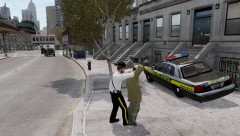
From the album: Images
I was performing an arrest after a pursuit, only when I watched back the recording did I notice the guy getting carjacked in the background... -
-
It would certainly offer a different perspective of the game for those who haven't experienced LCPDFR before.
-
Great script, but would you consider filtering government vehicles from having any sort of flags? While it's funny to see a police car with a wanted marker, it takes away from the realism a little.
- 105 comments
- 62 reviews
-
If they're all ticked, go ahead and click "start" on the diagnostic tool and copy and paste the wall of text that appears into a post.
-
Please ensure that you have all of the boxes with a green tick in the G17 diagnostic tool, if one of them is not ticked then it will indicate that you are missing something essential to running the mod. We also need a full startup log, if possible. Download the diagnostic tool at
-
This. If you're pulling over a reckless driver generated by PoliceHelper, then LCPDFR will not recognise it as a pursuit and therefore the pursuit specific backup keys (F10, F11, etc) will not work. You get the error in .PullOver as the PoliceHelper script is making the vehicle evade you, while LCPDFR is trying to make it pull over, as they aren't linked and LCPDFR treats it as a normal vehicle, and therefore they clash, and PoliceHelper wins. This is my theory, it's happened to me a few times. When in a PoliceHelper pursuit I normally just handle it by myself. Hope this isn't too difficult to understand, it was difficult to explain
-
You should be able to change the format that fraps saves in by going to the "screenshots" menu and selecting your desired format. Should look something like this. Anyway, good luck with the scenes!


