


Creators: Due to background reprocessing of files, approvals and file security checks may be delayed. Thanks for your patience.


br100x
Members
-
Joined
-
Last visited
Everything posted by br100x
-
That's a cool idea. I'm not very good at coding though, so i can't make it.
-
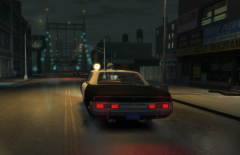 It's not done yet, I still need to fix some bugs. I'm hoping to have it out soon though. :)
 -
From the album: br100x's WIP mods
LAPD AMC Matador, modeled after the car used in the Adam 12 TV show. -
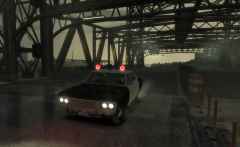
From the album: br100x's WIP mods
LAPD AMC Matador, modeled after the car used in the Adam 12 TV show. -
Well, that's because the recorder uses up the resources on the system that otherwise could have been used for GTA. Turning down the graphics settings may help mitigate lag.
-
What are your computer's specs?
-
:D That worked! Thanks!
-
Hi again, I've been stuck on this issue for a while, and I don't know how to fix it. The ELS lights on my car model do not illuminate as they should. One light (extra 7) illuminates normally, while the others can be seen in game, but don't light up. I've checked everything (that I know about) in zmodeler, and the extras are identical (save for the names). I suspect that I may have not set some user defined option or named the nodes wrong or something. Hierarchy: What it looks like in perspective/user view: Material: Also, another issue that has been bugging me is the tire material is super shiny and there is a line down the middle of the tire. It's hard to describe, so i'll post some screenshots: http://www.lcpdfr.com/uploads/monthly_06_2013/post-75491-0-07160200-1370318746.jpghttp://www.lcpdfr.com/uploads/monthly_06_2013/post-75491-0-37215900-1370318760.jpghttp://www.lcpdfr.com/uploads/monthly_06_2013/post-75491-0-97394800-1370318790.jpghttp://www.lcpdfr.com/uploads/monthly_06_2013/post-75491-0-14625800-1370318822.jpghttp://www.lcpdfr.com/uploads/monthly_06_2013/post-75491-0-21674900-1370318836.jpg Any help is greatly appreciated :)
-
Try using a clean install of GTA IV and clearing out all those files cluttering up your GTA IV directory. Don't store any files in the GTA IV directory (as you have), save it in a different location. If ELS v7 doesn't work, try ELS v5 or v6 with a clean installation. Make sure you make a backup of the clean GTA IV before you install any mods, that way you can just replace the GTA IV folder with a copy of the backup instead of re-installing.
-
Yes, by default, the siren is now toggled by H, Y for airhorn, and T for manual (change tones on light stage 3). I don't think the G key is meant to be used. If you want your controller to work with els sirens, you may have to re-map the keys. You can read the pdf that came with els v7 for more detailed information.
-
Wow, your models are amazing! Keep up the great work! :D
-
It's in the steam library:
-
Well, I just looked it up, and you can repair the game installation, which replaces all modified files with default ones. However, the catch is that steam only repairs the files that came with the original installation, and does not see other files. What this means is that steam will ignore extra files like .asi mods, .asi loaders, and any file that was not installed originally with the game. To access the tool, right click on GTA IV, then click on the local files tab, then press the "verify integrity of game cache" button. It will then proceed to scan all the original files and replace the modified ones. :)
-
Well, granted you have to re-download the whole game again, but i've never run into an issue where replacing files from my backup wouldn't fix things. I believe you can also repair the game installation through steam, which (I think) replaces the modified files with originals, so you don't need to re-download.
-
I use the steam version, and it works great for modding. Plus, it automatically updates to the latest patch. The only thing different is the install directory, which the LCPDFR installer automatically detects.
-
Yeah, I tried as well, and els isn't enabling on other cars specified in my els.ini file. It must be an issue with the way I added it to the ini or something. :/
-
It is my understanding that any vehicle can be enabled in the ini file. I know you could for v6, so it seems natural that you can in v7.
-
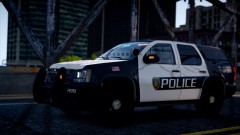 I love the door markings!
 -
If the message looks like this, then it's fine; just click the run button and it will install: That is just windows making sure you want to run the file. If it looks different, post a screenshot.
-
I'm not sure as to why ELS 6 would work better than ELS 7. The only thing that I know that changed in regards to the the J key is that you have to press it 3 times to get all the lights on (presses one and two turn on secondary lights and wig-wags). The only downside to using v6 instead of v7 is that v7 is more stable, has some better lighting effects, and provides more patterns and different setups. Plus, soon more cars getting released will take advantage of some new features in v7 that were not available in v6, so the cars may not work correctly in v6.
-
Your computer should be able to run the game decently. Try turning down gta's graphics settings, as running everything at very high on your computer will cause the framerate to suffer (I had the same series graphics card in my old PC). Also, try using a different car and see if that helps any. If you are still using the default police cars, ELS will not function correctly, as it needs specifically made cars. If you try a different police car, and it still freezes, try downgrading to ELS v6 and see if that helps.
-
What are your computer's specs?
-
^^^^ What c13 said ^^^^ If you don't already use it, use ELS v7 and it may help with the crashing. My game almost never crashes now, since i updated to v7. :) Download it here:
-
For people that are put off by the spongebob texture, I've seen some ambulance companies that have cartoon characters and similar graphics on some of their ambulances, so don't rate it one star just because of the spongebob theme. Although, colombia123, the text on the door is way too big, you may want to downsize it..
- 14 comments
- 25 reviews
-
No Problem! :D When you're done with the basic lessons, there are advanced lessons too, which cover some neat tools and more advanced modeling: http://www.zmodeler2.com/docs/program/lessons/advanced/advcontents.html Have fun! :)


