


Lazerus
Members
-
Joined
-
Last visited
Everything posted by Lazerus
-
So had to change up the cars, the other "new" ones were kinda blah, still nice models though. But the latest ones iam <3 with :) (above: "Police, we are the largest street gang in the world." ) ("We roll togeather, we die togeather.. bad boys for life.")
-
Good video, Im new too :) glad to see more and more new folks around here :)
-
Welcome to the community. I'm also a recent noob/recruit here, nice to see more new folks coming in :)
-
I would like you all to meet Officer Wilkinson. Hes a 12 year vet on the force. He just recently was posted to liberty city pd. (above: Just another morning shift *stretch*) (above: Lets get this baby nice and warm, its tooo darn cold out there this morning) (above: "Not even 10min into my shift and theres a hit and run..really") (above: "look lady, I dont care how long you have been a model for, you still hit that man and left the scene") (above: "Soo your a model and you have a warrent, what does daddy think of you?") (above: "In this part of town, in broad daylight.. really!?!") (above: *later on after the image* "Ohhh so its your vcr but not your vehicle.. rightttt and Im santa clause") (above: *whistles* "come onnnn speeder")
-
Hhehe, actually managed to get pretty close to the curb in that pic so traffic tended to just weeve around my parked truck.. which iam calling the "supervisor's truck". But no didnt hit the rear or him :P, should of taken a pic of my little incident later on though lol. My father is ex military cop and always loved driven "when i was a kid" with him "when you could" and seeing him have the "supervisor" listed on the side of the car. Oh nice pic. Im now curious if its some sort of caution indication light. Just seems so missed placed with the others. And does my little eye spy a tahoe infront of it too :). Just was looking in the downloads section and seen it there. Figured id give it a shot to improve what I was dealing with in game. Iam getting a good mix of cars though. Getting exotics, trucks, buses, just a really good mix of vehicles to make my patrols a little more interesting then seeing 20 thousand taxis in a row lol. But Im still new so not sure if there is anything better :P. Ohh wanted to ask... i downloaded strobe "cant recall the version i download" but i think its the recent version. And was really liking that my front lights and my rear lights would flicker, but it tended to cause some issues. Iam curious if there is another program other then this or is this the one everyone uses. I see some vechiles out there that have the riverse lights flash red and blue or the rear "stop" lights flash a brighter red. Also is there a guide somewhere that explains how to add new "skins" (for police officers) so you can look different then just the selected ones given from the mod? Thanx in advance :) So tonight the plan is to try some new vehicles out. Going to try a 2 new squad cars and a new tahoe (i have two new tahoe's) just deciding which one to go with :P CANT WAIT *giggles with anticipation*
-
(above: he ran with "sir.. its just a small dent.." -reply- "care to use my glasses?") (note: was litterally driving around like this facepalm) (above: "nothing beats eating a dilicious hot diggity dog")
-
Yeah must of been the issue, installed traffic flow which really is alot better now, I dont see 40+ taxis which i think was causing the issue not to mention all the cop cars looking like my model mixed in. Now I barely see a taxi or a cop car, just me on the roads *yay* lol. (above: "Not fast enouph")
-
Oh nice, noticed that too, usually i try to pull them over to the side but at times they tend to stop right in traffic lol. But I usually go abit to the right of the vehicle in the event that a car trys to go around while iam at the pulled over drivers, drivers window. That way they just hit my car and slowly go around without taken me out. But I just noticed something last night and it just recently became worse. Seems as though that distant objects are hard to load, even some of the details on close up walls, buildings kinda fade out and clear up as i go in. Heard a few talk about this but not sure wha to do. Is it because I have ELS going? Running on a quad core with at least 8 gigs so I wouldnt think id have an issue in this department lol. Hmm seems as though it could be the moded cars causing this "from what ive read recently". Whats best to do, have only one mod car in game so this doesnt happen. I only have about 4, highway interceptor, state trooper car, state trooper tahoe truck, and that really nice looken swat truck. Should I just pick something out that Im going to ride and just use that to limit this issue?
-
The very one, i cant stop using it, it really is a great model. Yay Im not the only one that noticed it. Would of made more sense "to me anyways' if there were two but it looks like it goes [red/blue/yellow/red/red/blue/red/red] i would of gone [red/red/blue/red/red/blue/red/red] but thats just me. Curious if the RL if this is based "since iam canadian and not quite sure" on the model, has the lights this way also. Well back in for my "night shift" tonight, cant wait to hit the streets. Thinking of downloading the traffic mod tonight for the game, last night was kinda funny. Seen like 10 taxi's, one after the other then 10 cop cars mixed in.. and nothing else lol.
-
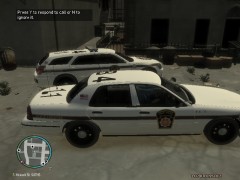 wow almost look like canadian military police vehicles. nice pic though :)
 -
Unreal, but not surprised. Most forums have a few bad apples. I hope the dev team and moderators dont take it too heart. Your all taking time out of your day to do what you do to help others out or "police the forums" or on the other side, create new pieces for this great mod to go further and further. You guys rock, and keep up the great work for FR and the site, cheers Laz
-
Nice, ill have to take a peek at these and give them a try.
-
Eventually id like to dable in the modding area for this but for now just want to enjoy the cars, experience. Lots of fun to be had :). Im actually using that and the state trooper tahoo truck.
-
Hitting printscreen and pasting into paint also works (for me anyways) not sure if you have tryed that. Only thing ive had an issue is when it gets really dark and I paste into paint, it tends to be just all black :P.
-
It took sometime to get use to things, knowing how to get my os to run the game first off, but finally managing to get it going *yay*. Then figuring out how to get the cars in and what not, thanx for everyone who supplied great tutorials on this site. Ive always been a fan of state troopers, even though Im canadian lol. Was going to download some RCMP vehicles but eh.. again I prefer our US counterparts vehicles then ours lol. Anyways did some busts, domestic's, speed traps along roads that people would tend to speed on, and the odd jay walker. Had such a blast. Must of spent at least 7+hrs playing today. Most fun Ive had in awile hahha "game wise". Anyways just wanted to post a little screen "hopefully itll show" of me helping a poor teenager try to get his car working :P. Anyways just wanted to say ty for some of you doing some amayzing work on here *cheers* =D (above: *scratches elbow* "yeah... that thing goes there... yep... umm... should work..... oh gotta go, theres a call you see...")
-
-
I attempted last night to do it but it kept giving me issues, so i downloaded 1.0.3.0 and 4 and patched it up after install but...... YAY its working, patched up with 1.0.7.0 patch and it worked, no hitches or anything, just got into game and looks very sharp ps.. do i need to complete the whole game before using first response, or can i just install the mod and go right to duty?
-
Alright, little update. Managed to fix what ever was giving me the WS10 issue (which seemed to be the missing xlive.dll file), but from one hole to now another. So I click on the gtaiv launcher and my cursor like always has the spinning cd "loading" just after the gta iv window pops up but within 1 second disapears.. then nothing. No error, just closes down. Any ideas? Laz
-
Want to trade comps lol. Ive gone through all my compatabilities and nothing is going. Times like this I wish I had an old system lol. So at this point Im feeling that its just not gonna go. Thanx, gonna keep trying, if anyone else has any ideas that may help, all ears lol. Laz
-
Hey All, Iam new here and I hate being a nub but Iam for today lol. So anyways been following the youtube clips of this mod for GTA IV, and was really into what I was seeing, so went out today and purchased GTA IV for PC. Anyways dont want to bore you with a long winded story here. Ive installed the game several times now. Tryed debugging it myself through online tutorials that have been given on the issues Iam experiencing with no luck at all for a fix. Maybe my system is just too new for it to run *sad face* I just dont know. Here is my System Specs: Intel i5-2500 CPU 3.30ghz 8gb ram 64 bit OS (Windows 7 with service pack 1 installed) Now from my understanding the issues (as listed in the title) Iam experiencing have to due with a compatability issue. Now ive gone and right click the appropiate files within the main folder, giving them admin rights and also selecting the right os compatability selection. So here I am hoping that one of you are on a system similar and may have experienced the same issue I have and may hold my answers of fixing this so I can enjoy the game and this awsome mod that has been built for the game. Laz

