


Creators: Due to background reprocessing of files, approvals and file security checks may be delayed. Thanks for your patience.


Lazerus
Members
-
Joined
-
Last visited
Everything posted by Lazerus
-
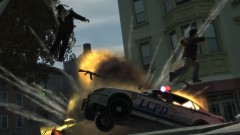 That's gotta hurt :P , nice pic!
 -
Hey guys, Ok so I've been trying to figure this out on my own for awhile now with little to no luck at all. So hopefully one of you bright individuals can help me out. So here's my little problem. I'm trying to figure out how I can get my siren in game to work in this fashion, by activating it, then using eather another key to go through the different modes without issue. Now currently with the ELS file, it has "G" as the siren scroll key. When in game, and I hit "G" it does turn on, but the issue is, I cant move through the siren modes nicely, I actually have to push "G" down and hold it down while I can try to get the type of siren mode I want for the situation *but if I let it go, it just goes back to the normal siren* at hand, such as yelp ect. I'm also using ELS v4, reason being as most of the cars that I use and am happy with work very nicely with this version, and I don't want to start messing around further since my game right now works 100% of the time. So.. is there away I can get it so I have two keys used to go through the siren modes, so say "G" activates the siren, there's another key that I can setup so I can scroll nicely through the modes? I've seen a lot of clips on youtube and people seem to be able to move nicely through there siren modes with little to no issue. Could be that I'm just using an older version that is limited but maybe I'm just missing something entirely. Any help would be most appreciated. Thanks. Laz ps. Also one more thing, the / key above the numpad #8 is setup when I hit it, states 2nd Lighting, but actually does something funky with the siren. For example itll kill the siren but itll try to select what mode to set it as "manual, ect". I thought maybe this was the key I was hoping for but when ever I tried hitting "G" then "/" it would kill/mute the siren. Did notice cars moving out of my way also, so I imagine it was still going on just couldn't hear it.. very odd.
-
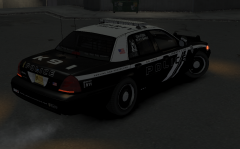 thanx for the feedback, much appreciated. Might look at taken a few of the decals off "more simplistic"
 -
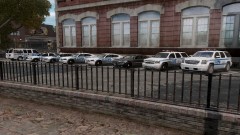 with*
with* -
teach me your ways, how do you have so many different car setups? I have a cvi wish push bar, unmarked cvi, charger, Tahoe, and a normal patrol cvi with no push bar.
-
From the album: My screens/publications/ect
-
From the album: My screens/publications/ect
-
From the album: My screens/publications/ect
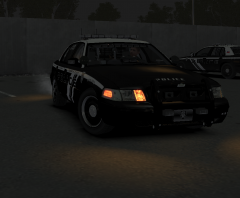
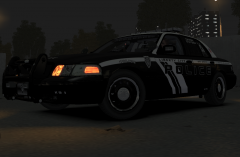
Took a front angled shot of the cvi with the skin on. Has a pretty slick front plate on it (which i made), the decals on the windows were from the original maker (bxbugs & crew), so again all credit there. Overall very pleased with how it turned out. I'll be posting this skin pack once I complete the next few skins "tahoe/charger" so stay tuned :). Hope you like it. If you think of any ideas to add to the skin feel free to suggest. Cheers Laz -
From the album: My screens/publications/ect
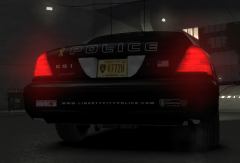
Was working on this while working on my previous white and blue which I recently posted up a few days ago. Wanted something along the style of a black and white theme. I did a good chunk of this from the ground up. Few things I reused such as (flags/decals) from the previous skin, rest is all new :) Car: CVI which was all made by bxbugs and crew, so all credit goes to him/them. Notes: added the yellow ribbon on the back "support our troops" not much to add to that, thought it would be something worth while to have on this skin. Fixed and modified the license plate to be more LCPD themed. -
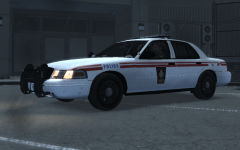 Didnt download it, made it personally :) Btw, sorry for the huge late reply :(
 -
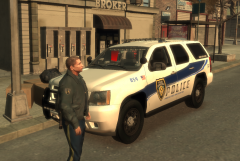 Ty :)
Ty :) -
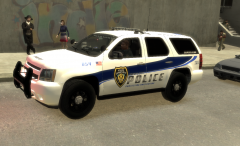
From the album: My screens/publications/ect
Side view of the new skin. -
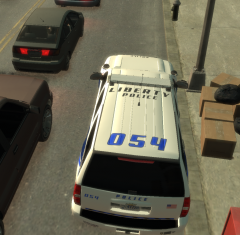
From the album: My screens/publications/ect
Top part of the skin for the tahoe -
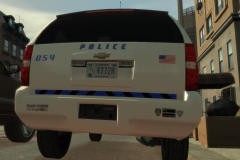
From the album: My screens/publications/ect
As you can see i used elements of the NYPD bumper stickers which I think look really good with the skin, and also a very nice license plate. -
From the album: My screens/publications/ect
This is a new skin ive been working on, 3rd skin ive made thus far. Ive taken elements from NYPD, and also Amtrak Police vehicles and combined them all into a LCPD type skin. Ive made a CVPI patrol and k9 skin, with also a tahoe supervisor skin. Still doing a few tweeks to it. If you like the skin, I may publish it for everyone to download, let me know :) -
If the skins were something that really caught my eye and made me want to use them on my vehicles in game for sure. But as a graphic artist myself, I just usually make my own, but its always nice seeing other artists out their create ideas that you never thought of so, again it have to be something that caught my eye. But like others suggested, try getting the game and then making skins for the vehicles, so you know how they look, any errors that can be fixed before posting them up to the world to have.
-
Im the kinda person that loves to drive current police vehicles that are in service. And most of them are eather cvi's, chargers, and tahoes. There are a few different models id like to see, unless there out there and I just havent poked around enouph.. older impala would be nice '> But again I never get old driving the same vehiles, just put a new skin on it and its like a new car :P
-
-
Duh keymap at the bottom of readme.. oy blonde moments galore tonight. great mod :) Laz
-
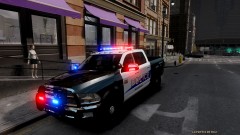 She is a sexy thing aint she. That license plate light setup is very interesting :)
 -
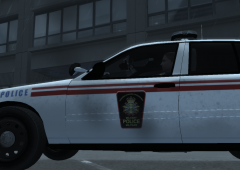
From the album: My screens/publications/ect
Side view shot of the crown vic with skin. (Credit to BXBUGS123 on his crown vic model) -
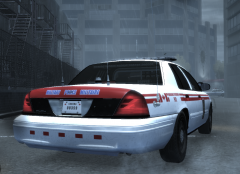
From the album: My screens/publications/ect
Added the black parts to the skin "that I missed in the last version". (Credit to BXBUGS123 on his crown vic model) -
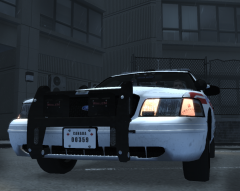
From the album: My screens/publications/ect
Added detail to the license plate, put in "screws" to make it look like its actually part of the vehicle. (Credit to BXBUGS123 on his crown vic model) -
From the album: My screens/publications/ect
Fixed up some of the lines to make them more straight on the body, the last version was abit bad in that department. (Credit to BXBUGS123 on his crown vic model) -
![[WIP] Code 3 MX7000](//s3-gallery.int-cdn.lcpdfrusercontent.com/gallery/album_432/sml_gallery_9139_432_45265.jpg) nickie nice work bro, well done, love this!
nickie nice work bro, well done, love this!

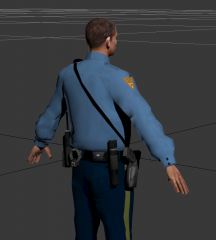
![[WIP] Code 3 MX7000](http://s3-gallery.int-cdn.lcpdfrusercontent.com/gallery/album_432/sml_gallery_9139_432_45265.jpg)