



Officer Here
Members
-
Joined
-
Last visited
Everything posted by Officer Here
-
maybe install them. put the heap adjuster.ini and asi into your main game directory and packfile limit adjuster.ini and asi into main game directory too. dont put the readme.txt into the directory. and then install this latest Gameconfig into GTAV-mods-update-update.rpf-common-data
-
did you install heap adjuster and packfile limit adjuster and Custom Gameconfig?
-
one question. does your game crash when going into Ped Database in PM?
-
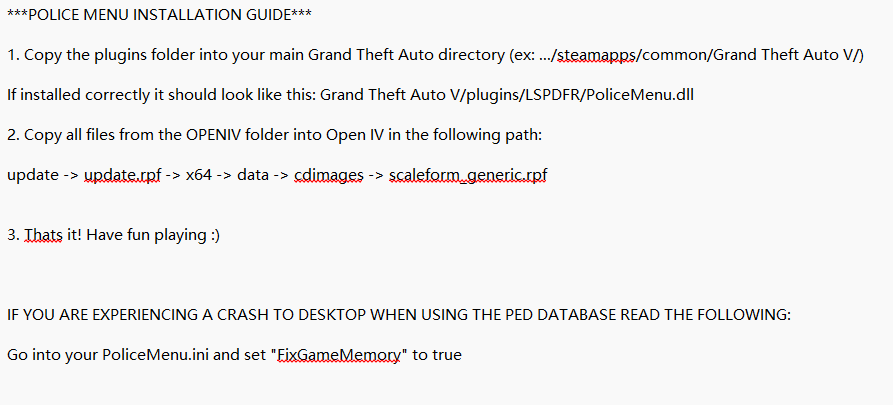
did you read the Number 2?
-
did you put the PM files for OpenIV into the correct order?
-
Did you read the installation guide from Police Menu that is in this link(scroll down after clicking this link and find "Installation Guide") https://www.lcpdfr.com/downloads/gta5mods/scripts/40987-police-menu-computer-speedcam-parkingticket-and-more/
-
Does your game still crash?
-
Looks like the pursuit crash fix was removed. So you don't need it. But you need the RageNativeUI
-
-
-
Sorry thought the pursuit crash fix was there. Long time not use that. Sorry. Ok then did you install the RageNativeUI 1.9.3?
-
The link you gave is correct now click the download and then agreee to the something and then there us 3 options. And you should choose/download the one named Pursuit crash fix something.
-
No no no. Go to zour google browser and search lspdfr. Then go to site where you download lspdfr. There are 3 options. One is the LSPDFR manual install. One is the lspdfr setup.exe and ine is the Pursuit crash fix. You should download the Pursuit crash fix and drag and drop all the files that is inside the pursuit crash fix zip into your GTAV main Directory
-
 You should just drag and drop the plugins and lspdfr and Irrklang.dll that is inside the Policing Redefined.zip-GTA Main Directory into the main game directory (GTAV Main Folder). And your EUPFR Basic is also not installed correctly
- 709 comments
- 49 reviews
-
Install the Pursuit Fix that is inside the download for downloading the LSPDFR main game. And Install the latest RageNativeUI and put it inside the GTAV Main Directory.
-
I have no clue why your game crash. You might need to delete GTAV and then Reinstall it.
-
Did you install the Pack File Limit Adjuster too. And Gameconfig. Install Pack file Limit Adjuster into GTAV Main Folder Install Gameconfig for the Latest GTAV version to mods-update-update.rpf-common-data. And did you have OpenIV? If don't then please install it(IMPORTANT).
-
I can't understand the RagePluginHook.log but did you change the Plugin Timeout Threshold that is inside the Rage Plugin Hook-General from 10000 to 60000.
-
Did you call the backup with Ultimate Backup? Normally Code 2 backup shows up only with lights no siren(LAPD) and in some other without lights and siren only lights on when at a intersection.
-
Seems like it's not the problem from SHV and SHVDN. So did you install the Heap Adjuster,...?
-
Yes
-
Install Heap Adjuster and Pack file Limit Adjuster and Gameconfig for the latest GTAV Version.(Optional: Siren setting limit adjuster) Always read the README.txt/Instructions .txt that is usually in the zip or rar file. Try play GTAV without SHV and SHVDN I don't know if it's the problem of given cause I don't use them
-
Try play GTAV without RealTrafficAI and ELS(remove them)
-
Looks like you installed these correctly. So did you installed the car pack like in the Video?
-
https://www.google.com/url?sa=t&source=web&rct=j&opi=89978449&url=https://www.youtube.com/watch%3Fv%3DBR0dZUXet8s&ved=2ahUKEwiO44r8x--RAxXR5wIHHaqUFWgQwqsBegQIFhAB&usg=AOvVaw1SqviWP16KTlsWCw0OIoEi Ok the SHVDN is install correctly and where did you put the SHV?



