
Imperfection
Members
-
Joined
-
Last visited
-
Currently
Viewing Forum: Script, Ped & File Modifications Showroom
Everything posted by Imperfection
-
Yes, early access is the plan. How exactly this gets released is still a little grey, honestly. The mod is getting bigger every day and it’s already well past what I first set out to build, which I’m fine with, since I mostly finish what I’ve got before I add the next thing. Or at least I try to . I keep a roadmap with targets for exactly that reason, so a feature doesn’t get left half done in the shadow of a newer idea. But it does mean I’m not ready to put a date or a format on it yet. Though I can say the date would be closer than it may feel.
-
Actually, no. This mod does not “run” on PR. Do I leverage a lot of its mechanics? Sure. However, it’s just the only one supported at the moment. Other medications that control backup and officer behavior will also be supported, and the intent to completely step away from dependencies is also in the plan, albeit very far down the road. PR has fantastic audio, it’s control of units and peds is stable, and its logic for various tasks is also great. Just because I use those features, in no way does it mean that this mod runs on it. They coexist and work together. There are not many mods around that do what PR does and stay maintained. As I’ve stated before, as I continue to develop, PR will be used less and less as FiveAlive gets more features associated to it. I’m interested in your thoughts about this and further discussion, along with why it is or is not an issue for you so I can understand and develop with other considerations in mind.
-
Good question. No, none of PR's code is integrated into FiveAlive. Everything goes through PR's public API at runtime, so nothing of theirs is copied or bundled. The reason it's a requirement right now comes down to three things: Player interactions. When PR is installed it takes over LSPDFR's stops, arrests, pat-downs, searches and dispatch checks, so most of what you do as the player goes through PR's menus and never reaches LSPDFR's own events. FiveAlive's officer requests depend on knowing what you actually did. When an AI officer asks you to run a plate or pat someone down, FiveAlive listens to PR's API events (plate and ped checks, pat-downs, arrests) and queries PR's state for that ped or vehicle (stopped, arrested, grabbed, searched). That's how the officer knows you finished the job and can skip doing it themselves. Shared state. If you and an AI officer are working the same suspect, both mods need to agree on whether that person is stopped, cuffed or free to go. I read PR's ped state so my officers don't try to arrest someone you've already cuffed, or release someone you're still holding. Audio. PR ships an extensive library of recorded radio audio, and FiveAlive's radio traffic is built from real recorded clips only (no text-to-speech). A lot of the dispatch and unit phrasing you hear comes from PR's audio. Longer term I don't want this to be a hard wall. The plan is to go one of two ways: either reduce the dependency so FiveAlive can run on plain LSPDFR (it already listens to LSPDFR's own events as a fallback for some of this), or add proper support for the other popular interaction mods so you can use whichever one you prefer. The audio is the harder part to replace, since that library is a big piece of why the radio sounds the way it does. Maybe in the future the developers and I can come together to share integrations or audio. I'm open to anything. For now PR is what I develop and test against, so that's what I can promise works.
-
Thanks, I really appreciate that! It's only been up a little while, so I'm not worried about the quiet just yet (ask me again in a week, lol). Comments like yours are what keep me motivated on a project this size, so thank you for taking the time. Good luck with the livery work, and I'll keep the updates coming.
-
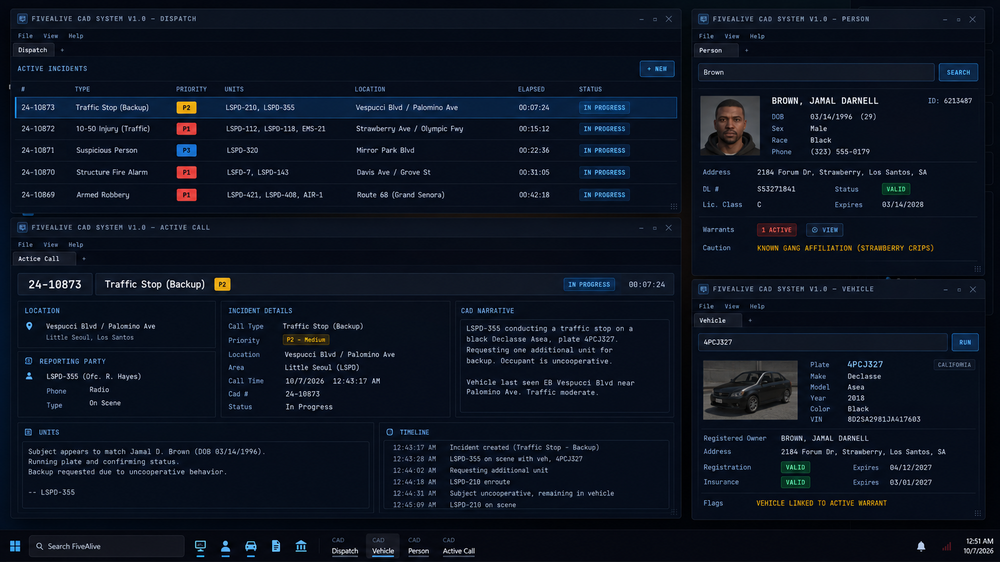
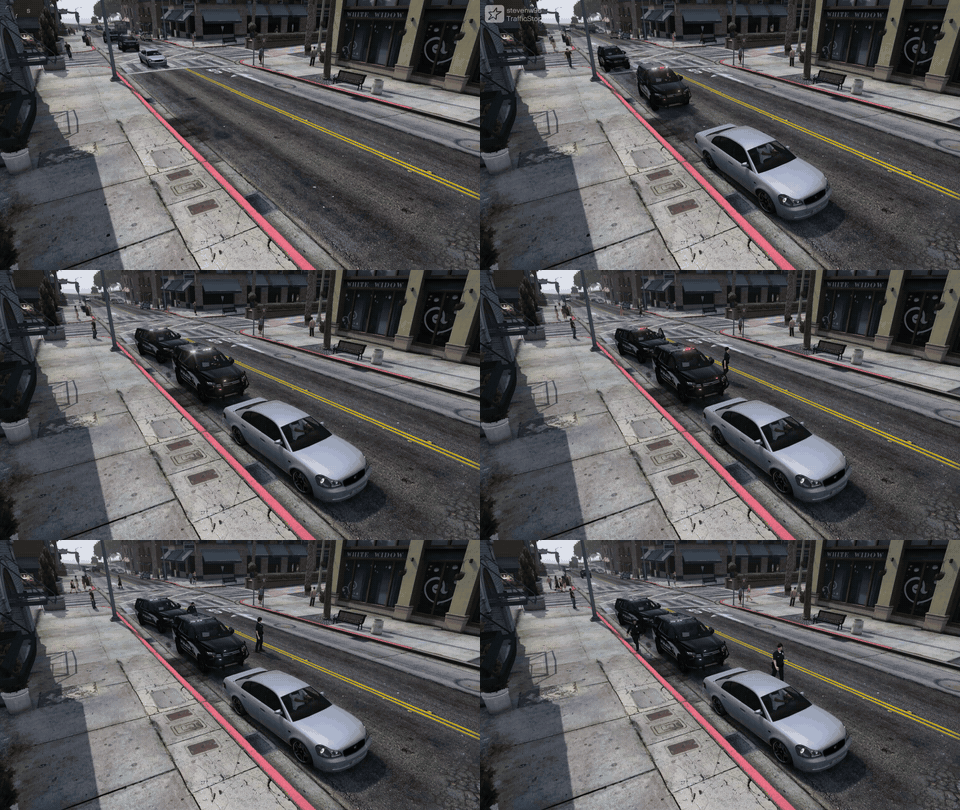
STATUS: WORK IN PROGRESS Last Update: 10/13/2026 - Check Updates section FiveAliveAI Department Overhaul for LSPDFR AI Traffic Stops | AI Arrests | Officer Requests | CAD | ELS Add-on Hey everyone, Imperfection here, nice to meet you. I've been a part of the GTA community since SA:MP and have seen some really incredible modifications along the way, some of them far ahead of their time, and I've met some really great developers. After years of playing other people's work I decided it was time to build something of my own, and for the better part of a year that's what I've been doing. I'd like to introduce you to FiveAlive. FiveAlive is an AI overhaul for LSPDFR. I've always wanted to go on duty and feel like I work for an actual department, and not like I'm the only cop in Los Santos who does any work. FiveAlive is the answer. The AI officers patrol, take calls, run traffic stops, make arrests and chase down runners, and they do it all by themselves. You can jump in and help them out or go find your own trouble. I want to be clear about what this is, because it's easy to assume it's LSPDFR's backup units and ambient cops wrapped up in a new mod. It isn't. FiveAlive loads as an LSPDFR plugin, but everything the AI does runs on its own systems, built from the ground up. It has its own dispatcher that creates the calls and decides who gets sent, and its own unit system that tracks every officer and what they're doing. Officers make their own decisions based on what's happening around them, and the stops, arrests, foot pursuits, call intelligence, all run on FiveAlive's own scene logic. All of it feeds the CAD in real time. LSPDFR and Policing Redefined are still what you use as the player. The department around you is all FiveAlive. It has taken a ton of work to get here. It isn't anywhere near finished and there's no planned release date yet, but I'm really proud of where it's at and I've been wanting to show it off for a while. Features(not exhaustive)AI Traffic Stops - Officers pull drivers over and work the whole stop on their own, anywhere on the map. Warnings, citations and arrests. And yes, they actually pull over to the side of the road. That part alone took me longer than I'd like to admit. AI Arrests & Foot Pursuits - Officers cuff, search and transport their own suspects, and go after the ones who run. AI-Handled Calls - Dispatch sends AI units to calls and they work them start to finish. Attach yourself to any of them. Officer Requests - We've all spent years bossing AI officers around from a backup menu. It's about time they started telling us what to do. On scene, AI officers will ask you to cover the passenger side, run a plate, search a vehicle, pat someone down, cut off a runner and a lot more, and for once you get to be the partner. Works with Policing Redefined and the LSPDFR computer. Player Interaction - NEW — This started as a “third eye” reticle and turned into FiveAlive’s own way of dealing with people and cars. Look at someone and new UI marks them; hold the wheel key and you get a radial menu of what applies to them in that moment: Contact, Search, Custody, Commands, Cite, Dismiss, Dispatch. Nothing is a fixed chain. Stop, ID, run, pat down, cuff, search the trunk or the cabin, put them in your car, walk them, tell them to stand somewhere, let them go on foot or drive off. People have moods and answer questions with real facts (whose car it is, where they’re headed, whether they’ve been drinking). Ask for a license and you’re handed and actual ID card in the game. Citations and warnings are written in the CAD and handed over in game. I built this so FiveAlive isn’t leaning on anyone else’s menus for the player side. Quite frankly, I'm tired of menus for everything. Radio Traffic - Constant chatter between units and dispatch using the audio packs you already have. Real recorded audio only, so nobody on the radio sounds like a GPS. Scene Dialogue - Officers talk to drivers, suspects, witnesses and you, with captions on screen. (and planed actual voice audio) CADYes, FiveAlive comes with its own CAD (I'm sorry to add another). I did a lot of research into the CAD systems that already exist for GTA V single player, and they're phenomenal. I also realize the "market" is getting a little saturated with them. But none of them could do what this one needs to do, because this one is wired straight into the AI department: Every AI unit and what they’re doing right now, every call as dispatch puts it out, who got sent and how it cleared Person, vehicle, call and report records that actually connect: click a name, a plate, a call number or a callsign anywhere and you’re there, with Back One report per call with citation, arrest, warning and tow sections, written against a statute list with codes and fines Run a plate or a name from the CAD or the radio, same result, and it goes on your call Paper written by AI officers shows up in the same records, under their callsign Court cases from contested tickets and arrests, BOLOs, tows and impounds Windowed desktop layout in a browser, so a second monitor or a tablet both work I intend to make this CAD friendly for any developer to use, and to let other mods integrate with it (it already works with most). It uses most of the same frameworks the others do, and data integrity is important to me. I don't want you to feel like you're starting over. With so many mods coming out lately that seem to be written heavily by AI, I want to provide something that is clean, scalable, well written and properly tested. ELS Add-onWAIT, an ELS add-on?? Yep. In 2026. This one started as a side project and turned into something I think ELS users will want even if they never touch FiveAlive. It's an add-on for ELS V 1.05 that brings some features ELS has never had. Pattern Sync - Units parked together on scene flash in sync, using whatever pattern you've set for them. It isn't locked to a preset. Sync works by groups: each vehicle's ELS file can name a sync group, and only vehicles in the same group, parked within range of each other, will sync. So your LSPD cars can flash together while the Sheriff units next to them run their own, and anything you'd rather keep out (a slicktop, an older lightbar that wouldn't match) just isn't given a group. Vehicles with no group set behave exactly as they do now, and syncing stops as soon as a car pulls away. Park Patterns - A separate lighting pattern for when a vehicle is stopped. Silent AI Lighting - AI units can run lights without the siren. AI Light Stages - Stage 1, 2 and 3, takedowns and scene lights for AI vehicles. Bug Fixes - Fixes for a few long-standing ELS issues, including that one AI siren that never, ever shuts off. I believe I do plan on releasing this separately as well for use. I understand some of these features exist with ELS like modifications, however these have never existed in ELS. Never has AI has such control over each feature and we have not seen new features in a long time. Preface: The credit for ELS will always be retained by LT. Caine. I take no credit for the foundation that he has created over the years. RequirementsLSPDFR & RAGE Plugin Hook Policing Redefined - NOTE (10/13/2023): Policing Redefined is still required currently, but its job has shrunk significantly. Player interaction is now FiveAlive’s own; PR is used for its radio audio library and a couple of shared-state hooks. The hooks will go away also as development continues. The audio is the hard part, and I’d rather have that conversation with the PR team than fake it. Their audio overhaul, and even Bluelines audio.. is as task I can just not take on right now to make for myself and maybe a collaboration is in the future. 👀 ELS V 1.05 (for the ELS add-on) I know requirements can be limiting. As development continues I plan to support other systems and configurations so more players can use this mod, but as it stands right now, these mods are essential to the immersion and realism FiveAlive offers. ReleaseNo date yet, and yes, I know every dev says that. I'd like it to be solid before anyone downloads it, so there's more testing to do first. TestersI'm going to need testers. So far it's only been run on my own setup, and we all know no two LSPDFR installs are the same. I'm not opening this up to everyone yet. I'm looking for a small group to start, and I'm being a little picky about it. I'd like people who have been playing LSPDFR for a long time. You know what a normal patrol looks like, so you'll notice when an AI officer does something a real one never would. If you've tested for another mod before, even better, because you already know the drill: find your logs, tell me what you were doing when it broke, and run the same thing five more times to see if it happens again (and something will break).I'm also looking for people who are good with video. A clip of what went wrong tells me more than a paragraph describing it. And if you have some editing or production experience, your footage of it going right may end up in this thread, with credit. Finally, I need a mix of setups, so I'm building two pools. One is heavily modded installs: lots of callout packs, vehicle packs, ELS, the works. The other is close to clean: LSPDFR, Policing Redefined and not much else. If something only breaks in one pool, that tells me where to look. If that sounds like you, reply here or shoot me a PM. Ideas welcomeThis is the part where you get a say. If there's something you've always wanted AI officers to do, a call you'd love to roll up on, or something an officer should ask you for on scene, post it. A lot of this mod came from me thinking "why don't they ever do that?", and I'd like to hear yours. UpdatesUpdate 10/13 Media Media is light for now. Most of what I've recorded over the past year is from testing, which means it's mostly footage of the mod misbehaving, and I'd rather show you it working. Two things to start with: The CAD - a screenshot of the dispatch desktop with live units and calls. AI traffic stop - a short clip of an AI unit lighting up a car and bringing it to the curb (excuse my driving in the back). Keep an eye on the two lightbars once everyone is stopped. That's the ELS sync. The video purposefully has no logic in it to show (other than the actually insane logic already in to accomplish a smooth and realistic stop in the first place), because why give you all me secrets right now. However, there is a spot in the beginning where she asks me to take the passenger side of the vehicle and I comply. This thread will get new clips and screenshots as I capture them. Everything here is a work in progress: Screenshot - FiveAlive CAD - Rough Draft Traffic Stop and ELS Sync FiveAlive is a work in progress. Features may change before release.
-
I dont see an args.txt file for battle eye. Could potentially be what's stopping that. I disabled my battle eye all together in the Rockstar launcher. I also suggest following Bastions recommendations as well. You can create the args.txt file in the main directory and its just as below -nobattleye -noBE
-
Just to make sure... you do have RPH installed in the correct location and the most recent LSPDFR downloaded and installed? Can you show your GTAV folder?
-
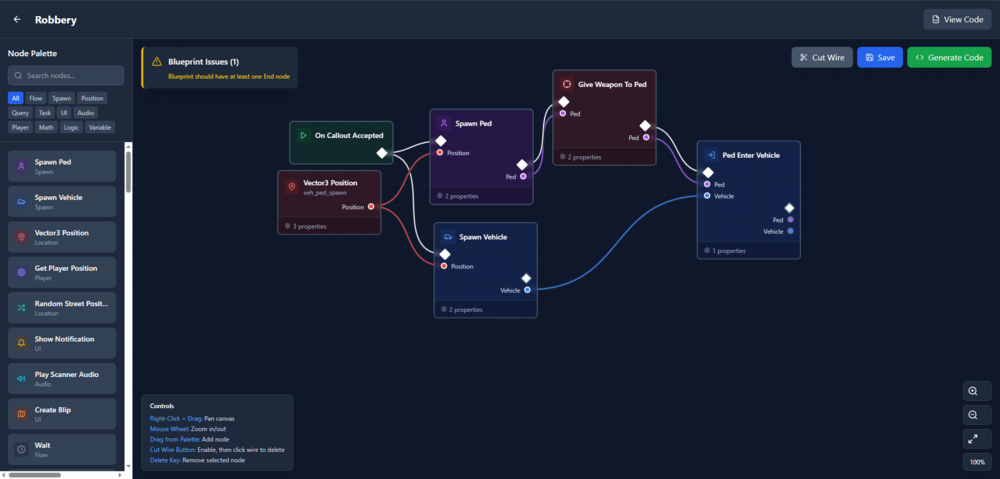
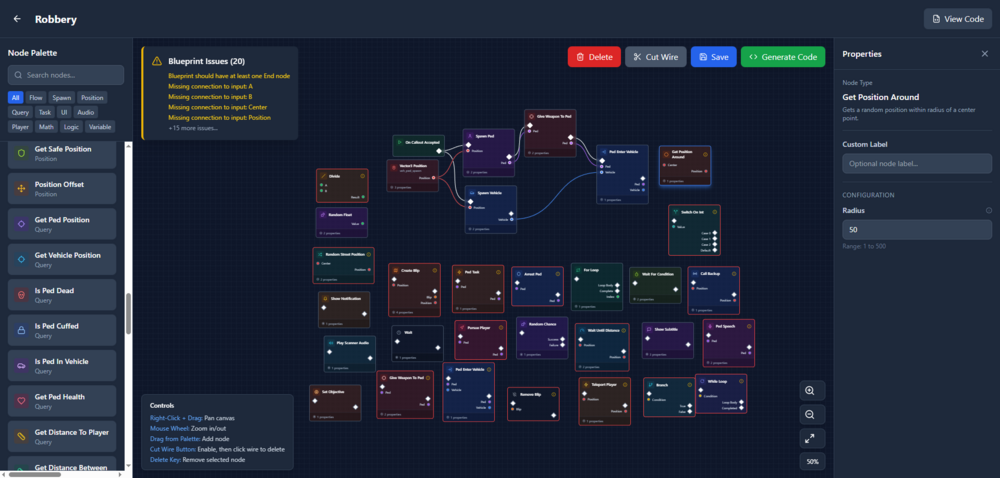
Introducing the LSPDFR Blueprint Callout Platform A New Way to Build Callouts. A Modern Framework for a Legacy Problem. For years, LSPDFR callouts have been created using the same repetitive cycle: duplicated boilerplate, tangled logic, and frustration every time you need branching behavior or AI interaction. Traditional callout coding works, but it was never built for scalability or clarity. The Blueprint Callout Platform changes that. Inspired by the visual logic systems found in modern game engines, this platform brings a node-based, modular, highly structured approach to LSPDFR callout development, without requiring any external editor or engine. This is a ground-up redesign of how callouts can (and should) be built. Many users don't want to spend their time learning to code, but I can guarantee there are many out there who could write some amazing callouts and scenarios for us all to enjoy instead of the same thing over and over. What It Is A fully modular, node-driven callout framework that lets you design complex event flow. Every action, condition, trigger, and branch is represented as a node. Nodes link together to form a clear, readable callout flow that is both easy to create and easy to maintain. Decision trees, dialogue, random events, and way more can be created here and visualized. Core Features Modular Node Architecture Actions, conditions, timers, branches, AI tasks, and player interactions are all reusable node types No repeating boilerplate code No more buried logic spread across multiple files Intelligent Execution Engine Automatically handles sequencing, branching, looping, and failure recovery Manages state transitions cleanly Eliminates the usual callout race conditions and Fiber issues AI-Aware Behavior Integration AI units react based on environment and player behavior Supports multi-suspect scenes, conditional escalation, surrender logic, and more Built-in interaction nodes for prompts, questioning, decisions, etc. Behavior-Tree Style Callout Flow Supports highly dynamic, multi-stage callouts Easy to design user choices, alternative outcomes, suspect behavior changes, and event escalation paths Developer Tools Live execution debugger Step-through node profiler Fully extensible API for custom node creation Traditional LSPDFR callouts require developers to manually rebuild the same systems repeatedly: suspect spawning, decision branches, wait loops, condition checks, and progression logic. The result is often hard-to-maintain code that becomes increasingly fragile. This platform solves that by giving callouts structure. It elevates callout development to a modern standard—clean, organized, modular, and predictable. Beginners can create callouts without diving deep into framework internals, while experienced developers can design far more complex scenarios in a fraction of the time. Preview and Early Access A full demonstration, including video walkthroughs and examples of Blueprint-built callouts, will be posted as development continues. Developers interested in contributing node types or testing the framework are welcome to reply. A small early-access group will be invited to provide feedback and help refine the system later in development as well. I hope you all may enjoy something like this and I look forward to more discussions, ideas, and improvements.
-
You can look up numerous forums, videos, and tutorials on how to use zmodeler and textures. If you are new to texturing or modeling, then it will not be easy and there is a lot of things that need to be learned.
-
Ah, I see what you're saying. That more than likely would need to be edited in zmodeler in the gauges emissive texture.
-
That seems more like the sunlight coming through the vehicle more than it actually being the dash based on the shadows. I don’t believe that’s a setting for the car that you’re looking for rather a visual mod setting.
-
Make sure that your RPH is updated to the latest version. [2/21/2021 4:40:55 PM.507] LSPD First Response: UNHANDLED EXCEPTION DURING GAME FIBER TICK [2/21/2021 4:40:55 PM.507] LSPD First Response: ------------------------------ [2/21/2021 4:40:55 PM.507] LSPD First Response: Origin: Game fiber "<UNNAMED THREAD>". [2/21/2021 4:40:55 PM.507] LSPD First Response: ------------------------------ [2/21/2021 4:40:55 PM.507] LSPD First Response: Exception type: System.NullReferenceException [2/21/2021 4:40:55 PM.507] LSPD First Response: Exception message: Object reference not set to an instance of an object.
-
Do you have a visual enhancement mod installed?
-
In the UltimateBackup.ini file (GTA V > plugins > lspdfr) scroll down and look for this line BackupSpawnDistance=100 Setting this to a higher number will make backup take longer to arrive. Keep in mind, this is a spawn distance, not a time interval.
-
Make sure that your ELS xml files are in all CAPS. The vehicle itself needs to be in the most updated patchday vehicles.rpf folder.
-
Open IV isn't using any of the reflective materials or shaders that the game uses when the vehicle spawns in. That's why it looks that way.
-
If you go to the tutorials section of this page or the developer resources there are a bunch of articles on how to create callouts and plugins for GTA. There's actually a callout creator for download as well.
-
Are you launching through RPH?
-
That's a very open ended question. You should be able to change all of them as long as you are placing them in the most current patchday.
-
A bit of a mess is definitely a good way to put it. I originally was just trying to search through string names and such which is how I originally found the references to the sirens. At this moment, I have no idea where to find the hashed names but ill keep looking and try to figure it out. It is unfortunate that there is not a lot of documentation on the matter. There are also multiple .exe's in GTA's directory but I'm assuming the most useful one is GTAV.exe EDIT: Yeah, it appears the other .exe files are nothing really game related.
-
Creators by no means are obligated to add any file for their vehicles. It is expect that when you download the vehicle, you know what to do with it and what all requirements it needs. There are numerous packs that come with vehicle handling files. If you have knowledge about editing handling files, you can always edit and change what you need to to fit your vehicles needs. If you don't there are many tutorials on how to do this such as the one below. https://forums.gta5-mods.com/topic/3842/tutorial-handling-meta
-
What he said ^
-
https://forum.cfx.re/t/ocrps-leo-vehicle-pack-with-templates/750695
-
I'm actually looking for anything I can salvage from the Carcols file. There are still some things that are left unanswered that I am trying to find and honestly don't know if I ever will. Specifically, I was trying to look for anything referencing the code for <lightGroup> in the Carcols but have had no luck presently. I have found things referencing sirens and the Carcols file itself but nothing inside of it and I don't know other than looking at source code (which obviously we don't have access to) where to find anything referencing it. Yes, there was a TON of gibberish. I'm guessing most of the numbers are referencing where the line is stored in the memory or its referencing another file location but that's not really what I'm looking for. Thanks for the help by the way. @LMS
-
Just gonna reply on top of myself here now.. Im in Ghidra and looking through the files. Im specifically looking at the <CVehicleModelInfoVarGlobal> Descriptor because I am looking into the file that defines the different setting in the carcols.meta file but I'll be honest a lot of it is just gibberish to me. Some is readable but some is not. Is there any way to point me in the right direction as to where it would define that information or how to specifically access that? @LMS