
Imperfection
Members
-
Joined
-
Last visited
Everything posted by Imperfection
-
I dont see an args.txt file for battle eye. Could potentially be what's stopping that. I disabled my battle eye all together in the Rockstar launcher. I also suggest following Bastions recommendations as well. You can create the args.txt file in the main directory and its just as below -nobattleye -noBE
-
Just to make sure... you do have RPH installed in the correct location and the most recent LSPDFR downloaded and installed? Can you show your GTAV folder?
-
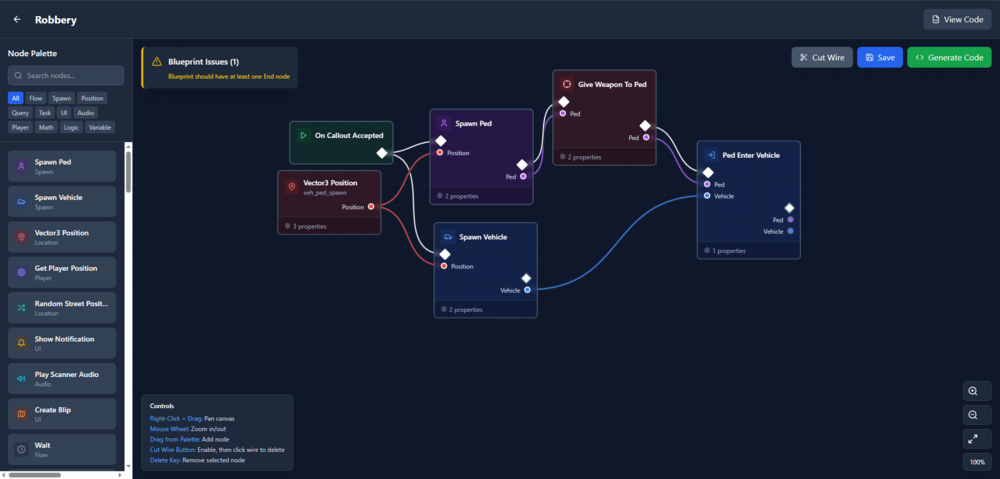
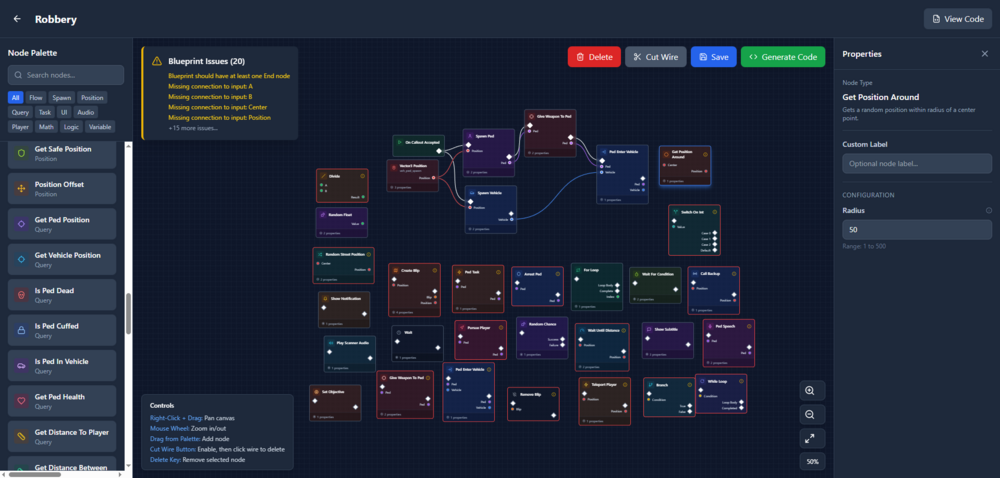
Introducing the LSPDFR Blueprint Callout Platform A New Way to Build Callouts. A Modern Framework for a Legacy Problem. For years, LSPDFR callouts have been created using the same repetitive cycle: duplicated boilerplate, tangled logic, and frustration every time you need branching behavior or AI interaction. Traditional callout coding works, but it was never built for scalability or clarity. The Blueprint Callout Platform changes that. Inspired by the visual logic systems found in modern game engines, this platform brings a node-based, modular, highly structured approach to LSPDFR callout development, without requiring any external editor or engine. This is a ground-up redesign of how callouts can (and should) be built. Many users don't want to spend their time learning to code, but I can guarantee there are many out there who could write some amazing callouts and scenarios for us all to enjoy instead of the same thing over and over. What It Is A fully modular, node-driven callout framework that lets you design complex event flow. Every action, condition, trigger, and branch is represented as a node. Nodes link together to form a clear, readable callout flow that is both easy to create and easy to maintain. Decision trees, dialogue, random events, and way more can be created here and visualized. Core Features Modular Node Architecture Actions, conditions, timers, branches, AI tasks, and player interactions are all reusable node types No repeating boilerplate code No more buried logic spread across multiple files Intelligent Execution Engine Automatically handles sequencing, branching, looping, and failure recovery Manages state transitions cleanly Eliminates the usual callout race conditions and Fiber issues AI-Aware Behavior Integration AI units react based on environment and player behavior Supports multi-suspect scenes, conditional escalation, surrender logic, and more Built-in interaction nodes for prompts, questioning, decisions, etc. Behavior-Tree Style Callout Flow Supports highly dynamic, multi-stage callouts Easy to design user choices, alternative outcomes, suspect behavior changes, and event escalation paths Developer Tools Live execution debugger Step-through node profiler Fully extensible API for custom node creation Traditional LSPDFR callouts require developers to manually rebuild the same systems repeatedly: suspect spawning, decision branches, wait loops, condition checks, and progression logic. The result is often hard-to-maintain code that becomes increasingly fragile. This platform solves that by giving callouts structure. It elevates callout development to a modern standard—clean, organized, modular, and predictable. Beginners can create callouts without diving deep into framework internals, while experienced developers can design far more complex scenarios in a fraction of the time. Preview and Early Access A full demonstration, including video walkthroughs and examples of Blueprint-built callouts, will be posted as development continues. Developers interested in contributing node types or testing the framework are welcome to reply. A small early-access group will be invited to provide feedback and help refine the system later in development as well. I hope you all may enjoy something like this and I look forward to more discussions, ideas, and improvements.
-
You can look up numerous forums, videos, and tutorials on how to use zmodeler and textures. If you are new to texturing or modeling, then it will not be easy and there is a lot of things that need to be learned.
-
Ah, I see what you're saying. That more than likely would need to be edited in zmodeler in the gauges emissive texture.
-
That seems more like the sunlight coming through the vehicle more than it actually being the dash based on the shadows. I don’t believe that’s a setting for the car that you’re looking for rather a visual mod setting.
-
Make sure that your RPH is updated to the latest version. [2/21/2021 4:40:55 PM.507] LSPD First Response: UNHANDLED EXCEPTION DURING GAME FIBER TICK [2/21/2021 4:40:55 PM.507] LSPD First Response: ------------------------------ [2/21/2021 4:40:55 PM.507] LSPD First Response: Origin: Game fiber "<UNNAMED THREAD>". [2/21/2021 4:40:55 PM.507] LSPD First Response: ------------------------------ [2/21/2021 4:40:55 PM.507] LSPD First Response: Exception type: System.NullReferenceException [2/21/2021 4:40:55 PM.507] LSPD First Response: Exception message: Object reference not set to an instance of an object.
-
Do you have a visual enhancement mod installed?
-
In the UltimateBackup.ini file (GTA V > plugins > lspdfr) scroll down and look for this line BackupSpawnDistance=100 Setting this to a higher number will make backup take longer to arrive. Keep in mind, this is a spawn distance, not a time interval.
-
Make sure that your ELS xml files are in all CAPS. The vehicle itself needs to be in the most updated patchday vehicles.rpf folder.
-
Open IV isn't using any of the reflective materials or shaders that the game uses when the vehicle spawns in. That's why it looks that way.
-
If you go to the tutorials section of this page or the developer resources there are a bunch of articles on how to create callouts and plugins for GTA. There's actually a callout creator for download as well.
-
Are you launching through RPH?
-
That's a very open ended question. You should be able to change all of them as long as you are placing them in the most current patchday.
-
A bit of a mess is definitely a good way to put it. I originally was just trying to search through string names and such which is how I originally found the references to the sirens. At this moment, I have no idea where to find the hashed names but ill keep looking and try to figure it out. It is unfortunate that there is not a lot of documentation on the matter. There are also multiple .exe's in GTA's directory but I'm assuming the most useful one is GTAV.exe EDIT: Yeah, it appears the other .exe files are nothing really game related.
-
Creators by no means are obligated to add any file for their vehicles. It is expect that when you download the vehicle, you know what to do with it and what all requirements it needs. There are numerous packs that come with vehicle handling files. If you have knowledge about editing handling files, you can always edit and change what you need to to fit your vehicles needs. If you don't there are many tutorials on how to do this such as the one below. https://forums.gta5-mods.com/topic/3842/tutorial-handling-meta
-
What he said ^
-
https://forum.cfx.re/t/ocrps-leo-vehicle-pack-with-templates/750695
-
I'm actually looking for anything I can salvage from the Carcols file. There are still some things that are left unanswered that I am trying to find and honestly don't know if I ever will. Specifically, I was trying to look for anything referencing the code for <lightGroup> in the Carcols but have had no luck presently. I have found things referencing sirens and the Carcols file itself but nothing inside of it and I don't know other than looking at source code (which obviously we don't have access to) where to find anything referencing it. Yes, there was a TON of gibberish. I'm guessing most of the numbers are referencing where the line is stored in the memory or its referencing another file location but that's not really what I'm looking for. Thanks for the help by the way. @LMS
-
Just gonna reply on top of myself here now.. Im in Ghidra and looking through the files. Im specifically looking at the <CVehicleModelInfoVarGlobal> Descriptor because I am looking into the file that defines the different setting in the carcols.meta file but I'll be honest a lot of it is just gibberish to me. Some is readable but some is not. Is there any way to point me in the right direction as to where it would define that information or how to specifically access that? @LMS
-
I had thought that it was not a .NET assembly but I just wanted to verify. It's used for a lot of other things related to GTA so I thought I might just get lucky. I am assuming yourself has actually looked through the .exe?
-
I'm trying to find GTA V's base code files. I'm researching into the code that defines the Non-ELS sirens, Mostly to include the Carcols file. When trying to open gtav.exe it says that its not a supported file as its not using .NET assembly. Does anyone know how to look as the files in the .exe? I have looked everywhere else it seems for the actual game engine code that runs these meta files and I can't think of another place that would be than in the .exe files. Has anyone actually unpacked any of those files?
-
I have never had a problem with the dash lights being too bright with a visual effects mod.
-
Still need to use some type of light enhancement mod (such as RadianceV) for them to be bright. You can always edit you visualsetting.dat file but that's a little more complex.
-
Hey everyone, As GTA V has now been out for...my goodness SEVEN YEARS now, the community has come a long way it the development of modifications. Among those being lighting modifications such as ELS. Many people use this modification but now with FiveM and FivePD being as popular as they are, most are using Non-ELS vehicles for servers and now even just single player. I have been in the GTA Dev world for many years and when we first started to discover things about the Carcols file, that we could make custom patterns with 32 bit ints, and be able to use the games own engine to our advantage, we were hype. What a time. There is a lot of documentation on the Carcols file and more than most will probably ever need, but me being me, there's still some things left unanswered (at least for me anyway). What does the lightgroup value pertain to? At first I thought that this might be for changing the type of environmental lighting that was emitted or the texture per say but I don't believe that is the case after testing. How does the speed value differ from the BMP value? It seems as though the SV is a percentage of the BPM and only effects the light in the speed that it flashes, not the pattern itself. How does the start value effect the pattern and what are its uses in an actual pattern if we can just set a light to be off with our binary? Where is the Carcols settings defined? Where is the code that takes these declarations and puts them into action? For example; Say I have this line in Carcols: <lightGroup value="0"/> Where is the file that is telling the game what that means? Where is it defined at? Those are some of the questions I have and I am currently digging into files and researching trying to find any information. It seems that even the old forum pertaining to Carcols had just speculated about these settings and were never really pursued up to a point. So, if anyone has any documentation on these, that would be absolutely great. I am not sure if these are even useful in the long run but who knows, maybe they will be. Id like to imagine that the "<lightgroup value = ""> " could be used to group lights together and given them a separate BPM all together but again that's just speculation and hopefulness. Again, thanks for any help and being one of the best communities out there. Best, Steven