Vaskulis
Members
-
Joined
-
Last visited
Everything posted by Vaskulis
-
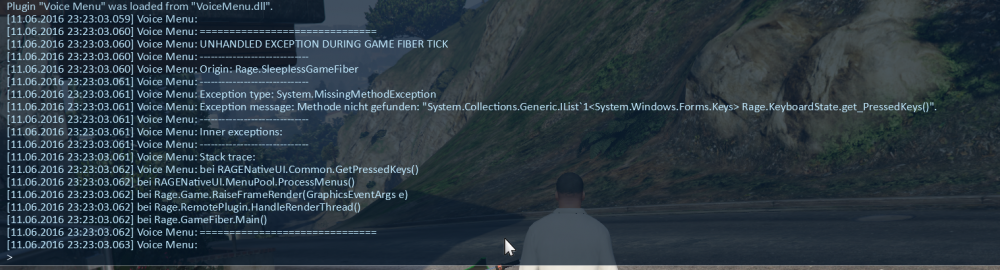
Hey guys, when I try to load my plugin voice menu with the updated RPH, I get the following error message: I recompiled it using the latest RagePluginHookSDK.dll and RAGENativeUI.dll as references, so what am I doing wrong? EDIT: Scratch that, the Issue was being caused by an outdated RAGENativeUI.dll installed by the EUP package installer. Unlucky me reinstalled EUP last, after updating the game.
-
-
Why, thank you! I bet there's more useful resources where that's coming from, so could I have a source please?
-
Related to this topic, is there a list of names of the objects we can attach to peds? E.g. I want to make a ped carry a bag/crate/anything from the boot of a van, and there are animations for that, but I don't know what object to attach to the ped.
-
-
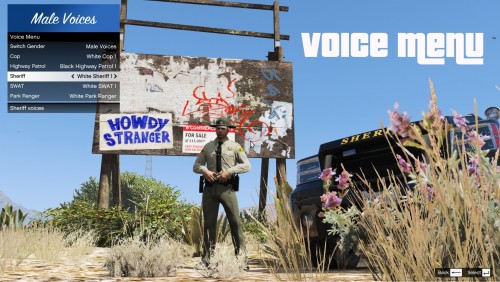 Okay, I didn't know about this! But hey, now you have an easier way of doing this (at the expense of a keybind which I know are rare when playing with a modded LSPDFR). It's on you to decide what you're gonna do!
 -
Voice Menu This plugin allows you to choose your character's voice from a menu that gets its data from an editable XML file. That's it. Originally made for use with EUP it soon became obsolete with the release of EUP Menu. Now with LSPDFR 0.4 including most of EUP Menu's functionality, it has some purpose again, as there's (apparently) no way to change your character's voice from the standard cop voice. So for those of you who like using the MP Characters and want to hear the occasional "Inbred Dickwad!" when performing traffic stops, I bring you a new and improved version of this little plugin. Enjoy! To install, just drag and drop the contents of the zip archive into your GTA directory. In the game, press LCtrl+V to open the menu (can be changed in the INI file). Help! The audio played when I arrest someone is still the standard LSPD voice! I'm sorry but I don't know why LSPDFR doesn't use the character's voice for that particular line and instead seems to play a random line from a predefined selection of lines in the standard character voice. In any case, that is something I can't do anything about and that will hopefully be changed in an upcoming LSPDFR update.
-
Thanks, but it worked without the dot. This probably depends on the method/class requiring your path. XDocument.Load("plugins/PluginName/MyXML.xml") works. (Note that I'm using slash(/) instead of backslash(\).)
-
Aaah, I thought it was relative to the plugin .dll! Thank you so much!
-
Hello! For the plugin I'm working on, I have created an XML file that needs to be accessed. The path to the file is .../Grand Theft Auto V/plugins/PluginName/MyXML.xml and my dll is at .../Grand Theft Auto V/plugins/PluginName.dll So what should I tell my plugin where to look for the XML? I've tried XDocument.Load("PluginName/MyXML.xml") but that doesn't seem to be working. I'd be glad for any suggestions!
-
Aaaah, thank you, this makes sense now. I got confused by Player.Character and Player.Model which of course doesn't have such an attribute. BTW your video series is really helping me getting started with this, thank you so much!
-
Hi there, I'm really new to plugin development (as in: I started looking into it today). For my first little project I want a plugin that allows me to change the player's voice to any of the cop voices for use with EUP. Now I know that until a certain update of the RPH this was possible through the console, but strangely this option was removed at some point. My question now is, if and how this is even possible. I know there is a Ped.Voice property, but I couldn't find anything similar in the Player class.
-
 I love these callouts, man! Especially the silent alarm callout adds so much diversity to the game! Also it was nice getting personal support from you and being able to help you test! One suggestion for the mod though: Could you make it so the silent alarm can only be ended manually so you never know if you found all the suspects until after you end it. Also maybe have the suspects drop some items they stole for you to find and pick up and get a little debrief on how well you did (i.e. how many suspects/items you missed)?
- 546 comments
- 103 reviews
-
-

- 4
-
-
 Hey @Stealth22, loving your callouts, especially the interaction menu! However, whenever I try to "Observe Subject" during the assault callout, it crashes the LSPDFR plugin. Here are the relevant RPH Log lines: "Der Objektverweis wurde nicht auf eine Objektinstanz festgelegt." means "Object reference not set to an object instance". Hope you can help!
- 423 comments
- 73 reviews
-
Hey, these look promising! However I only get the illegal broadcasting callout. The RPH console tells me it tries to spawn the other to but each time doesn't find properties/parking lots that are close enough, even when I'm standing in the middle of Vinewood Hills. It's not the same error the russian dude is getting, but idk if it still happens because I use the german time/date format (HH:MM / DD.MM.YYYY).
- 546 comments
- 103 reviews
-
There should be some buttons on your monitor that open a menu. But seeing as you already tried using your tv the issue seems to be on your pc's side. Also, the driver setup not registering the graphics card implies that it's indeed been built in incorrectly. If you don't know what you're doing you should take it to the place you got it from and have them have a look at it.
-
hey sam, open your monitor's menu, sometimes you have to manually tell it to take input from the dvi/hdmi port instead of the vga one.
-
You're very welcome! Glad I could be of help!
-
Huh, then I guess it's one of the other mods which have to be updated. That last error in the log was thrown by Vehicle Search so maybe try disabling that and see if it helps.
-
Using RDE by any chance? If so, you have to wait until an updated gameconfig.xml is released by the RDE devs. They are working on it but haven't said yet, if it will be days or weeks until a version that works with the latest title update is released. If that's your problem, the only option you have is to revert to an older game version using RPH or play without RDE for the time being. Also, in the future, when posting your logs, please put them in a spoiler.
-
 Sorry, I didn't mean to push you! That's good to hear and thank you for putting so much effort in your mods and always having an ear for support requests!
- 1,081 comments
- 166 reviews
-
-
- 1
-
-
Hey Albo, maybe you read past this when I first posted it, but can you please look into this?
- 1,081 comments
- 166 reviews
-
 That's great, but like I said: don't rush it. If you want to get positive reviews, only release your mod when you're sure the bugs and little problems are marginal! I'd be happy to act as a tester for your mod, as I have some time on my hands in the next two weeks. If you're interested, please PM me.
 -
Well did you add the new update to the dlclist? If not, add it to the list above the EUP entry.
-
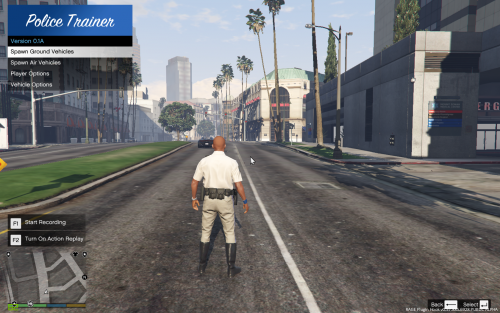
Hey again, thank you very much for implementing my request so soon! This has the potential to become an essential trainer for LSPDFR players who want a streamlined trainer that has all the basic options you need and nothing more! However, I am a little hesitant to give this mod a review, because in the current state, it wouldn't be a five star one. Here are the reasons: The voices you can give your character aren't all the police voices there are. I will add a comprehensive list at the end of this comment. The voice menu should be part of the player options. Backspace as "back" doesn't work. The car spawn section is missing a few cars (e.g. all the sheriff ones). Please take your time to look into these issues and test your mod thoroughly! I know you want to release your mod as soon as you can, but maybe it could use a little more testing before the next release. Nobody, apart from yourself, is rushing you! P.S.: Maybe you should recategorize this mod as an LSPDFR plugin, since it uses the API and can only be used when on duty. P.P.S.: Here is the list of the voices: s_f_y_cop_01_black_full_01 s_f_y_cop_01_black_full_02 s_f_y_cop_01_white_full_01 s_f_y_cop_01_white_full_02 s_m_y_cop_01_black_full_01 s_m_y_cop_01_black_full_02 s_m_y_cop_01_white_full_01 s_m_y_cop_01_white_full_02 s_m_y_hwaycop_01_black_full_01 s_m_y_hwaycop_01_black_full_02 s_m_y_hwaycop_01_white_full_01 s_m_y_hwaycop_01_white_full_02 s_m_y_ranger_01_latino_full_01 s_m_y_ranger_01_white_full_01 s_m_y_sheriff_01_white_full_01 s_m_y_sheriff_01_white_full_02 s_m_y_swat_01_white_full_01 s_m_y_swat_01_white_full_02 s_m_y_swat_01_white_full_03 s_m_y_swat_01_white_full_04