


.png.52200072d4f7f7f19052e7ce58a60a31.png)
InnermostZero
Members
-
Joined
-
Last visited
Everything posted by InnermostZero
-
 Good shot buddy. Nice summary!
 -
 Thanks Nutt.
 -
Lol saying ''A challenge'' to get some to do it. wow..
-
10-4 I'll give that a try.. Yes I tried the tool before ,I must give it another try. At the moment I have a good ENB but I would like better timecycle modes. Any idea ,maybe taken from an ENB that has a good time cycle? Here's the results of minimizing the BLOOM radar and radar1: '> '>
-
Ahh i guessed such. I have Kept all my original files and just changes the number higher but how it I make it less of circles of light and more direct strong light. You can see here it's very circuler : '> '>
-
 You really do love old vehicles!
 -
Thanks a lot that's very helpful. I'll post pictures! Well I have a ICEhancer ENB and I imported the Game4Video ENB visualsettings.dat into my game: Oh and If I imported the whole file could it have changed anything else?
-
 Lol well....Gangs are intimidating too!
 -
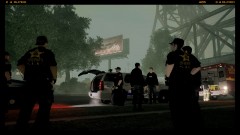
From the album: Photo-realistic Shots.
The teams cover could soon be blown as they have stayed in the location for over 15 minutes an need to move out to the suspects location(s) and get the warrants served ASAP without any injuries ,on both sides.. -
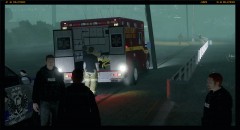
From the album: Photo-realistic Shots.
EMS personnel are on stand-by as there will be live weapons along with bean bag rounds preferred to be deployed inside the complex. Initially there will be 2 flash bang grenades thrown throw the window from outside task force deputies and then a sledge hammer will give them access through the main door. -
From the album: Photo-realistic Shots.
The Liberty City's Gang Unit Tahoe is looking very slick as they have been preparing for this operation for two months doing undercover stake-out's and going undercover and buying off these suspects in their apartment to see the inside to help them draw a blueprint of the apartmrnt so no risks are taken during the raid. -
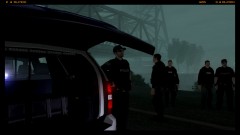
From the album: Photo-realistic Shots.
Members of the DEA's-(Drug Enforcement Administration) task force are loaing up and teaming upo with LC's finest gang unit officers .The are arranging a joint operation raid on two apartments on Ivy Road In Algonquin. They plan to hit to apartments at the same time hopefully giving the suspects no time to alert possible associates involved. -
Would anyone know how to make the ELS lights brighter while still using mt current ENB ,but just adjusting a file but not sure which one I should adjust?
-
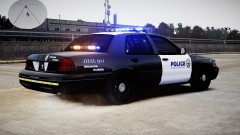 Nice skins. Simple but done well.
 -
From the album: Photo-realistic Shots.
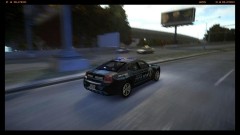
N .Jackson arrives 10-23(On-scene) and immediately see's the fight occurring in the middle of the right lane on the exit ramp .The Sgt. got to break away and the backup officer then tased the suspect. He was then put in custody and booked into the PD after the Police medic checked him over for bruised ribs. -
From the album: Photo-realistic Shots.
Every officer's worst nightmare as the Patrol Sgt.'s Assistance tone went out over the radio. Later it was recorded that he got into a fist fight with a young 20 year old male on a traffic stop and got him in a head lock. -
Does the LCPD:FR install fail?
-
Did you try to re-install it?
-
Not all action ,LCPD:FR is the best mod for role-playing yet it's still full of priority and un-regualr calls. Maybe welfare checks and small scale calls.
-
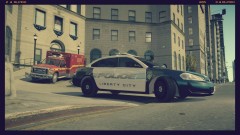 Yeah that's true. Not getting my best shots ,hopefully I'll get better ones soon.
 -
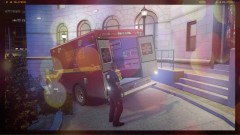 LOL ,Feedback! You like it?
 -
Did you really just upload these when I'm doing screenshots! Yes, Another piece of amazing work.
- 14 comments
- 16 reviews
-
-

- 1
-
-
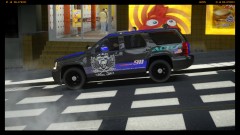 Yes all are edited and purposely uniformed like these too ('?do=embed' frameborder='0' data-embedContent>>) LOL how could you think I'm such a n00b ;(
 -
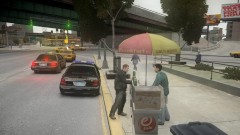
From the album: Photo-realistic Shots.
One Southfield officer just got a nice American hotdog along with this guy - Sgt. Garry Redmond who is involved in the K-9 division but also is the SWAT support team member who give assistance to the SWAT team while the K-9 and himself being tactically trained. -
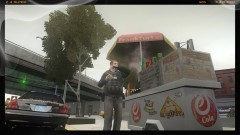
From the album: Photo-realistic Shots.
It's getting cold and chilly here in Liberty City and he explains that his 15 minute break really refreshes his mind and body. giving himself a break then going back at it hard again as he is refreshed. The only problem and it's sad to know is that he rarely gets his 15 minute break as his division are busy day-in-day-out
.thumb.png.ecf43c03aae99a7abd3f5a0d930d62f9.png)
