


GTAbear
Members
-
Joined
-
Last visited
Everything posted by GTAbear
-
I have tried to find a way to get a better identification than RAGE.ped, but cant. I need it for several methods including this one: if (Game.IsKeyDown(System.Windows.Forms.Keys.NumPad2)) { Ped purper=null; Ped[] suspectGroup = Game.LocalPlayer.Character.GetNearbyPeds(2); if (suspectGroup[0] != null) { purper = suspectGroup[0]; Game.DisplaySubtitle("~b~PrisonerTransport requisted FOR: " + purper, 5000); } //int id = 0; Functions.RequestSuspectTransport(purper); } It is the 'id' of this precise ped that is needed. The message shows only RAGE.ped, but that is not precise enough, to get any respond from game-engine. I know the method is functional, because i have arrested myself 😛 If i replace the instance purper with Game.LocalPlayer.Character, i get arrested. So RAGE.ped is not precise, Game.LocalPlayer.Character is. Can i get a precise 'ID' on the RAGE.ped i have infront of me, and in suspectGroup[0]?
-
If property public bool IsPoliceVehicle { get; } had a set -option, it would expand the plugin gameplay significantly. It would not need much change, it should simply set any vehicle to the have the flag that makes other vehicles 'respect' the vehicle and move a side. As an argument for this feature i would mention that this is already common in most police-cores worldwide. The officer has a blue-light in the clove-compartment and some kind of siren added to his ordinary horn. In case of emergency the blue light is placed on top of the car with a magnet, and the officer now drives a police-car. Remember the old Kojak intro? Telly Savalas placed a red police-light on his cars top, and of they go to the crime-scene. "Yes Leuytennnanent "
-
That sounds like the TODO-error Is "recently" before 27/10? Have you updated RPHook to the newest version? That one that is linked right here: The page start with scriptphook but scroll down to RPHook and get that update. Read carefully on the page so you get correct version!
-
Perhaps you could use the start-up- sequence i describe here: https://www.lcpdfr.com/forums/topic/125624-rph-does-not-open-game/ It has worked for others.
-
Try what i suggest here: https://www.lcpdfr.com/forums/topic/125624-rph-does-not-open-game/
-
Read: https://www.lcpdfr.com/forums/topic/125624-rph-does-not-open-game/
-
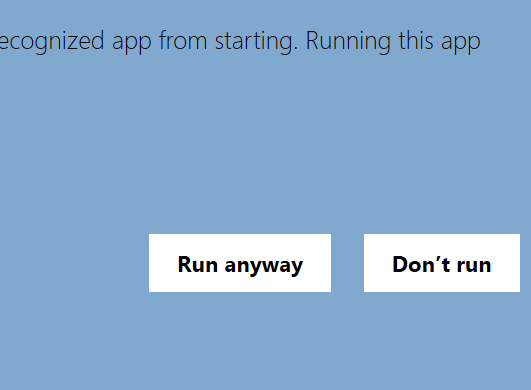
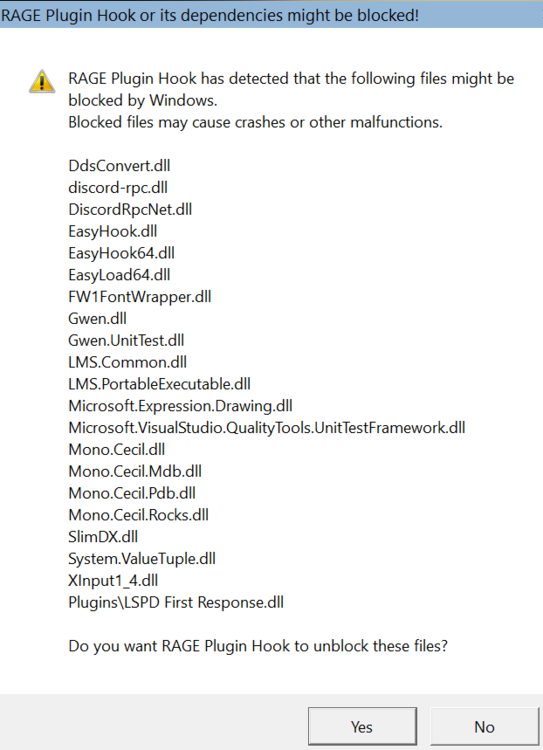
The best way is to first open GTAV, enter Story-mode, when you have a stable story-mode with free roaming, then use Alt-TAB, goto desktop and there start RPHook. Then use Alt-TAB to jump back to GTAV and wait for LSPDfr to open completely. A more detailed way to do this: Special situation 1. run after an R* update After you have entered story-mode as normal RP-Hook will react a bit different. First you get a warning from windows defender It says that win-defender has protected you from a *potential* dangerous executeable click More Info Scroll to the right Choose option run anyway In GTA nothing seams to happen Go to tray RPHook has now a disclaimer-popup Click the OK to accept the EULA We are almost there but RP-Hook will now open a pop-up in tray Dispaying all the files that has been blocked by windows Here you choose Yes to unblock all files Now RP-Hook opens the std UI. Here you should check that plugin-timeout is 60000 ms, and then you should chose the option Save-and-Launch. Now You will see a message that RAGE is hooking -as it should and shortly after you will see that LSPDFR is running inside GTAV From here after ...until the next R* update- The startup sequence is again normal and as above.
-
Why does opening the backup-menu influence your signalling? Are those two functionalities sharing a button? If so only possible solution would be to have your ordinary keyboard on your table and using 'E' to signal the suspect-car, instead of using your controller-key.
-
Thanks once again! You are a life-saver! 👍
-
That would be where i would start. If the weapon is 'illegal' for STP, it could be that you get an exception. Disable STP and retry.
-
Above is a snippet that i expected to be functional, but it crashes my plugin, with : Exception message: Cannot convert null to 'bool' because it is a non-nullable value type But that makes no sense. The check in HasEntityCollidedWithAnything(crimeCar) is secured in the entrance of the segment: if (crimeCar != null) HasEntityCollidedWithAnything(null) is not possible(?) If crimeCar was null, then the expression should never be executed. The api says that HasEntityCollidedWithAnything() returns a bool: What am i missing?
-
Police Utilities has a set of tools from just useful like switching serene on/off or transport of colleagues to some rather far out stuff like ped-aggravation and car-destruction. If enough finds it useful, i will publish here, -or at least ask for that. The features: License-plate scanner Gives stungun in foot-race Toggles serene on off Transport colleague ao Peds Create mayhaim Suspect-transport Universal-CarKey Ped-aggravator Removal of corpses Fast Transport call Fast Backup Call Destroy cars Car-Blipping & Blip-Removing Fast Ambulance call
-
You find that in your game-folder: ..steam\GTAV But i dont think its a game issue Follow this tutorial: I prerequest we are talking base-game, not a mod! It is a two-key sequence, where you can botch it up in several ways. 1) Do NOT have your emergency lights ON when you initialize the stop! Initialize stop right behind the purpcar, with a press on left-SHIFT It is a MUST that you see a info-screen in top left and a buzz-sound is played! 2) DONT exit your car! 3) follow the purpcar to a spot where a stop wont block traffic. Tab E Now the purpcar will either pull-over or speed-up for a chase. If it stops, exit your car and approach the purpcar A menu will prompt you to start a conversation with E. Then just follow the menu-suggestions.
-
You use the menu, tab LSPDFR -not a key to go on duty, or you use console cmd: forceDuty You can also setup new keys inside menu. Choose tab LSPDFR and then keybindings
-
If your mods are RPHook mods, copy the dll-files to ..\GTAV\plugins This type of plugin must either be registered inside RPHook or you can load them manually from console (F4) type loadPlugin Then select the one you want from the list the white item is inserted with a press of TAB But if your plugins are LSPDfr-plugins, they must be in a folder named LSPDFR inside plugins Eg: ..\GTAV\plugins\LSPDFR These plugins are loaded automatically by LSPDfr.dll
-
This is not going to make you cheer.. " There are 15674 animation dictionaries. There are 156119 animation clips. " What there is not, is a sensible description of object of the list... Further more the animations are named really user-friendly (=!) How about : ah_1_ext_t6-5 or perhaps: anim@amb@business@cfid@cfid_desk_docs@ Easy and fully logical -right... 😣 Here is the list: https://alexguirre.github.io/animations-list/
-
'J' is defined as the key for a short buzz-sound feature-key in native LSPDFR. The feature seams to have been integrated in "E" depending on weather or not you have full serene on or of. My guess is that you used to have a plugin that made use of that, but now that plugin is not loaded? Tabbing "J" does nothing for me, in LSPDFR 0.4.6 It actually may do something in plain GTAV -eg without hooking (?)
-
an update for this problem. I have made an ugly 'solution' with warp of a kneeling ped. The strange thing is that a ped in kneeling-state does not leave the car! The approach has 2 major drawbacks. * It looks stupid that the ped disappear when warped * The ped does not sit at the seat, but rather kneels at the cars floor, and the car look empty. Looking down angled, it is possible to see the ped crumpled down on the car-floor. That also looks stupid.. The upside of this is that it is possible to transport peds in own car, witch makes the default callout : Apprehend wanted suspect.. possible to respond to. It is actually a very limited benefit for all that hazzle 😕 My next idea is to make the ped kneel after it has entered the car, still i am confused that the ped get reset by the game-loop, and that having peds in friendly relationship groups wont change the behaviour -at all.. Wonder if there is a way to list all settings of an Entity. That could be interesting.
-
Uninstall the 3 new plugins and waste yourself -Like Drive over a cliff. If you then have no issue, then it is one of the 3 Then install one and retry the cliff You should be able to find the one that acts up that way. About test-installs see: In general, never install bundles of plugins without testing the functionality. Much of griefs can be avoidedMy guess would be conflicting plugins, You could find out if you move your LSPD:FR plugins to a temp-folder. Your RPHook plugins can be disabled in settings: Select the cogwheel and uncheck them, then recheck one by one or use the CLI-cmd loadPlugin inside LSPD:FR. but that said, during pursues there are segments where the AI tries to drive slow and make fast swirls infront of you, because the ai want you to take the wrong road, but thats propl not what you see/Dispatch is not text, it is sound-files. You find the files in ..GTAV\lspdfr\audio\scanner Functionality are depending on the file META-data. Iow you need same sample-rate and bit-depth, as the orr. files a program like audacity can do that (free). It will be a HUMONGOUS job! The files are fragments of the combined messages, so there 100'tds of them ..! OBS! The file-names must be preserved!!! They are loaded with the name as key by the program!!! If you go ahead with this.. Experiment! Change a few and make sure your new files works, before you continue with ALL the others.Many thanks for explaining. Guess i have to shelf licence-plate-scanner. I have made a DisplaySubtitle() with the info, and let it stay up for enough time to type it into "police computer". That 'works', it just clunky and not streamlined 🙂Ratch.. it does, but 😕 Well then its a dev thingie, a way to get in-game text out to a windows-text-editor. Really difficult to see when that is needed. I You or anyone else knows the name of the "police computer-gadget" or the "Police-radio-gadget" (even though that is programmed to make fails..) i would appreciate it posted here. Even The class name of this component would be helpful, because then i can start going through them one by one.Game.SetClipboardText does nothing afai can see. I have been able to set a string in all other chrome-components, but Game.SetClipboardText is empty GetClipboardText will also no do anything so It is definitively not windows-clipboard that is addressed. This String st = purpCar.LicensePlate; Game.LogTrivial("@@@@@@@@@ Scannet: "+st);//yes Game.DisplaySubtitle("~b~scan attempted "+st, 8000); //Yes Game.DisplayNotification(st);//yes Game.SetClipboardText(st);//no is meant to be a licence-plate scan. I hope i can avoid having to type inside computer-component: The scan should then be posting-able .. i hoped (What btw is the component in the image named) -But i cant get SetClipboardText to hold any string Is it defect, or am i using wrong?


