


GTAbear
Members
-
Joined
-
Last visited
Everything posted by GTAbear
-
Wait.. That sounds like you are making your own call-out, as if you have an issue with your code of where your purp are spawned Is that so?
-
That is wrong log Please drag this file ..GTAV| RagePluginHook.log Into this topic
-
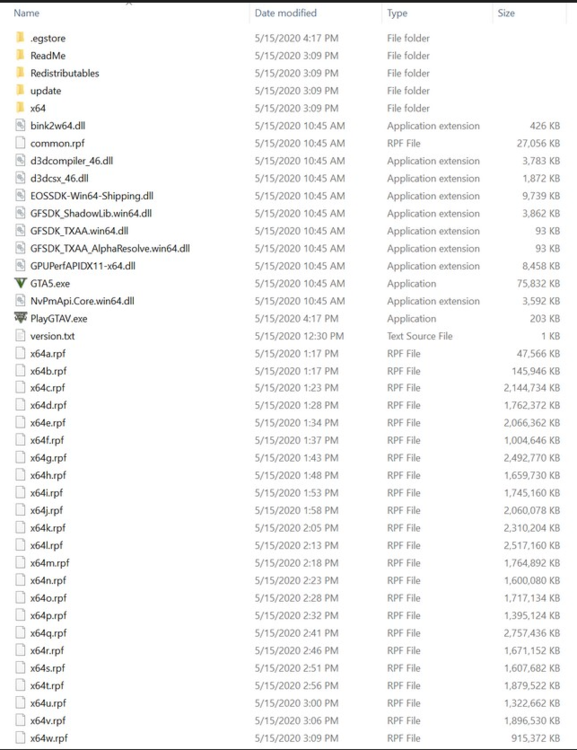
Not that i want to shake a finger patronizing, but there is a rule-of-thumb for any type of MOD-usage. DO make a record of the vanilla installation before you do any modding. (The high-end of this rule is to make a complete vanilla back-up, but all games does not allow that... Publishers are 'funny' bed-fellows that way 😕 ) This is my shot of all vanilla files in GTAV-game-folder: Maybee you can use it
-
Then you need to use the general method for troubleshooting and disable all mods, and then add them in sequence between test If a mod is featured https://www.lcpdfr.com/ Then its ok
-
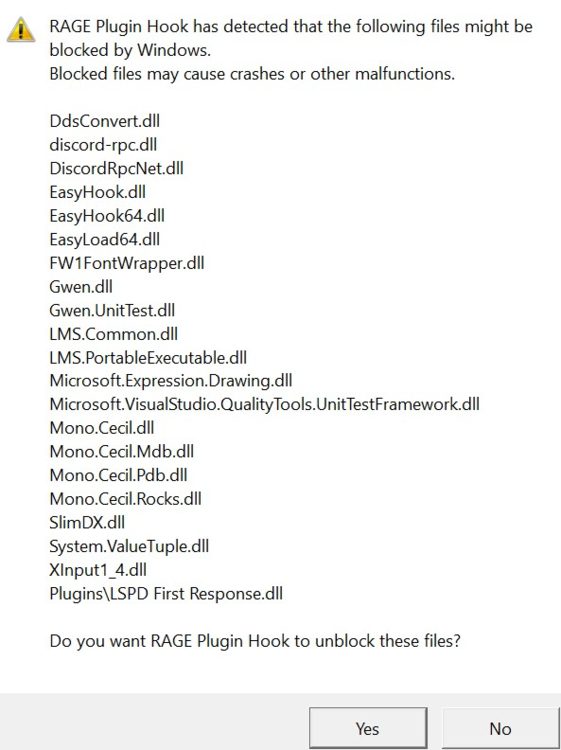
No not plugins, its a list of files belonging to RPHook It should look like this (img below) Did you see that and unblocked all?
-
👍 Good one 😄
-
That wont do! You must complete an active story-chapter before you try to use LSPDFR! Perhaps the reason for the crash.. not sure though, but LSPDFR will not work correctly if you are inside a GTAV-story-chapter. Finish or abort it! -Then retry LSPDFR yes, it has no new info
-
You should do in reversed like: https://www.lcpdfr.com/forums/topic/125624-rph-does-not-open-game/ If it crashs again Please drag this file ..GTAV| RagePluginHook.log Into this topic
-
But it is loaded? Then there may be info in log so Please drag ..GTAV| RagePluginHook.log Into this topic
-
Your log has no info at all. You crash before you have even loaded LSPDFR. Follow this guide
-
Please drag this file ..GTAV| RagePluginHook.log Into this topic
-
At least BeachfrontCallouts is reported as in need of updating. Try and disable it The general method for troubleshooting is to disable all mods, and then add them in sequence each with a new test-run But if you know when the fail was introduced and also know you added a MOD just before, then testrun without that newly added mod
-
At least AutomaticSirenCutout is reported as in need of updating. Try and disable it The general method for troubleshooting is to disable all mods, and then add them in sequence each with a new test-run But if you know when the fail was introduced and also know you added a MOD just before, then testrun without that newly added mod
-
Please drag this file ..GTAV| RagePluginHook.log Into this topic
-
'all' Meaning that you have selected all files in GTAV-folder and created exceptions for them?? AND that you also said Yes to the list of files that RPHook showed when you made first installation? (Did you get such a list?) The screen thing should be a setting selection in GTAV not! in LSPDFR So... ESC| Settings | Graphics | Screen Mode -Select your preferred display mode, restart.
-
Ohh! In thatta way What have you selected in GTAV setup as controller, try the opposite of what you have now and see if that works, but im not knowable in gamebox-controllers at all, i use a simple keyboard for 'all' my gaming, do not own a gamebox-controller (old you know.... : D
-
😖 Not good What 'cutscene' ? That was why i asked you Also are you absolutely sure that you posted your complete log? Just to be sure drag this file ..GTAV| RagePluginHook.log Into this topic
-
Stumbled over this https://www.sentencing.us/ It is very comprehensive and elaborate with ~100 of checks need to be done before a sentence and prison-time is calculated, but it is RL so for those that perhaps want to know what sentences various committed crimes would result in, for all type of felony and misterminor law-breaking in US, it may be of interest.
-
drag this file ..GTAV| RagePluginHook.log Into this topic
-
Wrong log drag this file ..GTAV| RagePluginHook.log Into this topic
-
forceDuty will leave you with the same default inventory as you get when you go on duty from a PD without specifying a loadout. To get a user-loadout, you need to script an inject where you use the console-cmd giveWeapon and then specify what loadout you want. something like forceDuty giveWeapon stungun giveWeapon APPistol giveWeapon Pig Ya.. a Pig is a weapon ! says R* : D The script need to be in your LSPDFR folder afair... ( I have never used it. my Plugin gives me the only weapon i need beside sidearm, and that is a stungun. )
-
Very good descission! If your vanilla-game crash there are several possible reasons. Your GTAV basegame need an update: * Make sure base-game is newly-updated Your LSPDFR/ RPHook is not from this homepage(?) and outdated/ corrupt * Download a new pack from this page: https://www.lcpdfr.com/lspdfr Your RNUi is outdated.. * Get Alex' latest version: https://github.com/alexguirre/ A good read: https://www.lcpdfr.com/wiki/lspdfr/04
-
Ya, its not intuitive, but you need to click on that black-screen, then it should change to the over-view-map. Wait until your blue cursor blink continuously (It may freeze for a few secd) -Then press ESC. Your screen should change to a serious blurred image of last map-position your GTAV-story-character occupied. This also seams to hang, but it does not. Wait for the load-message in lower right, and then your avatar changes to your civ-LSPDFR-character. Wait for the blue load-bar to finish, and then go on duty If this does not run as above, in witch stage does you have a hangup?
-
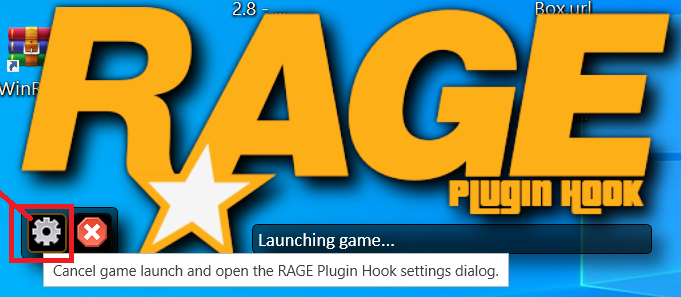
You have to be at least in your civilian LSPDFR avatar before you can activate console (F4) -Eg LSPDFR must be fully loaded Also make sure that F4 is selected as console-key in RPHook (Open setting by clicking the cogwheel) If you never did create a civilian avatar then Make sure LSPDFR is fully loaded, then walk to a PD and enter the locker-room, there you will be prompted to make an avatar ..afair.
-
Ehrrr.. To play LSPDFR you need to be on a windows computer -win10 or 11 is preferred. You should not see anything from X-box. You should however see all PD-stations on the world-map (press-ESC, then mouse-click anywhere and all icons are shown in a selectable right-sidebar. Mouse-wheel zooms the map*), and also any PD close to your Player-character on the mini-map. Visit youTube and see some basic videos for LSPDFR usage of hot-keys and map-graphic. [Bet btw that im the older bear : D]



