


GTAbear
Members
-
Joined
-
Last visited
Everything posted by GTAbear
-
Its that part that is really odd. If all bikes was disabled, it would be more logical, but one works.. That is odd Have you some Mods installed? Some Mods allow themself to disable not only some weapons, but also vehicles. That is serious annoying! You could try and disable all installed Mods, and then see if a Vanilla LSPDFR installation allows you to ride all bicycles
-
My guess is that you either have something that is not deleted or you deleted something that should not. The simplest way forward is to remove everything Get your GTAV game verified and updated, and then download a complete new LSPDFR pack incl. RPHook, and do a reinstall ( Simplest is the manual install, then just drag everything into GTAV-folder
-
The part on pastebin shows nothing and is not complete Do this: In ..GTAV| Find file RagePluginHook.log Rename it OLDRagePluginHook.log (just to keep it, you can also just delete it) The open LSPDFR and play until you crash. The new RagePluginHook.log should be tiny. drag that file into this topic
-
There are invalid props in loading pipe-line Do you have a folder named Mods? If so, try rename it _Mods, and retry LSPDFR
-
At least AmbientAICallouts is reported as in need of updating. Try and disable it. The general method for troubleshooting is to disable all mods, and then add them in sequence each with a new test-run But if you know when the fail was introduced and also know you added a MOD just before, then testrun without that newly added mod
-
Very good! Have Fun!
-
Thats great! Have fun!
-
At least AutomaticSirenCutout is reported as in need of updating. Try and disable it. The general method for troubleshooting is to disable all mods, and then add them in sequence each with a new test-run But if you know when the fail was introduced and also know you added a MOD just before, then testrun without that newly added mod
-
Please drag this file ..GTAV| RagePluginHook.log Into this topic
-
Have not seen that before. How do you start your game? Best is to follow: https://www.lcpdfr.com/forums/topic/125624-rph-does-not-open-game/
-
What is the gameplay? Have you considered that? Gameplay is the most important angle to consider at all time, when you make a computer-game, and a call-out is a 'kind' of computer-game-Level. What is the difference between stealing gas and apprehending any Ped on any location? Are there any special gameplay in the situation stealing gas? If you can find new special or interesting gameplay in the situation, then you have a good chance to make a great call-out
-
Great stuff! Have fun
-
Its that part that is strange unless you did something to files or folders Yesterday, did you? Other options are tedious but should work.. Make a game-update with your game-site, (i only know how to in EPIC) Just look in Q&A on their site. Retest LSPDFR Not fixed? Verify your game. It takes HOURS 😕 Retest LSPDFR Not fixed? Reinstall LSPDFR completely Retest LSPDFR Not fixed? Then you have some pc-issue could be with activeX or ?? Lets hope we dont need to go there..
-
Thats very good! Have fun
-
Have you re-booted and not just restart, but complete-reboot * go to Power * press & hold SH then mouse-select Shut-down * After the prolonged full shutdown, pull the plug and wait 2 mins, before you restart the pc * Restart GTAV & initiate LSPDFR as normal
-
At least UnitedCallouts is reported as in need of updating. Try and disable it. The general method for troubleshooting is to disable all mods, and then add them in sequence each with a new test-run But if you know when the fail was introduced and also know you added a MOD just before, then testrun without that newly added mod
-
So you dragged 'something' into chatGPT ... ? Instead drag this file ..GTAV| RagePluginHook.log Into this topic
-
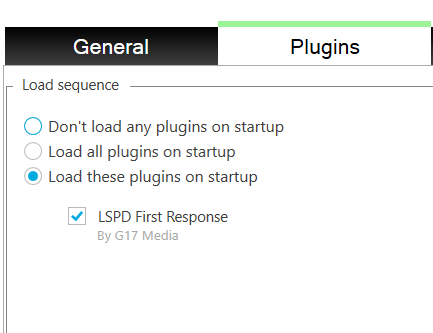
The most plausible reason, but not the only one, is that You need to setup RPHook so LSPDFR is selected as load on activation. To do that open RagePluginHook and click the cogwheel-icon, then make sure you have selected LSPDFR in the load-plugin-section Like this: If its not that, its get more complicated..
-
rsg.ms is R* homepage. You get an R* error if you have an non-updated main-game (GTAV for online gaming). The method for updating depends on where you bought your game. Basically you should just follow the instructions. If you have a pirated version, you are out of luck
-
Great! Have fun : D
-
At least Emergency Callouts is reported as in need of updating. Try and disable it The general method for troubleshooting is to disable all mods, and then add them in sequence each with a new test-run But if you know when the fail was introduced and also know you added a MOD just before, then testrun without that newly added mod
-
Yes that is 'normal' if you have found a plugin that acts up, then disable it, and retry. Only the author can fix program-errors. Your only action is to disable it. ( A civilized thing to do is to reach out to the programmer if there are any contact info in the readme-file
-
Did you also get the newest RNUI from Alex? https://github.com/alexguirre/ I have no idea why that is not in the RPHook-pack
-
At least ALPRPlus is reported as in need of updating. Try and disable it. The general method for troubleshooting is to disable all mods, and then add them in sequence each with a new test-run But if you know when the fail was introduced and also know you added a MOD just before, then testrun without that newly added mod
-


