


GTAbear
Members
-
Joined
-
Last visited
Everything posted by GTAbear
-
Why not?! You had a working game, You add a new item, and the game crash! That would indeed indicate that the newly added component create an exception. Your log is truncated, there are no loading information. Do try and disable that car you added, then reboot and retry the game
-
Please drag this file ..GTAV| RagePluginHook.log Into this topic
-
Your log is truncated Please drag this file ..GTAV| RagePluginHook.log Into this topic You also need to make sure that you have all the updated files of hook, lspdfr, and RNUi I made a list of all here: https://www.lcpdfr.com/forums/topic/131448-help-needed-with-crash-report-please/?do=findComment&comment=748910
-
Please drag this file ..GTAV| RagePluginHook.log Into this topic
-
No dont use that RNuI. You should use Alex' newest, because that is what fit current installation This one: https://github.com/alexguirre/ If that does not help, Please drag this file ..GTAV| RagePluginHook.log Into this topic
-
That could come from a plugin you have installed. Driving from a position to anoter can have different levels of aggression. If the call-out developer has chosen the most aggressive level of driving, the Peds will drive really rotten, and behave like you describe. The solution is to find what plugin it is that has these call-out, and the disable the plugin or some specific callouts in the plugin
-
Not sure that pose exists, but could be, there are ~35K poses and animations! But lets look at the game-play in that situation. We need to make this event different from stopping a random ped. Can you think of a way?
-
That is correct. You cant use mouse in LSPDFR menus All LSPDFR menus are controlled with the NUMBLOCK keys - for UP + for DOWN ENT for select -Its a bit 'odd' but it is necessary to avoid activating GTAV features
-
I believe that any of the cars you have entered as police-cars will be used for transport. All of the default police-cars at least will. You can call a specific branch of the police in the B-menu, and they will use their car, but i doubt you can control it better than that.
-
At least SimpleCallouts is reported as in need of updating. Try and disable it. Lately some has reported issues with stop-the-ped so you may need to disable that too. The general method for troubleshooting is to disable all mods, and then add them in sequence each with a new test-run But if you know when the fail was introduced and also know you added a MOD just before, then testrun without that newly added mod
-
Those mods are properly not liked by either LSPDFR or one of the mods you may have for that as well (?) My guess is that the mods you have for GTAV are visual mods, but you do not say anything about it (?) Disable -then retry LSPDFR, and if LSPDFR then runs, then make up with yourself if you like the visual-improvements more or less than LSPDFR If you still have issues and If anyone should be able to get insight in this drag this file ..GTAV| RagePluginHook.log Into this topic
-
Have you made sure that f7 is bound in the INI-file for callout-interface? F7 may also be used by another plugin, so you need to check up on that too. The same goes for the default keys in both GTAV and LSPDFR. Here you also need to see if F7 already are in use
-
At least ManiacCallouts is reported as in need of updating. Try and disable it. The general method for troubleshooting is to disable all mods, and then add them in sequence each with a new test-run But if you know when the fail was introduced and also know you added a MOD just before, then testrun without that newly added mod
-
Before? But At least ManiacCallouts is reported as in need of updating. Try and disable it. The general method for troubleshooting is to disable all mods, and then add them in sequence each with a new test-run But if you know when the fail was introduced and also know you added a MOD just before, then testrun without that newly added mod
-
Yup. That happens if you are inside a gang-turf. No gang will allow anyone to use a firearm inside their hood The reason you experience this as a game-ending event, is that you have installed a one-shot-one-kill mod. Normally Player can take cover (Q-default) call backup (B-menu) and fight off the gang-bangers, but not if you have an instant-kill-mod installed.
-
The AI is not geared for that automatically. You have to make a request with the B-key-menu (default-key B) In that menu you find different backup-options and the one you use for chases is code-3 It wont necessary be a car you just passed, in fact the game insert an other police-car and he will back-you up, or drive you off the road... Depends on ...idk.. You also need the back-up menu B to call ambulance, firebrigade and transport of kneeling apprehended crooks. Do also investigate your M-menu. Lot of the gameplay depends on menu options
-
It is not the best way to launch the game, but since you have used this way when it worked, then the 'best' way most likely wont fix your issue, but try https://www.lcpdfr.com/forums/topic/125624-rph-does-not-open-game/ Reinstalling may be only way out but befor total reinstall you could try to 'only' verify game -Still takes hours : /
-
At least SearchWarrant is reported as in need of updating. Try and disable it. The general method for troubleshooting is to disable all mods, and then add them in sequence each with a new test-run But if you know when the fail was introduced and also know you added a MOD just before, then testrun without that newly added mod
-
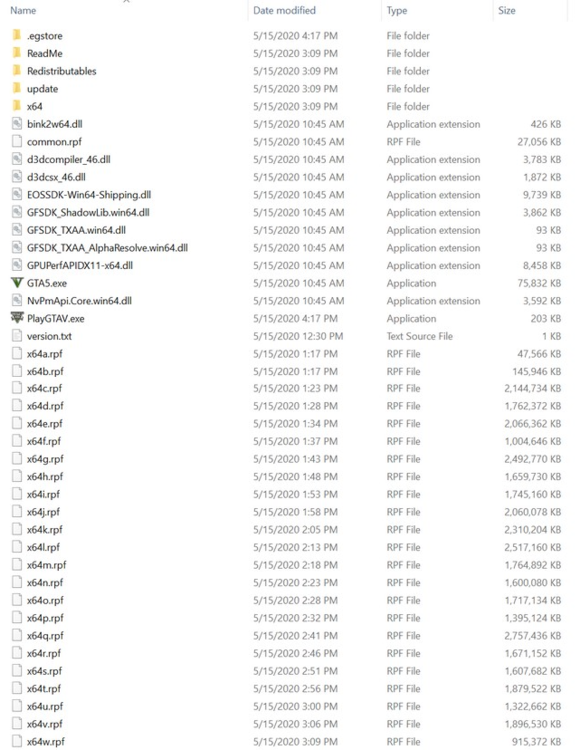
What do you mean? Have you installed 2 plugins, but they are not inside your installation, but still they make your game crash? I would advice to revert to a vanilla GTAV without anything added. Your vanilla installation should only contain there files and folders Remove everything else! If thats not enough, you need to first try and veryfy your installation with your portal, and if even that fails you need to do the long and tedious reinstall of the base-game : /
-
No that is not so. The most recent log is ..GTAV| RagePluginHook.log That would be the data for your crash The log you attached is the penultimate log. But it shows that At least ArresTWarrantCallouts is reported as in need of updating. Try and disable it. The general method for troubleshooting is to disable all mods, and then add them in sequence each with a new test-run But if you know when the fail was introduced and also know you added a MOD just before, then testrun without that newly added mod
-
If you limits yourself to the Featured-call-outs, i would say that you will find high quality. If you find some callouts to be of inferior quality, you should reach out to the dev, and invite the dev to a constructive talk about what could make his callouts better and more diverse. You also need to understand that scenario-wise there are not a whole lot to work with for a dev. * Pursuets * Shoot-outs * Look-for xyz -But that turns out to end up in the former.. The best you could do generally spoken, would be to present Your ideas for better call-out-scenarios, then perhaps Devs would either implement your ideas or explain why the game-engine does not support that scenario. ( You can see my plugin in the signature below. Plugin, not callout : p
-
Great! Have fun
-
Are rare : p What about GTAV without LSPDFR does that run perfectly? If so, the reason is found, then you need to pinpoint the part in your LSPDFR installation that is flawed Please drag this file ..GTAV| RagePluginHook.log Into this topic If GTAV alone -And i would expect other games, also lag, then you have a pc-issue
-
Its that part that is really odd. If all bikes was disabled, it would be more logical, but one works.. That is odd Have you some Mods installed? Some Mods allow themself to disable not only some weapons, but also vehicles. That is serious annoying! You could try and disable all installed Mods, and then see if a Vanilla LSPDFR installation allows you to ride all bicycles
-
My guess is that you either have something that is not deleted or you deleted something that should not. The simplest way forward is to remove everything Get your GTAV game verified and updated, and then download a complete new LSPDFR pack incl. RPHook, and do a reinstall ( Simplest is the manual install, then just drag everything into GTAV-folder


