



ApparentlyRohan
Members
-
Joined
-
Last visited
Everything posted by ApparentlyRohan
-
 This is a graphics mod issue. Whatever graphics mod you use has a timecycle modifier that is broken. The bandaid fix is to disable transitions in the INI. The INI also mentions this bug 😅
- 73 comments
- 11 reviews
-
Please join the discord server for help Are you the same person that joined the discord server about this issue?
- 73 comments
- 11 reviews
-
This bug is weird tbh. 5% of people face it. I’ll try and fix it for 1.4. I’m on vacation for a little bit so might not see update until September :/
- 73 comments
- 11 reviews
-
Real life weather sync does not change on its own. It syncs to whatever weather you inputted into your INI. You can periodically do RefreshWeather in the F4 console if the weather that you inputted in the INI changed. Make sure your ini values are set properly. Hard to tell you what went wrong with such little detail. If you ever need help, join the discord: discord.gg/bluelinevibes
- 73 comments
- 11 reviews
-
-

- 1
-
-
Right now, the only way to post an update to a mod is by uploading a new version. Then, that version immediately gets released if it passes security checks. The only way to not have it immediately release is hide the entire mod to the public then unhide it when you want it released. Is it possible to add a way to schedule new releases or some way to not immediately release the mod once the update passed security checks? Possibly an ability to hide certain versions instead of the entire mod?
-
The photos taken were taken with QuantV as the graphics mod installed with reshade effects added:
- 73 comments
- 11 reviews
-
Could you please join the discord server linked: https://www.bluelinevibes.com/resources I think you are making a configuration mistake. I can help you debug it there.
- 73 comments
- 11 reviews
-
-
Thank you for your response. I was unaware you can develop vehicle models with AI 😂😂 Yes, objectivity is what is needed. It seems more difficult to have 1 general AI disclosure that is able to fit so many different styles of mods. Making a charges xml modification is super different from making a plugin which is super different from making a car model. Each has its own level of nuance. I do not know if that can be captured in 1 general disclosure. That is my only concern with the current approach. I remember reading the page you linked. However, when uploading my mod, I forgot it existed. Maybe add a tooltip or link to that post next to the AI disclosure section when uploading the mod?
-
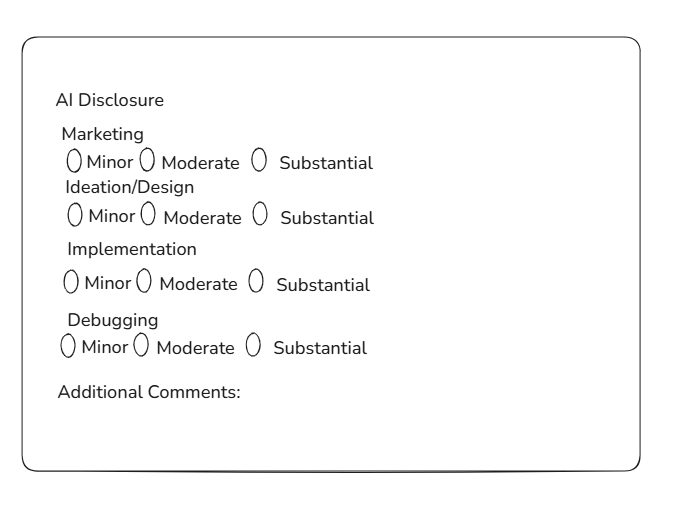
Preface: I have seen there has been a lot of discourse in different LSPDFR discords about vibe coding and the AI disclosure. I recently updated an older mod and had to fill out the AI disclosure. To be honest, I was a little confused. The wording was vague. There is no clear distinction between the 3 different tiers(minor, moderate, substantial). The suggestions below aim to improve that. Also some additional thoughts. There are 4 main ways a developer can use AI to aid in their development of a mod: Ideation/Design work, Implementation(the actual methods/code), Debugging, Marketing(Description and Images). Currently, the first 3 ways are represented with 1 option and the last option (Marketing) is represented with 2 options. This feels lobsided and where I think the disconnect is happening. As an example: If the AI did a substantial amount of debugging which in turn changes a lot of code, I would think one would have to choose "substantial" for mod and mod content. Therefore, my mod would be slapped with the "Made with AI" tag. This gives users the impression in this scenario that I vibe coded this out with Claude Code and posted it on the forums with no thought behind it. How I would improve the system? My theoretical new disclosure system would look like this: This gives each aspect of script development its own disclosure giving the user a clear picture of how the developer uses AI and whether the AI is an aid or the developer. If this new system feels too invasive, I would understand that. However, I think the hesitation in telling the truth comes from what the consequence is if you did use a lot of AI; the dreaded black tag, "Made with AI". Many devs nowadays use AI as an aid within development. This system hurts those devs just as much as the devs who are using Claude Code to build plugins ("AI Slop"). If this system does not get implemented, I would maybe suggest changed how the tag is phrased.
-
.thumb.png.37aea5b9796867ffe512606c9aabc3d5.png) ALL CREDIT FOR THE ORIGINAL MOD AND MOST OF THE CODE GOES TO @debuggyt Original GitHub Link: https://github.com/RealDebugg/RPH-ClothingToggle GitHub link for changes: https://github.com/Rohit685/RPH-ClothingToggle/ What features have been added since the last version of the mod: XML file that lets you edit what the EUP component is set to when a certain piece of your outfit is "on" and "off" Make sure to set the component number in the XML to the same number that is in EUP Menu. Support Discord: https://discord.gg/cxVZwSC
ALL CREDIT FOR THE ORIGINAL MOD AND MOST OF THE CODE GOES TO @debuggyt Original GitHub Link: https://github.com/RealDebugg/RPH-ClothingToggle GitHub link for changes: https://github.com/Rohit685/RPH-ClothingToggle/ What features have been added since the last version of the mod: XML file that lets you edit what the EUP component is set to when a certain piece of your outfit is "on" and "off" Make sure to set the component number in the XML to the same number that is in EUP Menu. Support Discord: https://discord.gg/cxVZwSC -
The o in oldest is not capital but the n in newest is. This is for comments on files

-
.thumb.png.7b018185db2ef152e68c330015b2bf39.png) Fixed in the latest version 😂 Thanks for the bug report
Fixed in the latest version 😂 Thanks for the bug report -
.thumb.jpg.68046a4b42381bd4f48080c95d5bcb9a.jpg) No. Mainly for two reasons. 1) Its hard to detect modifier keys and which modifier key pairs to which "normal" key. 2) Im not really updating any of my mods. Sorry :(
No. Mainly for two reasons. 1) Its hard to detect modifier keys and which modifier key pairs to which "normal" key. 2) Im not really updating any of my mods. Sorry :(- 25 comments
- 10 reviews
-
So I probably did not add detection for modifier keys. So I probably did not add detection for modifier keys.
- 25 comments
- 10 reviews
-
If you press Numpad9, does it detect? I do not think I added support for modifier keybinds when detecting. Open source, maybe...probably not. The mod is a very simple C# script. As much as I hate AI slop, ChatGPT can make this script in a second. Simple GUI: No. Reason why: With this mod, there is no need to search multiple ini files. You know what mod has the conflicting keybind so the difficulty of searching multiple inis has been solved. Thus, I do think the feature is a bit overkill.
- 25 comments
- 10 reviews
-
Much appreciated! ☺️
-
Hello, I am a developer for the mod MTFO: Move the F*** Over. @Guess1m also develops the mod with me. Before the site design, it was very visible who all the developers were in a project. I had added him onto the mod before and it showed. Currently, I do not see any of that information anymore. I also do not see a place to add new developers.
-
🤣🤣 I could fix that. Thanks for the bug report. Workaround would be to do “full auto” on the fire extinguisher.
-
-
-
 Dialogue SystemThe DialogueSystem is a framework designed to give developers the tools to create interactive, branching conversations for their plugins or callout packs. It provides the underlying logic and data handling needed for dynamic dialogues, including linked questions, multiple answers, and conditional outcomes that react to player choices. Web Editor IntegrationTo make building complex conversations easier, the DialogueSystem is fully integrated with a custom built web editor: https://dialoguesystem.vercel.app. The Web Editor allows creators to visually design branching dialogue trees by connecting questions and answers, setting conditions, and defining outcomes. The editor exports your dialogue as a JSON file, which mods or callout packs can load using the DialogueSystem’s API. Developers and advanced players can edit these exported JSON files directly or modify them through the Web Editor to change how in‑game interrogations, conversations, or roleplay interactions unfold. This makes it possible for the community to customize existing dialogues, add new lines, or adapt tone and pacing without altering core gameplay logic. The combination of the DialogueSystem framework and the Web Editor tool creates a powerful, modular system where both mod creators and players can shape dialogue experiences to fit their worlds, from simple Q&A interactions to deep, branching narrative systems. Note It’s important to note that the DialogueSystem itself does not add any gameplay content or dialogue by default. Instead, it acts as a foundation that other mods, callout packs, or plugins can build upon. Without a supporting mod or callout that uses it, the DialogueSystem will not trigger or display any conversations on its own. Its purpose is to supply the necessary structure (data parsing, state handling, and runtime management) so that mod authors can easily integrate interactive dialogue into their own creations. For a full overview of how conversations flow and how to design your own dialogues, see the Github Wiki: https://github.com/DialogueSystemV/DialogueSystem/wiki. FinallyIf you enjoy immersive roleplay, investigative storytelling, or natural-feeling character interactions, encourage your favorite mod developers and callout creators to integrate the DialogueSystem into their work. Your feedback and requests help developers see the value of integration. The more mods that use the DialogueSystem, the richer and more interactive the game world becomes for everyone. Support/Hangout: https://discord.gg/pqHurm4W2V
- 10 comments
- 1 review
-
-

-
-

- 8
-
-
 This is more complicated unfortunately and probably will not be included in this mod. Plugins/LSPDFR
- 113 comments
- 19 reviews
-
-
- 2
-
-
 imagine leakin a free pack ☠️☠️☠️☠️☠️
 -

.thumb.png.37aea5b9796867ffe512606c9aabc3d5.png)
.thumb.png.7b018185db2ef152e68c330015b2bf39.png)
.thumb.jpg.68046a4b42381bd4f48080c95d5bcb9a.jpg)
