




Lennyy
Community Team
-
Joined
-
Last visited
Everything posted by Lennyy
-
Of LSPDFR? Yes. Just install that and nothing else to see how it goes.
-
If you want to play story mode just not load LSPDFR via RPH at all.
-
If it's already installing again, great.
-
Can you click on the 3 dots and still hit uninstall? Just try that.
-
Since I don't have GTA on EGL I can't tell you what to do exactly here. on Rockstar it just prompts you to do a new install. Did you restart your system? Maybe sign out an in on Epic?
-
Update RNUI here. Drag the .dll into your main game directory.
-
You delete the entire folder labelled GTAV and then you pretty much install the game again. You're not doing an uninstall through the launcher since you just did that manually.
-
Then that's most likely the issue. As I said it won't clean up files unrelated to the base GTA. Do as I instructed above and manually delete the entire folder prior to reinstalling.
-
Which of the steps I asked you to do worked? The _mods way or Alt-tab then start RPH? Your topic has been moved to GTA V Support, this is not LSPDFR related. Please post in the correct location in the future.
-
Before reinstalling, did you delete your GTA directory or did you uninstall via Epic games launcher? The latter does not clean the files sufficiently.
-
The issue is typically related to a faulty mods folder. Have you ever installed something to your game outside the mods folder (by accident)? Otherwise, keep your mods folder renamed to _mods, and delete your update folder and x64 folder. Then, verify the game files via EGL and try again. If that still doesn't help, remove any file/folder from your directory that isn't from GTA itself and retry. If a clean directory also fails, delete the entire GTAV folder and reinstall GTA through EGL.
-
Rename mods to _mods and retry.
-
Start without Rage. Once in the game as Michael Trevor or Franklin, alt-tab out of the game and start Rage. If that fails to work start the game with your mods folder renamed to _mods, then retry.
-
If thats the only thing you changed recently, it could be at fault here. Did you install it to your mods folder?
-
Delete the two LSPD First Response files here. That's why I asked you earlier if you were sure that there aren't any LSPDFR files outside your plugins folder...
-
Double-check your custom.ini. Don't edit the default.ini. Alternatively, use the in-game menu CTRL+F2 for editing the natives, then hit save to config. Or you can ask the IPT discord server which created GP: https://discord.gg/rRfdF3hm. Some times GP is a bit hard to troubleshoot when you're not extremely familiar with it yourself.
-
And your main directory please.
-
You're most welcome!
-
Just get the latest version from GitHub when installing Bejoijos plugins. He never bothered updating the included one, hence the frequent crashes.
-
Something must've went wrong when editing your settings.
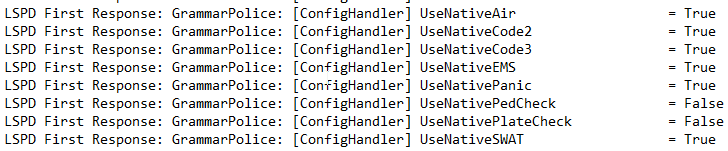
-
You're still on an old build of LSPDFR. Attach screenshots of your entire GTA directory, your Plugins folder and your Plugins/LSPDFR/ folder. Then open your Plugins folder, right click on the LSPDFR .dll and select properties, screenshot the details tab.
-
Download this version of RNUI and drag the .dll into your main directory. Hit replace when asked to overwrite files.
-
And when using GP it doesn't call for UBs backup? Can you attach a RPH log from a session where you used GP to request Code 2 / 3 backup?
-
Then launch GTA and RPH again to load LSPDFR.
-
Copy the content of the custom.ini and paste it here. Or you can attach your screenshots as you said above.



