




Lennyy
Community Team
-
Joined
-
Last visited
Everything posted by Lennyy
-
Rename mods to _mods and retry. Your topic has been moved to GTA V Support, this is not LSPDFR related. Please post in the correct location in the future.
-
After which step specifically did it stop playing?
-
You’re welcome!
-
Non ELS cars require a carvariations and carcols meta. You’d have to find a way to replace the existing entries with the ones provided by the download or convert the entire vehicle pack into an addon. Is this a download from LCPDFR.com?
-
„[1/13/2025 4:02:50 AM.510] LSPD First Response: Exception type: System.FormatException [1/13/2025 4:02:50 AM.510] LSPD First Response: Exception message: String was not recognized as a valid Boolean.“ A Boolean is a true false value. This error occurred during the loading process of the GrammarPolice settings file.
-
Addon cars that have the same spawn names will override the replace cars. That depends on the load order in the dlclist of the replace patchday and the addon folder. Your topic has been moved to GTA V Support, this is not LSPDFR related. Please post in the correct location in the future.
-
Your RPH build is outdated, not the GTA V game version. Grab the latest RPH from the LSPDFR manual download.
-
Yes thank you. To narrow it down, please rename your Plugs\LSPDFR folder to Plugins\_LSPDFR in order to temporarily deactivate it. If that works, it’s a plugin form that folder causing the issue. Otherwise, launch the game without RPH to „disable“ the plugins folder and spawn the car this is happening with. If neither of those fix the issue, attach images of your entire GTA V directory. My last guess is an .asi script you may have installed.
-
Still not the correct one. Read my last replay again please.
-
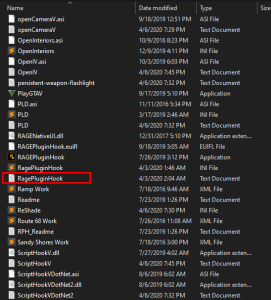
Can you please upload the actual RagePluginHook.log found in your main GTA V directory. It’s a text document and hasn’t got any numbers in the file name. Drag that file into the opened text window here in this thread.
-
Can you please upload the actual screenshot instead of the location on your PC?
-
Post a picture of your scripts folder (if you have one), your plugins folder and plugins/LSPDFR folder.
-
Your topic has been moved to GTA V Support, this is not LSPDFR related. Please post in the correct location in the future.
-
Verify your game files. If it's not the the game folder, you're probably running an outdated build.
-
Go to update/x64/dlcpacks and it'll be there. Copy that to the same path within your mods folder and edit that one.
-
Kannst du gerne versuchen, achte aber darauf dass du den GTA V Ordner mit rechtsklick -> löschen entfernst und nicht via steam -> uninstall (oder EGL/RGL je nach dem was du hast). Andernfalls bleiben alle gemoddeten Dateien, die nicht ursprünglich zu GTA gehören, in dem Ordner. Nach dem reinstall dann ausschließlich LSPDFR/RPH installieren und nochmal versuchen.
-
It's not containing malicious files but try the manual install instead.
-
Komisch. Hast du mal mods ausversehen in dein GTA Verzeichnis anstatt deinen mods Ordner installiert? Normalerweise ist eine koruppte Datei im mods Ordner der Grund für den Crash im log.
-
Zeig mir bitte nochmal einen Screenshot von der ersten Seite des GTA Verzeichnis
-
Häng mal bitte die Date aus deinem GTA V Hauptverzeichnis. Die log Datei sollte keine Nummern im Dateinamen haben.
-
That's because you disabled it. If renaming to _mods works, a mod from your mods folder prevents the game from loading. Revert recent changes or create a new mods folder.
-
Hast du mal nen neuen Log für mich.
-
If renaming mods to _mods works the issue lies within that folder. Revert any recent changes or start with a few one.
-
Remove TowTruckCallouts and update RageNativeUI from here: https://github.com/alexguirre/RAGENativeUI/releases. Your topic has been moved to LSPDFR 0.4 Support. Please post in the correct location in the future.
-
It's a weird issue, haven't seen that before. Try to rename mods to _mods and retry.

