




Lennyy
Community Team
-
Joined
-
Last visited
Everything posted by Lennyy
-
Can you please attach your latest RagePluginHook.log found in your main directory.
-
It may cause issues in rare cases. Safer to load it manually. Let me know if that helps!
-
Install the latest RageNativeUi to your main directory please: https://github.com/alexguirre/RAGENativeUI/releases
-
Launch GTA into story mode completely (until you spawn as one of the three GTA characters) and then alt-tab out of the game to launch rage. Make sure you don’t load any plugins on startup and load them individually instead.
-
You're welcome!
-
You're welcome!
-
Your issue is somewhere within your mods folder. I suggest reverting the last changes you made to it. If that doesn't help make a new mods folder.
-
Can you go ahead and try to launch the game without rage for me? If it crashes as well please rename your mods folder to _mods and re-try. Note:You never got to the point of LSPDFR loading therefore its GTA V and not LSPDFR which is crashing.
-
You can (temporarily) remove it and report the issue to the author via the comment section:
-
Is GTA crashing without rage as well? If so rename your mods folder to _mods and try again without rage.
-
https://www.microsoft.com/en-US/download/details.aspx?id=26999
-
Please attach your RagePluginHook.log found in your main directory.
-
-
The window you have opened on the right
-
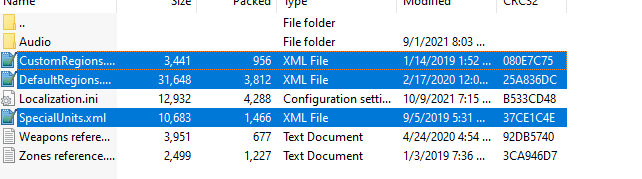
In the winrar file open the same path (Plugins/LSPDFR/UltimateBackup) and drag those files from the left window (winrar) to the right (file explorer).
-
Redownload ultimateBackup (here) and put these files into Plugins/LSPDFR/UltimateBackup.
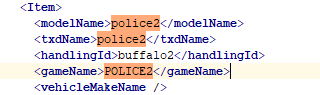
 Open OpenIV and go to: -mods/update/update.rpf/common/data/levels/gta5. -Right click the vehicles.meta file and click on edit, press ctrl+f and search for "police2" (without the ""). -Take a look at this line: <handlingId> </handlingId> -change it to "buffalo2" (without the "" again) and hit save in the bottom right corner. Example: to Hopefully that helps you. If not let me know!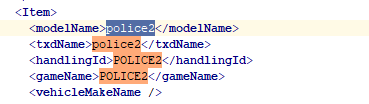
 Which kind of car (e.g. FPIS) did you install into which slot (e.g. police4)?Can you provide a screenshot of your Plugins>LSPDFR folder please.Glad you’re able to play again!The ones spawned through LSPDFR ambiently/backup or with e.g UltimateBackup?Can you try to go into the area without the map mod installed? It could be the reason for your crash.Check Charlie's signature for a link


