




Lennyy
Community Team
-
Joined
-
Last visited
Everything posted by Lennyy
-
Send me a screenshot of your Plugins/LSPDFR folder. Might be able to help.
-
In your GTAV main directory. It's a text file.
-
If somebody is running away from you, you can also hold the B-Key to initiate a pursuit. A red progress bar will appear in the bottom right to indicate how long you need to hold the key for.
-
Maybe. Try to rename your LSPDFR folder in GTAV/Plugins to _LSPDFR so no plugins get loaded. If the issue no longer occurs it's something with a plugin you have.
-
That sounds like a plan!
-
Can you upload your new log again please.
-
 Great work on those sounds! I keep coming back to this pack when looking for enhancements.
- 143 comments
- 12 reviews
-
-

- 1
-
-
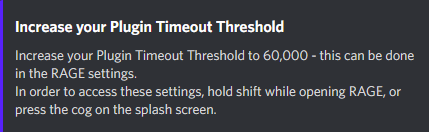
Thank you for providing your log! Thank you for using one of my plugins 😄 Quite a few vehicles are not getting preloaded correctly because they appear as invalid. I'm guessing that you installed the wrong version of EUPFR. Make sure to install without addon vehicles when you are going to reinstall that mod. Please update LSPDFR to the latest version. You can do so by redownloading the manual version of LSPDFR here. Drag and drop the contents of that download into your main directory. I have no idea why, but your PluginTimeoutThreshold is somehow set to 120000?! Set it to 60000 --> Retry after all these steps and let me know how it goes. If you have questions just post them here!
-
I remember having the exact same issue with a specific scorcher model. Unfortunately, I cannot remember how I solved it, but it was either an issue with the meta entry or the model itself. Maybe try a different scorcher replace and see if the issue persists.
-
Hey there! Could you please attach your RagePlugnHook.log. It's a text file in your main directory.
-
Please attach your RagePluginHook.log. It's a text document inside your main directory.
-
Kein Problem!
-
First of all, nice to see you debating on coming back to LSPDFR! In my opinion it is absolutely worth getting back into if you are still interested in it. Countless plugins are still actively maintained and many new ones have been released since you stopped playing 2 years ago. If you have some time to invest, I’d say give it a shot and reinstall it!
-
What do you exactly mean with ELS beeps? Like the sound you should hear when you cycle through light stages?
-
Hey there, can you provide more detail about the crash you are experiencing? Are you loading your game via RPH, do you have a mods folder etc.
-
I think what you are describing is a feature which is meant to be like that. You might be able to change that via the ELS xml file of that specific vehicle but I’m unsure how that would be done.
-
Have you tried installing a custom UB backup config like this: If your backup units arrive as the default peds that usually means you are using the stock configs from UB. For ambient spawns you’ll have to check out the agency.xml file.
-
Hey there, can you try to start launching GTA without RPH for me?
-
 Been using this for ages now and never got to leave a review. Outstanding work!
- 937 comments
- 23 reviews
-
Also, on a side note, you can save your last outfit as your off-duty outfit via the RPH console when LSPDFR is loaded. That way you don't need to go through the EUP Menu to equip it all the time. You're most welcome!
-
Are you using ELS? If so, you can adapt the brightness of the takedowns in its .ini file.
-
No, there's no way of doing so. However, somebody has updated the plugins you mentioned and uploaded them to GitHub here.
-
You can use EUPmenu with the EUP packs to customise your character and configure an off-duty outfit.
-
-
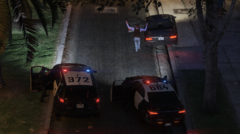
From the album: Lore Patrol
LSPD conducting a felony stop on a wanted suspect, Downtown Los Santos



