




Lennyy
Community Team
-
Joined
-
Last visited
Everything posted by Lennyy
-
Update LSPDFR by manually reinstalling LSPDFR Also, you are missing a file called XSerializer. Install the missing file from the S136Callouts download.
-
You're welcome!
-
You can edit lspdfr keybinds in the keys.ini found in the lowercase lspdfr inside your main directory.
-
The coroner is from STP/UB. You can edit the entires for it by taking a look at DefaultRegions.xml.
-
In order to identify LSPDFR crashes, please upload your latest RagePluginHook.log.
-
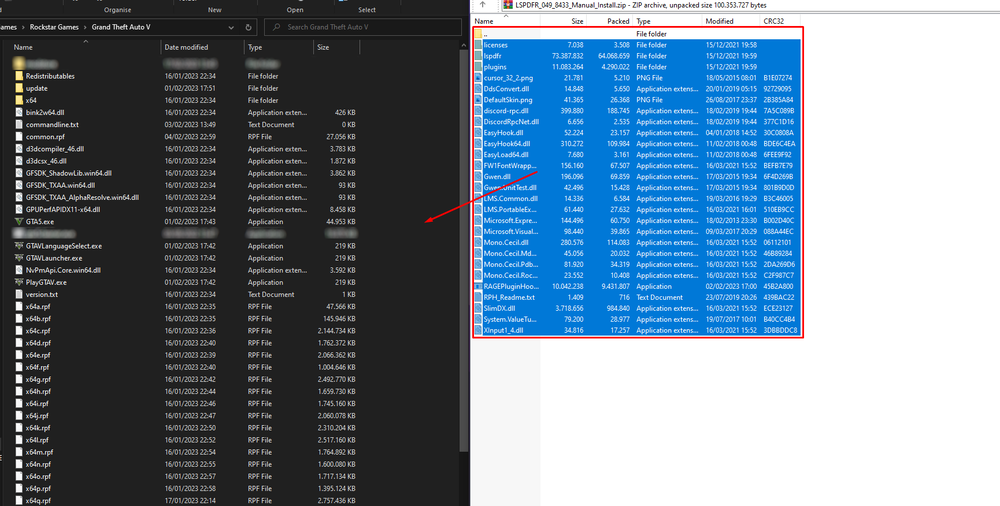
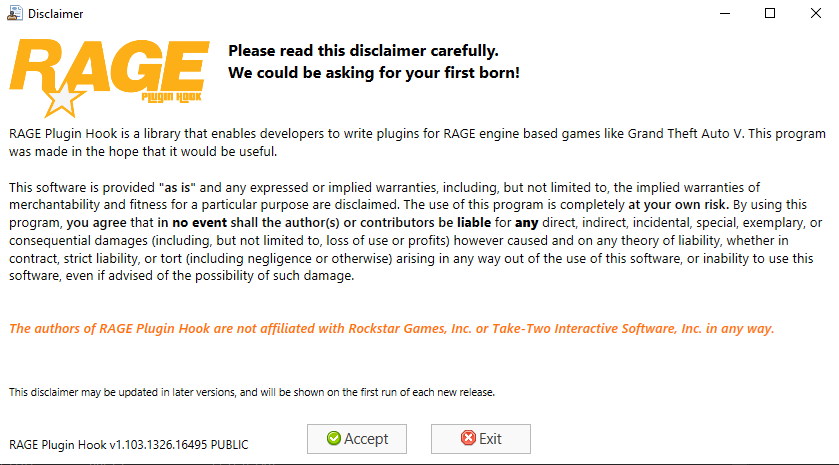
Da die meisten Anleitungen zur Installation von LSPDFR in diesem Bereich des Forums extrem veraltet sind, möchte ich heute einen aktualisierten Beitrag hierzu verfassen. Vorab benötigst du: Eine legal erworbene Kopie von GTA V (Steam, Rockstar oder Epic Games). WinRAR oder 7ZIP zum Entpacken der Downloaddatei von LSPDFR. Informationen Grundsätzlich gibt es zwei verschiedene Arten LSPDFR für dein GTA V zu installieren. Da ich jedem jedoch nur empfehlen kann die manuelle Version zu nehmen, wird auch nur diese hier ausführlich erklärt. Manuelle Installation von LSPDFR Die neuste Version von LSPDFR findest du hier. Auf der Seite klickst du auf Download this file und wählst die Datei aus, die als LSPDFR_xxx_xxxx_Manual_Install.zip benannt ist. Öffne die heruntergeladene Datei mit WinRAR und 7Zip. Öffne dein GTA-Hauptverzeichnis (Dieses enthält u.a. die Dateien PlayGTAV.exe sowie GTAV.exe) Ziehe den gesamten Inhalt der Downloaddatei in dein GTA-Hauptverzeichnis. Warte bis alle Dateien kopiert sind und schließe danach die Downloaddatei Starte RAGEPluginHook.exe aus dem Hauptverzeichnis. Lies die ggf. den Disclaimer durch und drücke danach auf "✅ Accept". Auf dem nächsten BIldschirm findest du einige Rage-spezifischen Einstellungen, welche du weitesgehend ignorieren kannst. Es empfielt sich, den "Plugin timeout threshold" von 10000 auf 60000 (Sechzigtausend) zu erhöhen. Drücke auf "✅ Save and launch" und warte bis GTA komplett geladen hat. Im Spiel kannst du die RPH-Konsole mit F4 öffnen. Dort schreibst du den Befehl "LoadPlugin LSPDFirstResponse.dll" hinein. Drücke Enter und warte bis Rage LSPDFR vollständig geladen hat. Besuche eine Polizeistation um das erste Mal On-Duty zu gehen und einen Character zu erstellen. Nach dem ersten Mal kannst du einfach "ForceDuty" in der Konsole nutzen, um On-Duty zu gehen. Wichtig! Momentan kommt es häufiger zu Fehlermeldungen durch Virenprogramme die sich auf dem PC befinden. Um RPH erfolgreich starten zu können, kann es sein, dass eine Ausnahme vom AV-Programm nicht ausreicht. Damit RPH einwandfrei starten kann, muss das Virenprogramm zeitweise komplett deaktiviert werden. Während der Installation bzw. während des Spielens kann es durchaus zu Probleme kommen. Damit euch schnell und effektiv geholfen werden kann, erstellt bitte ein neues Topic und stellt dort euer Problem ausführlich dar! Hängt außerdem immer die RagePluginHook.log Datei an eure Fragestellung an. In den meisten Fällen wird diese Datei früher oder später benötigt, um Probleme lösen zu können.

-
If you need further help, any screenshots or links would be greatly appreciated.
-
Drag and drop the folder containing the .rpf file into mods\update\x64\dlcpacks After that, add <Item>dlcpacks:/YOURDLCPACKNAME/</Item> to the dlclist.xml in mods\update\update.rpf\common\data\.
-
Your callouts can't be located. I'm guessing you installed them wrong. Can you show me: A screenshot of the location where you installed them A screenshot of the Plugins\LSPDFR folder
-
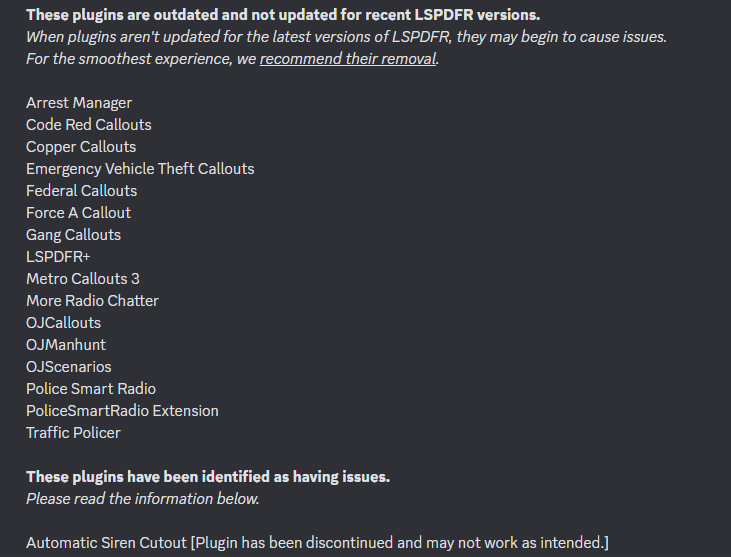
Update RageNativeUI from here. Also, set your plugin timeout threshold to 60000. You can do so by opening rage and clicking on the ⚙️. Additionally, you may want to have a look at this:
-
Please attach your RagePluginHook.log found in your main directory.
-
Do not load EUPMenu and start. Load it manually via the console and then tell me what it says. For the trainer, check your keybinds for it thoroughly and perhaps perform a clean install on it. Your asi loader clearly says it’s being loaded fine so SHV should not be the cause behind your issue.
-
Make sure to download the oiv files. Not the lml packages and install them properly with OpenIV.
-
Hi, I recommend removing AssortedCallouts and EasyLoadoutContinued as they are outdated and potentially malfunctioning. Also, remove PragmaticCallouts. That pack has been labelled as broken by the developers. Make sure you properly put IPT.Common.dll from the ProwlerRadar download in the main directory. Also, ensure you have a fully up-to-date version of RageNativeUI which you can find here: https://github.com/alexguirre/RAGENativeUI/releases To install this, drag and drop the RAGENativeUI.dll into your main directory. You don't need any of the other files such as the .xml or the license file. If you are still having issues after these steps, please report back with a new log.
-
Reinstall the oiv packages of EUP L&O and EUP S&R. Also, ensure the configs are in the correct locations. Drag and drop the data folder from EUPFR into the lowercase lspdfr folder.
-
So ist das manchmal mit GTA modding. Super, dass es jetzt läuft! Nichts zu danken.
-
Perhaps this can guide you towards the right direction? It’s a FiveM resource but I don’t see why the base game should handle it differently https://forum.cfx.re/t/switch-or-use-diffrent-sirens/53918.
-
Wenn nur LSPDFR abstürzt, muss ja ein log entstehen. Sicher das da keiner ist?
-
Did u install any weapon mods lately? Some skin on your gun seems to be invalid.
-
stations.xml in the lowercase lspdfr folder
-
New log please.
-
Send me your last log again after you entered that. What trainer did you install?
-
Hello. Maniac Callouts is trying to access a function from stop the ped. You most likely need to install StopThePed in order to play with ManiacCallouts.
-
Your trainer seems to load fine. In your log I cannot find a trace of EUP being loaded at all. Did you not type "LoadPlugin EUPMenu.dll" in the console?
-
Update RageNativeUI here. And set your plugin timeout threshold to 60k. You can do so by clicking on the ⚙ when opening RPH.



