




Charlie686
Members
-
Joined
Everything posted by Charlie686
-
Nice to hear. You may want to play around with your visualsettings.dat file. Specifically, the following values: car.defaultlight.day.emissive.on car.defaultlight.night.emissive.on If it still happens, it might be a graphics modifications you installed; I wouldn't be too sure unfortunately. 🙂
-
Hi there, Please attach your RagePluginHook log - a text document found in your main directory. This will be needed to diagnose your issue further. 🙂
-
Hi there, You have ENB installed. This intereferes with how RAGE hooks into the game. In order to prevent any crash, you need to launch GTAV without RAGE. Once you are in story mode fully, you can ALT + TAB out and launch RAGE. Let me know if this helps, Charlie
-
Hi there, There are multiple issues in your log; you'll need to address both. Could not find a part of the path 'C:\Program Files (x86)\Steam\steamapps\common\Grand Theft Auto V\Plugins\LSPDFR\StopThePed\Localization.ini Install Localization.ini. You installed Stop The Ped incorrectly. Could not load file or assembly 'RAGENativeUI, Version=1.6.1.0, Culture=neutral, PublicKeyToken=null' or one of its dependencies. You are missing RAGENativeUI. It is found here. Do not install the copy of RAGENativeUI found in Stop The Ped. It is an old version. Hope this helps, Charlie
-
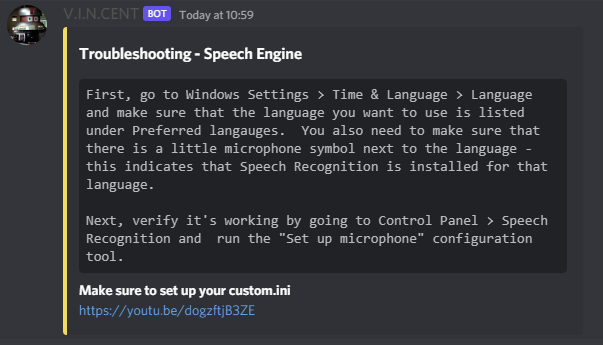
Hi there, Please follow the instructions below. Thank you. Youtube link:
-
Fantastic, enjoy!
-
Idealy where you replicate the issue, so a new log. 😄
-
No worries, let me know how it goes!
-
Interesting. Try disabling your LSPDFR Plugins as a diagnostic step. Go to GTAV/Plugins and rename the LSPDFR folder to _LSPDFR; does the issue still persist?
-
That's because it is crashing. 😄 You need to install RageNativeUI.
-
A ped became invalid; this cannot be avoided. You mention it happens frequently, another log would be useful to compare both. 🙂
-
Freezing as in lagging, to confirm?
-
Have you specified the ped model for SWAT to use?
-
This crash was due to an invalid ped. While there isn't anything you can do, I would typically recommend you to speak to the developer. Unfortunately, NobleCallouts is no longer available and has been taken down by the author, so if this issue keeps occuring I would have to recommend first, disabling that specific callout (barricaded suspect) and then, if that does not solve it, removing the plugin.
-
What do you mean won't let you go on duty; what happens? And please attach your RagePluginHook log - a text document found in your main directory.
-
Ultimately it's just finding new vehicles. It's the models themselves. However, you can always leave this step till last to see if finding new vehicles is needed. 🙂
-
I would personally disagree. You shouldn't be piling your game with 4K or even 8K textures. However, these are both personal preference and ultimately you can do steps in whichever order if you prefer one over another. 🙂 Another thing to check would be the polygon count of vehicles; generally, over 200,000 and you may start to see texture loss creep in.
-
Not to worry, enjoy. 🙂
-
Probably something using ScriptHookV rather than ScriptHookV itself. Please upload the following files in your main directory: - ELS.log - ScriptHookV.log
-
Please attach a screenshot of the error.
-
✨I wonder what this treasure trove is...✨ That will fix it! 😄

-
Fantastic, enjoy!
-
Rename your mods folder to _mods; are you now able to enter GTAV?
-
[4/3/2022 4:21:16 PM.785] LSPD First Response: [TRACE] ExpandableFileParser::Parse: Reading content from file:D:/GTAV/lspdfr/data/custom/agency_eup.xml [4/3/2022 4:21:16 PM.818] LSPD First Response: [FATAL] Failed to load backup data: System.Xml.XmlException: There are multiple root elements. Line 150, position 3. Either try fixing that XML or remove it.
-
Load GTAV without RAGE; can you enter story mode?


