




brenden.iannetta
Members
-
Joined
-
Last visited
Everything posted by brenden.iannetta
-
Please follow the instructions which are available here: https://darkvypr.com/irls
-
https://www.gta5-mods.com/misc/gta-5-gameconfig-300-cars Just drag and drop this into Mods/Update/Update.rpf/Common/Data
-
No Problem! Have fun 🙂
-
Welp... That's good then lol. Have fun 👍
-
You are on an old version of LSPDFR, find the new one here:
-
There was a new RAGEPluginHook.exe released last night, try this:
-
No problem 🙂
-
Try extracting the update.rpf from "Grand Theft Auto V\update", then replacing the one in your mods folder (Grand Theft Auto V\mods\update) with that new extracted update.rpf. After doing this, install a custom gameconfig.xml. Update Lenny's Mod Loader (if you have it), then install this, and this. Let me know if this works!
-
Go to your lspdfr.ini in "Steam\steamapps\common\Grand Theft Auto V\lspdfr" and turn this to true: Main.DisableGameBlipHiding = true
-
Try extracting the update.rpf from "Steam\steamapps\common\Grand Theft Auto V\update", then replacing the one in your mods folder (Steam\steamapps\common\Grand Theft Auto V\mods\update) with that new extracted update.rpf. After doing this, install a custom gameconfig.xml. Update Lenny's Mod Loader (if you have it), then install this, and this. Let me know if this works!
-
Did you follow my instructions? There is an updated one on my link.
-
Awesome!
-
I see. That's very weird then. Hope you can find a solution soon 🙏
-
Hmm. Unfortunate. Can you try updating LML if you haven't already? Also just to confirm, your mods folder shouldn't have a "_" before it, since you installed the custom gameconfig.xml. If it does, delete the "_" and try again.
-
There you go! Have you tried turning on "Load all plugins on startup", while also having your mods folder named: "mods" (without the "_")?
-
Actually I think I found the solution. You need to copy the new version of update.rpf into your "mods" folder. Your game crashes because your mods folder is not compatible with the latest version of the game. Try this: Try extracting the update.rpf from "Steam\steamapps\common\Grand Theft Auto V\update", then replacing the one in your mods folder (E:\Steam\steamapps\common\Grand Theft Auto V\mods\update) with that new extracted update.rpf. After doing this, install a custom gameconfig.xml.
-
Well yes. Gameconfigs are very important to install because they let you add more vehicles and such. The gameconfig.xml I linked should hopefully solve your problem, if that's what you mean. The gameconfig should go into the mods folder, then rename the mods folder back to "mods". If this doesn't work, try this: https://www.lcpdfr.com/forums/topic/123673-game-refusing-to-start-up/?do=findComment&comment=721431
-
The reason OpenIV's site was broken is because there is an incorrect http protocol. Use this link: http://ntscorp.ru/ovi/setup/ovisetup.exe
-
Very weird. Maybe try re-installing OpenIV like you said. Could be a new version and u might just have an old incompatible one 🤷♂️
-
Try extracting the update.rpf from "Steam\steamapps\common\Grand Theft Auto V\update", then replacing the one in your mods folder (E:\Steam\steamapps\common\Grand Theft Auto V\mods\update) with that new extracted update.rpf. After doing this, install a custom gameconfig.xml. Update Lenny's Mod Loader (if you have it), then install this, and this. Re-enable your mods folder. Let me know if this works!
-
You are missing RAGENativeUI.dll. Please download from this link, then drag and drop "RAGENativeUI.dll" from the .zip file info your GTAV root.
-
There was some fixes done to LSPDFR recently so just make sure you downloaded the latest versions of RAGE from the LSPDFR download page:
-
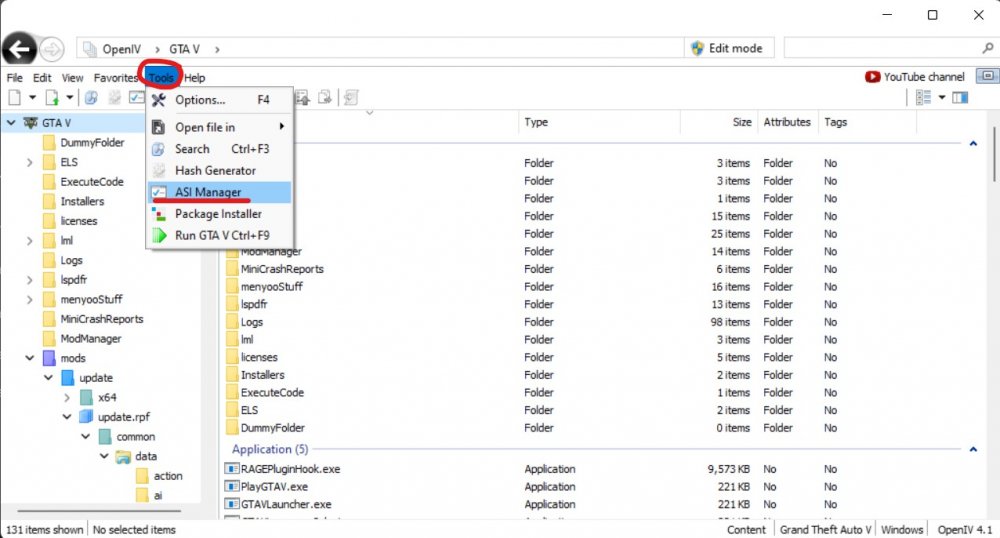
Interesting issue. Have you tried reinstalling the OpenIV asi manager stuff? Click ASI Manager (in the attached pic) then re-install all 3 of the plugins.
-
https://www.gta5-mods.com/tools/heapadjuster https://www.gta5-mods.com/tools/packfile-limit-adjuster Please try installing these and let me know. 🙂
-
Have you tried installing all of the following?: https://www.gta5-mods.com/tools/heapadjuster https://www.gta5-mods.com/tools/packfile-limit-adjuster Make sure to remove the _ from the mods folder after installing all of these, then boot GTAV.




