


luminouscarcass
Members
-
Joined
-
Last visited
Everything posted by luminouscarcass
-
 So far so good; haven't noticed any bugs and this makes general highway patrolling much more immersive! Thanks and keep up the awesome work Albo!
- 3,646 comments
- 306 reviews
-
-

- 1
-
-
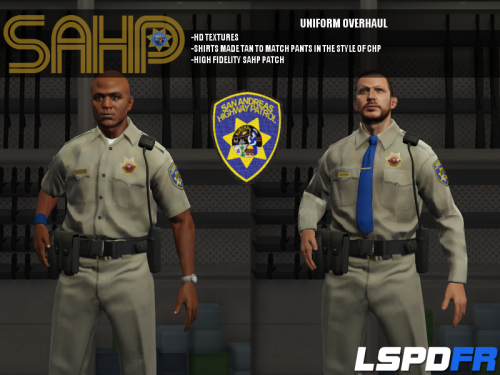 Just what I was looking for you! I love that the SAHP is getting Rockstar-like treatment from the LSPDFR community. Keep up the great work!
- 95 comments
- 17 reviews
-
 Weird, working now! I honestly have no idea what I did to "fix" the issue, all I did was change the binding to F7 from G and reload the plugin. Thanks again!
- 342 comments
- 49 reviews
-
Definitely sure I'm using 2.0.4; I've reinstalled RPH 22 and have manually reinstalled 2.0.4 multiple times, each time the plugin loads, I receive the following: [8/14/2015 8:13:03 AM.680] Plugin "Vehicle Search v2.0.4" was loaded from "VehicleSearch.dll". [8/14/2015 8:13:03 AM.979] Vehicle Search v2.0.4: System.ArgumentException: The specified type is not an Enum type. [8/14/2015 8:13:03 AM.980] Vehicle Search v2.0.4: System.ArgumentException: The specified type is not an Enum type.
- 342 comments
- 49 reviews
-
Can't seem to get the plugin to work now with version 2.0.4 and RPH 22; below is from my RAGElog: FWIW: Latest Pedsearch works fine. Any ideas? Thanks for your help!
- 342 comments
- 49 reviews
-
Don't get me wrong, I'm usually one of the first to test the public releases so I can stick with the times, but given the likely significant changes between RPH 20 & 21, I can tell this is going to be a problematic release. The fact that you need entirely new runtimes, new dependency DLL files, and more in order for the update to work is going to cause issues (like witnessed already in this thread). Chloe: Does the latest RPH update work for you?
-
I ran into issues immediately after updating, this seems like a rather significant update. First, you're required to download / install 2015 VC++ and after that, I then received error messages at launch regarding a missing D3DCompiler_47.dll file. I get the impression that file is associated with DirectX, however it wasn't required for RPH 20 and below and wasn't mentioned in the change notes for the update. Lastly, after putting the DLL in the the GTA V main directory, I was able to launch the game, but then received a CTD courtesy of Rage at the main menu. At that point, I rolled back the change and happily went back to cruising the streets in the primitive RPH 20 age.
-
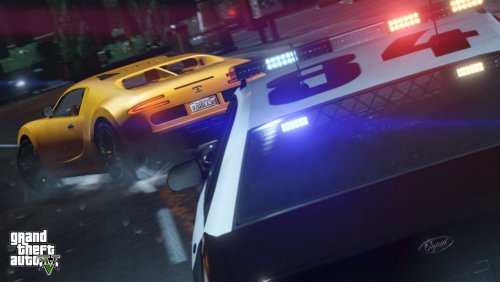 Any chance you could increase the frequency of your callouts? I had to go through maybe 15 callouts before I got one of yours. Do you need to be in a particular part of the map to see increased callouts? I'm typically always in Blaine County
- 76 comments
- 23 reviews
-
Really solid start! Was able to get all call outs to spawn and successfully took care of stranded vehicle and car collision. Really looking forward to how this shapes up!
-
 Really enjoy this PLD, but is it possible to add the time to the display variables?
- 220 comments
- 55 reviews
-
Works as advertised, had slight issue with being unable to pull over vehicles, but I simply re-installed 0.2 and rebooted, and so far so good. Need to come up with some good key bindings for the LSPD computer; obviously the light / siren conflict is annoying, but additionally I keep towing and breathalyzing perps while in the middle of calls when I use the computer, inadvertently using the towing and breathalyzing functions. Awesome work, thank you!
-
The Sopranos The Wire Gomorra (intense Italian gangster show) The Knick True Detective
-
Nice little work-around; keep it up!
-
-
Cool idea; how often do the callouts tend to align with reality? Very rarely?
-
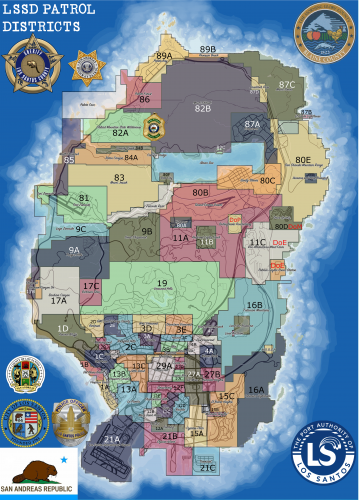 It's not an interactive mod; you can't currently install in-game. It's meant purely for role-play. If it was possible and I knew how, I'd gladly try to make an in-game map.
 -
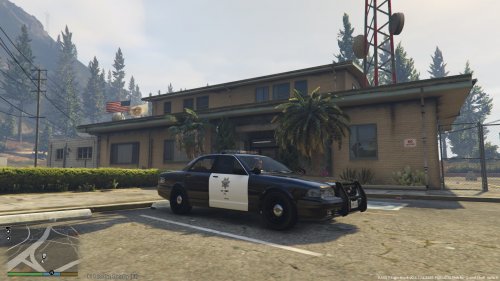 This looks great; please do a fictional version like OfficeLund suggested. That way, everyone is happy :)
- 4 comments
- 2 reviews
-
Just posting because I've seen a real CHP mod for GTV V, but not a fictitious one; it'd be awesome if someone made a San Andreas Highway Patrol texture for only the Interceptor. I'm not sure if this is currently possible, but I always prefer to keep my themes vanilla.
-
Not sure, probably eventually if not currently. I have no idea how to do something like that though.
-
You decide who patrols what, it's your role play. I personally view the LSSD as the equivalent to state troopers, they have a tremendous area of responsibility. In my "world" the LSSD doesn't patrol or service anything within the Los Santos city limits (though they could) and they have a limited presence at the airport. Starting at districts 1-4 and going north is where LSSD activity begins. I could go on and on...but these are my rules. This map is for anyone who's interested in creating backstories and adding immersion.
-
This is a fictitious map of LSSD patrol districts for GTA V for roleplay purposes. The map is the "District Map for GTA V" created by someone on Reddit; I simply just created "patrol districts" and "sectors" and overlayed them on the map. There is kind of a logical order to the numbering of the districts, but a lot of it's random too :) The convention goes: District Sector (i.e. Sandy Shores is listed as 80C; this is district 80, sector C). Districts 1-11 = City of Los Santos / Los Santos County Districts 80-89 = Blaine County DoP = Dept. of Prisons DoM = Dept. of Mines DoE = Dept. of Energy This was originally for personal use, but I figured someone else might find it interesting. I can upload the GIMP file with layers if there's interest.
-
 1.1 works now for me now; awesome little mod!
 -
Same exact thing; I'm using the Scripthook files you provided and standing on the side. Tried with multiple vehicles.
-
a.) Police database system and modify your SpeedRadar for ALPR and link the two b.) Ability (similar to PoliceHelper for IV) to check ped IDS / use your radio to perform ID checks (could be linked to police database system) c.) A script that enables you to write tickets / citations for parked vehicles d.) Perform vehicle checks for drugs / contraband. Vehicle checks don't have to be animation driven, how about an option during a pullover for "search vehicle" which is simply a randomly generated result e.) Like already mentioned: breathalyzer, DUI, drug tests f.) No word on LSPDFR EMS / FD support any time soon; are you able to enhance current EMS / FD? g.) Callouts for mundane things: take missing persons report, interview shoplifter, prisoner transport Not completely sure what is and isn't currently possible, but keep up the good work.
-
 Anyway to be able to modify the flags? Had to lower them to 20 to barely see any, and most of the ones I've seen are "unpaid fines". Would be nice to be able to modify those
- 101 comments
- 40 reviews



