


Yard1
Friends of LSPDFR
-
Joined
-
Last visited
Everything posted by Yard1
-
Happy birthday mates!
-
-
-
MODERATOR NOTICE Topic belongs to GTA IV Support Requests, moving.
-
Death to the Stormcloaks!
-
There are only 8 Divines, heretic!
-
 Are those my peds? Woah, I feel honored!
 -
OVERLOAD http://en.wikipedia.org/wiki/Valhalla,_New_York
-
Sovngarde, ineseri. TES Lore 101.
-
You have to download and install WinRAR.
-
Well, most cars from GPM are ELS enabled, but also most cars here (Downloads) are also ELS enabled. Just check description.
-
Disgusting. People like him give bad PR to gamers and games.
-
You have to use right pedvariations.
-
Happy Christmas and a merry New Year everybody!
-
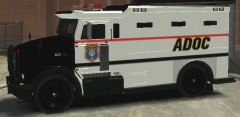 Alderney - to match the ADSP theme (AD instead of A as an abbreviation of Alderney).
 -
Hah, nice one! BTW. I have a version with ADDOC instead of ADOC - interested?
-
MODERATOR NOTICE Topic belongs to Development Suggestions & Requests, moving.
-
MODERATOR NOTICE Topic belongs to GTA IV Support, moving.
-
 Release it pls!
 -
He's in hypothetical G17 Media office.
-
-
MODERATOR NOTICE Topic belongs to GTA IV Discussion, moving.
-
MODERATOR NOTICE Topic belongs to GTA IV Discussion, moving.
-
http://www.youtube.com/watch?v=cVy7YeeqGZQ Poland, everybody!
-
MODERATOR NOTICE Clan advertisements are not allowed on the forum. Links deleted from the posts.


