


Yard1
Friends of LSPDFR
-
Joined
-
Last visited
Everything posted by Yard1
-
1. Make sure your cars are ELS enabled. 2. That .ini file should be located in your GTA directory. 3. Press J for primary lights, K for secondary and L for warning lights. With ELS G only toggles siren. If you didn't backup something and now you want it back, you can install whole game to another directory and use it for backup.
-
Just remember, you can't add memory (VRAM) to your graphic card without buying new one!
-
I'm not rude, I'm just confused. And if you mean this is rude: Then I don't know what I'm supposed to say. No problem, I'll stay away from your threads.
-
Oh, ok. But I still don't know is OP talking about how much disk space car models take or something about losing RAM... :geek:
-
What the hell are you talking about? Cars don't have any computer memory!
-
-
-
And have you tried running clean game without skins, mods etc?
-
Nope, just hit CTRL + P and you will be on duty again!
-
Maybe try to reinstall the game?
-
1. If a vehicle is multi-livery, it can have up to 4 different skins that will appear randomly. 2. You can download skins, but you will have to find some for the specific vehicle. There are tutorials on the net how to install them. 3. You can switch those liveries (skins) in-game via SNT.
-
-
I open GTA 4 again.
-
According to log, you shouldn't have any problems with LCPDFR.
-
-
-
It's bigger than a post!
-
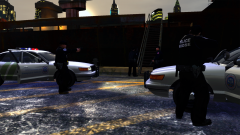
From the album: Shots
NOOSE U.S. Patriotism and Immigration Authority officers preparing to board and inspect "Platypus". My first real screenshot! NOOSE skins are made by me, and Vapid Police Cruiser skin is modified DLer one. Higher res here: -
Well, that sucks. I'm already using TSB.
-
Most of us here (including me) run GTA 4 on Windows 7 without problems. It's not listed because W7 wasn't simply released when GTA 4 hit the stores :happy:
-
Get a new card. This one is pure sh*t, and even if you'll manage to make GTA running, it will lag horribly.
-
Hi guys, I have a question - Is it possible to change added cop (Nutt's border patrol) to have SWAT weapons instead of pistol? Also, is it possible to change which vehicles and peds spawn when you're wanted?
-
Click link in my signature and follow the steps.
-
http://bit.ly/M4jZsE Was it so hard? Search for the problem before posting.
-
This is the Holy Grail of bad support posting. What doesn't download? What error? Are you sure this is a right section?

