




Caesar
Members
-
Joined
-
Last visited
Everything posted by Caesar
-
I recommend this topic is closed. A lot of arguments are heating up.
-
I wonder from who :)
-
Taser maybe? Why shoot a dog PROTECTING his owner? R.I.P. Innocent dog.
-
Woo hoo!
-
Those are really nice.... Here http://www.skinpacks.com/modules.php?name=Forums&file=viewtopic&t=505
-
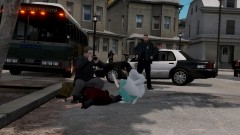 I still hate your computer. :)
 -
-
 Lol. Mine cant handle anything but a timecyc mod :P
 -
Ok thanks, Ill try them out!
-
You have nice graphics. WHY.
-
Yeah,but it only installs one thing, unless im just doing it wrong.
-
Is there an easy way to make an setup.exe file? Like for installing a car pack, etc? Also one that can install multiple things?
-
-
I would say ask EVI. But. He's gone...so.
-
its not the spotlight that is the problem, its causing the problem. But I will try what you said out.
-
Yes, you have Halogen_Only set to 1(one) in your ELS.ini file. Change it to 0 for whatever car you are using!
-
Can anyone else help?
-
-
Cool, but if this was suppose to be a throwback kind of thing...I suggest you dont have any equipment in it, not even the console.
- 21 comments
- 11 reviews
-
-

- 2
-
-
Well..I wasn't trying to be rude, its...common sense..lol
-
LCPD:FR is for GTA IV....so what do you think?
-
Basically what Carry said, you can also go into your trainer.ini file, then go to view->find. Then type keybindings, and make sure that the down thingy is checked. Keep clicking next until you come to Keybindings disable=0. Replace the 0(zero) with a 1(one)! This is done so everytime you go in game you wont have to disable them!
-
Not sure what you mean exactly (im rather new to zmod), so here is a picture of where wheelmesh is located!
-
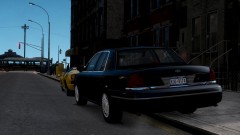
So I was modeling my next release of a CVPI. I noticed when I was done(reviewing it in OpenIV), my tire(s) was....floating. So I went through, portion by portion, meaning, putting the light bar on, checking it in OpenIV...putting the rambar on then checking in OpenIV..etc. When I got to my spotlight, that is when it did this. Any clues on how to fix? I have the spotlight under Chassis_L0 in the hierarchy. The spotlight I am using is BxBugs from GPM Please Help! Here are pictures of what I mean!
-

