


trewq34
Members
-
Joined
-
Last visited
Everything posted by trewq34
-
Which year of Charger are you looking for (ie. 2006-2010 or 2011-2014)?
-
Even still, it's better to learn it in 3ds Max as, personally, I believe it gives more flexibility in terms of what shapes you can make. (Not that ZModeler doesn't, it's just more difficult in ZModeler.)
-
Like what has already been said above, but there's more. Humster3D's license doesn't allow you to share the model. It's very limiting. I'd suggest (as Him1250 pointed out) TurboSquid or SQUIR (but be warned, the cars on SQUIR are extremely high poly. You'd have to optimize them). Another thing, it's often better to save your money on the models and learn to scratch model, or put the money into learning to scratch model, so you can make your own car instead of buying them.
-
![[DSF] Charger SRT8 and Crown Vic with 3D Interiors....](//s3-gallery.int-cdn.lcpdfrusercontent.com/gallery/album_1575/sml_gallery_20324_1575_876186.png) Nice. I have one thing to point out: a part on the door of the CVPI looks as if it's not mapped. Other than that, it's the best I've seen DSF cars.
Nice. I have one thing to point out: a part on the door of the CVPI looks as if it's not mapped. Other than that, it's the best I've seen DSF cars. -
You'd just have to attach an ELS-enabled part to the car. Most lightbars which are released unlocked are ELS-enabled. If you want to modify an non-ELS lightbar, there's a pretty good tutorials in the tutorials section.
-
3D modelling is only involved if you want to make your own parts (such as lightbars, pushbars, etc) otherwise it's not mandatory to know how to scratch make things. If you do however, it'll make you stand out from all a lot of the other modders here.
-
I suggest you take a look at the tutorials section: I used tutorials from there to learn. It's not an overnight thing - it's multiple headaches and weeks and sometimes even months of practice. Albeit, it'll only take you a few days to attach stuff, but if you want to improve rather than just placing things of roofs then it'll take a while to get used to the controls.
-
-
Knowledge in a scripting language: Visual Basic, C++, C#, C etc. Visual Studio: http://www.visualstudio.com/ A whole lot of patience and time BETA testers and finally, a basic idea of what you want your script to do.
-
![[WIP]2012 Chevy Caprice PPV Liberty City State Police](//s3-gallery.int-cdn.lcpdfrusercontent.com/gallery/album_1038/sml_gallery_13885_1038_277078.png) Lol, it's an interesting choice!
Lol, it's an interesting choice! -
There should a v2.0 folder in the archive you downloaded. If not download this one: http://www.gta4-mods.com/weapons/push-hk-usp-45-with-working-flashlight-v25-f16853
-
I was referencing to the colours of it. They don't look "normal" (pardon the pun). The normal ones I'm referencing to are these type: http://puu.sh/6Gt3X.jpg. when on the car, the colours of the sides of the bumpers normally merge into the main bumper colour, giving it a nice sleek look.
-
That's one of the ways you could do it, but another way is from the folder in YourusernameAppDataLocalRockstar GamesGTA IVsavegames and empty that folder. The appdata folder won't show up unless you type it into the bar at the top of Windows Explorer (similar to how you type URLs into a web browser) or if you tick the option to show hidden folders.
-
OMG What the fuck did you do to that template lol. I thought the original looked better since it kinda merged together...
-
Try removing your save game and see if that makes a difference (so you'd start right from the start.)
-
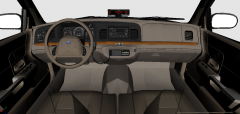 EVI's?
 -
There's no way around normal maps. You need a normal in order for the material to work correctly in game.
-
Yes
-
ZModeler isn't for making textures at all. Normal maps and bump maps are the exact same. Also, it's often better to have correct normal and spec maps for it to look decent in game.
-
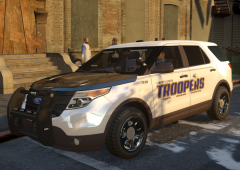 Mmmmm....dat ENB <3 If you don't mind me asking, which ENB are you using?
 -
Don't worry about it...it's much the same with us and the states :P
-
Yes.... God Save the Queen (alternatively "God Save the King" during the reign of a male sovereign). Cited http://en.wikipedia.org/wiki/God_Save_the_Queen
-
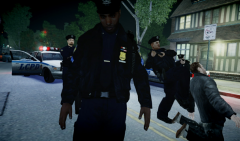 HOLY SHIT....that's scary. The cop just standing there *shivers*
 -
Did you not want one from Forza 5? There's a couple from Forza 4: '?do=embed' frameborder='0' data-embedContent>> http://gamemodels.ru/files/file/152-2008-chrysler-300c-srt-8/
-
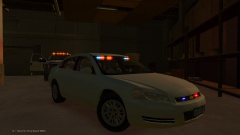 With those hubcaps, surely it's a 2004 Impala?
![[DSF] Charger SRT8 and Crown Vic with 3D Interiors....](http://s3-gallery.int-cdn.lcpdfrusercontent.com/gallery/album_1575/sml_gallery_20324_1575_876186.png)

![[WIP]2012 Chevy Caprice PPV Liberty City State Police](http://s3-gallery.int-cdn.lcpdfrusercontent.com/gallery/album_1038/sml_gallery_13885_1038_277078.png)
