



Gary Connor
Members
-
Joined
-
Last visited
Everything posted by Gary Connor
-
 Everything looks perfect except for a fatal problem. This car sometimes flies out of the bad model when it been hits. Please Fix It!
- 137 comments
- 25 reviews
-
Should ParksTools be placed in Plugins > lspdfr? I keep putting this file in the GTA V directory:/
-
 Thanks:)
 -
Since installing this, LSPDFR has been unsuccessful in loading and has been stuck since loading. LSPDFR seems to have this phenomenon every time a module is installed, and it will last for a long time. I have thought about whether it is a problem when I installed it, but my approach is to put the file into the location where it is, but sometimes it is ok, sometimes it will be a problem.
-
What does it mean? I have been playing well before, and now it inexplicably happen this. After loading LSPDFR, I have been stuck, and then RAGE crashes twice.
-
 In short, the clothing and accessories can be used before. But the character data I don't know. Anyway, I can use before.
- 631 comments
- 71 reviews
-
Yep, but only those files for clothing and accessories can be used in 8.0, and other files have to use the new version. And the EUP characters you have set before can also be used in the new version.
- 631 comments
- 71 reviews
-
Nope, this setting sometimes work, sometimes not work. He seems sometimes to be automatically locked out.
-
I mean the "Tracking" setting, When you pursuit, press N can open pursuit menu, Then you can setting pursuit status "pursuit" or "tracking", and "force on", "force off" and more.
-
I have a feedback on the 0.4 version, and 0.41 also does not solve this problem: the officer tracking setting at the time of chasing is not very useful, sometimes when I set up "Tracking", they will still go up to PIT or hit him.
-
This problem will be resolved if you have a file backup of the previous EUP clothing. I put the replaced EUP clothing in the old version into the new version of EUP, there is no such problem. Moreover, the new version of EUP Law & Order and Serve & Rescue replacement paths are different from the old ones. The path: update > x64 > dlcpacks
- 631 comments
- 71 reviews
-
-
So, if I want to replace the accessories, I can only change back to 7.5, or wait for new version?
- 631 comments
- 71 reviews
-
Why did EUP 8.0 cancel the accessories button? How do I choose sunglasses, armbands and other accessories?
-
Why did EUP 8.0 cancel the accessories button? How do I choose sunglasses, armbands and other accessories?
- 631 comments
- 71 reviews
-
When can I solve the FPS problem? XD
-
 So this mean, I can use my style audio in ELS police car? There are two major problems with the ELS police car: 1. Can't open the phone in the ELS police car and 2. Can't play the radio in the ELS police car.
 -
-
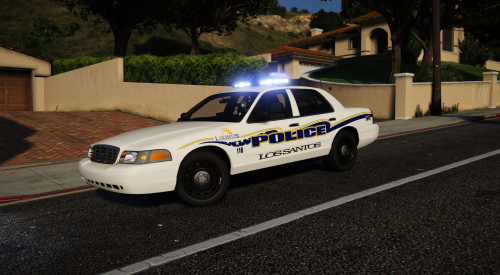 Can you make a LAPD CVPI? Use this kind of hub and change to be the oval police lights of reality LAPD.
- 16 comments
- 13 reviews
-
-

- 1
-
-
Awesome!!! I have been waiting for this for too long! GREAT
-
-
 Awesome! Amazing works!! Please make the voice of other police officers, thank u! 😄
 -
Yeah, thank you. I have returned the carvariations.meta file in update\x64\dlcpacks\mpchristmas2\dlc.rpf\common\data to the original version a few days ago, and the problem is solved.
-
Do you know why the default color of my FBI vehicle is white? I know the default color should be black, but I don't know why he turned white.
-
I don't know why, this problem has appeared in recent times, but the FBI2 car will not be like this. Who knows how to solve it?




