


TreadRed
Members
-
Joined
-
Last visited
Everything posted by TreadRed
-
you have a ; somewhere is doesn't need to be
-
Well I kinda figure the person who went through the trouble to make the uniform would make it available for you to use in game for patrol cops, but guess not. I did it for you Add this file to lspdfr>data>customoutfits_gdpclaases_eup.xml Add these peds to the agency file <Peds> <Ped chance="20" outfit="gpdclassa_cop">mp_m_freemode_01</Ped> <Ped chance="20" outfit="gpdclassb_cop">mp_m_freemode_01</Ped> <Ped chance="15" outfit="gpdclassc_cop">mp_m_freemode_01</Ped> <Ped chance="15" outfit="gpdarmor_cop">mp_m_freemode_01</Ped> <Ped chance="15" outfit="gpdarmor_femalecop">mp_f_freemode_01</Ped> <Ped chance="15" outfit="gpdclassc_femalecop">mp_f_freemode_01</Ped> </Peds> ofcourse in order for that to work, you have to download and follow the instruction of the readme in link you posted
-
try setting a file as an exception and choosing ragepluginhook.exe
-
You would copy the entire <Peds> <Ped chance="15" outfit="bcso_class_a.m_base">mp_m_freemode_01</Ped> <Ped chance="15" outfit="bcso_class_a.m_base">mp_m_freemode_01</Ped> </Peds> section of lspd and paste it over the peds section in sandy
-
You need to get the advancedhook file from the ELS download I don't see ELS, where did you put it?
-
yah
-
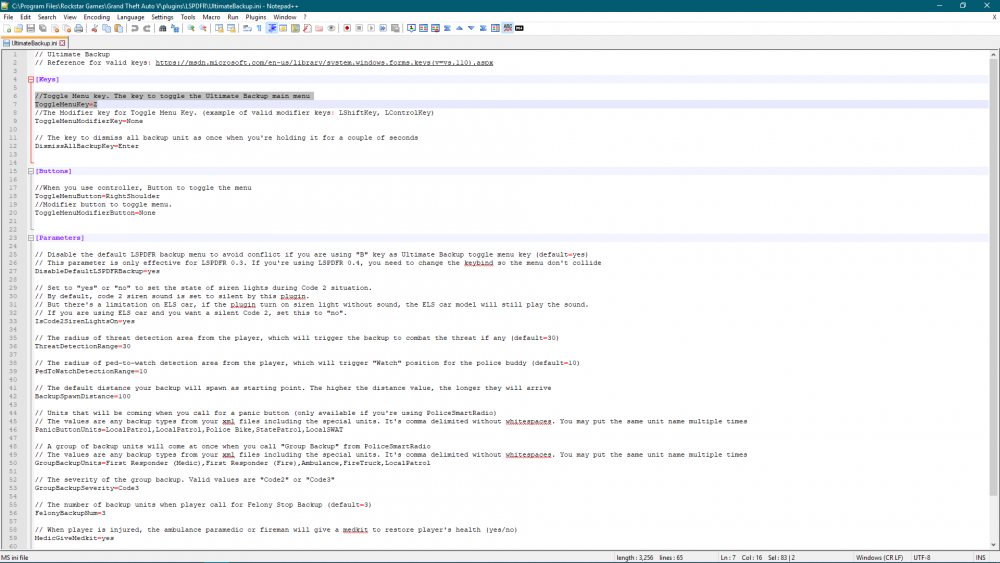
you have to change the button on there, go to Grand Theft Auto V>plugins>lspdfr Look for Ultimate Backup (ini file) Open it, change B to whatever.
-
Did you download Ultimate BAckup that uses the B button?
-
Upload the file from ScriptHookV (text document) and a screenshot of your gta directory, also the file from RagePluginHook (text document)
-
Its literally from a simple typo somewhere, make sure the spawn name(name in latest patchday where you installed the vehicle) matches the name you put in agency files make sure the vehicles meta and carvariations(if you have one) match the spawn name
-
scripthook is not required to run lspdfr with rage.
-
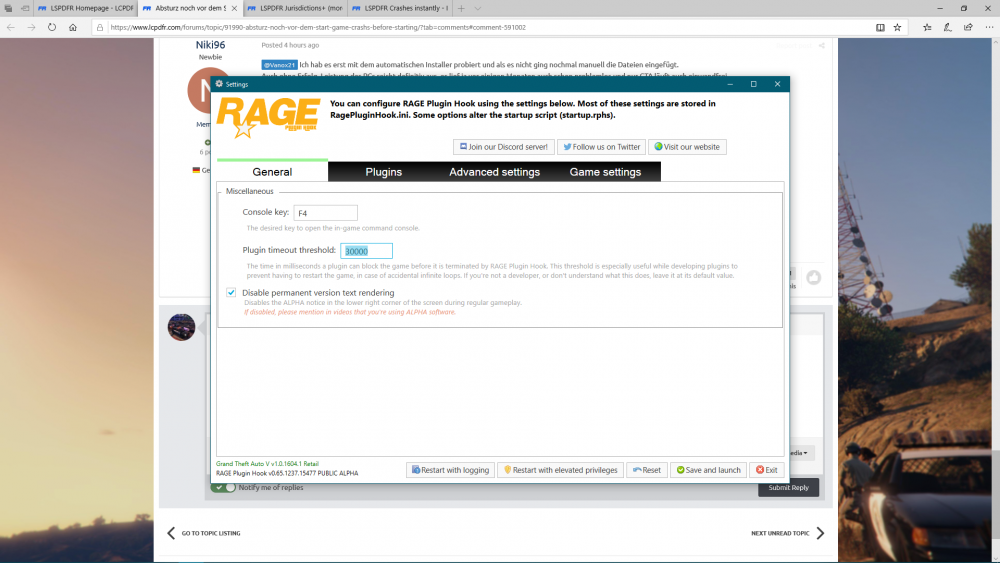
YOu need to set the threshold in rage settings to 30000 or higher
-
theres only 1 jurisdiction download https://www.lcpdfr.com/files/file/22139-lspdfr-jurisdictions-xmls-for-lspdfr-eup-and-ultimate-backup/
-
whatever vehicle you installed in the police slot is installed wrong
-
can I see the log
-
lol, the "police" one
-
Make sure you shared the whole log file, and try restarting your computer
-
what do you mean you think its fixed? DId you fix it? either fixed or not, does the game load?
-
Did you try installing something? Game isn't even close to loading in that log, you sure you copied it all? If you did you might want to try restarting
-
I was wrong if you seen that.
-
..
-
Start rage, press settings In the general tab set the threshold to 50000 and tick disable text rendering in the advanced setting make sure nothing is ticked in the game setting>command line switches make sure the only things ticked are directx11 and forced windowed mode.
-
post the stations file from lspdfr>data>stations
-
your welcome
-
yea I went to get food. WHats in the lspdfr file, share a screenshot



