


TreadRed
Members
-
Joined
-
Last visited
Everything posted by TreadRed
-
ok well you shouldn't crash from having offline mode disabled. LSPDFR syncs your ped up with this website, meaning you would need an internet connection and be able to access it. So that's possibly why you cannot load with a character. I guess for now we can try to keep offline mode on and disable character syncing, unless you would like this feature? It also tries to sync up with discord. go to lspdfr folder and edit your lspdfr.ini with these 2 lines. Networking.DisableServerCommunication = true Networking.DisableDiscordRichPresence = true
-
thanks that is it, Can you take screenshots of your gta directory please, log shows shit show for sure.
-
Ok you will have to share the ragepluginhook text document from your gta directory so we can take a look. Are you in a mission from offline mode in gta when you launch it normally, without rage?
-
According to your log your rage settings look fine. Can you run gta the regular way, without launching rage? If so, and all you installed was lspdfr, its more than likely going to be an antivirus issue, try making exceptions for rage and/or the gta folder. If the logo for the ragepluginhook.exe is not nice and colorful with Rockstar(or rage) logo, then the file itself was blocked when downloaded. It also could be nice and colorful and being blocked when you run it.
-
please post the ragepluginhook text document from your gta directory (ragepluginhook.log)
-
So that means somewhere down the line while installing stuff into the mods folder you made a mistake or installed something faulty, you will have to target that issue, or start a new mods folder.
-
Did you make any changes to the ini's for smartradio?
-
I would try configuring your rage settings as you currently have offline mode activated. I know the log says its crashing because of a vehicle but that does not make any sense, and this "offline" option is the only thing you have different from everyone else. When you open rage settings, under game setting tab, there should be nothing checked. Under advanced settings tab, for command line switches, you should only have directx11 checked. And under the general tab set the threshold to 60000. Hopefully this works out for ya, let us know!
-
in the simple trainer menu under options, you need to go to page 2 using 6 on the numpad, then find "keybindings" and disable them, and this shall fix your issue, have a great day!.
-
https://www.google.com/url?sa=t&rct=j&q=&esrc=s&source=web&cd=1&cad=rja&uact=8&ved=2ahUKEwjTzuHImIvnAhVDKawKHUtJDeEQFjAAegQICBAB&url=https%3A%2F%2Fwww.gta5-mods.com%2Fmisc%2Fgta-5-gameconfig-300-cars&usg=AOvVaw0x2l65KQBbzpptfNDiD7QE
-
Error while loading plugin E:\Games\Grand Theft Auto V\Plugins\CommonCallouts.dll. common callouts should be installed in E:\Games\Grand Theft Auto V\Plugins\lspdfr
-
 If you go into that vehicles vehicles.meta entry you can remove the tint by putting in this value 0x00FFFFFF
- 170 comments
- 11 reviews
-
-

- 1
-
-
yes because where </CustomRegion> is in your screenshot, should be </LosSantosCity>
- 170 comments
- 11 reviews
-
By the way there is already a Police Transport option in the defaultregions.xml, its at the bottom.
- 170 comments
- 11 reviews
-
-
-
They are already added and only show up in certain categories, code 2, code , 3, etc. You can enable the menu to you liking by going to grand theft Auto V>plugins>lspdfr>UltimateBackup>Specialsunits. In side this file you will see this first <SpecialUnit name="Police Bike" code2="True" code3="False" pursuit="True" traffic_stop="False" felony_stop="True"> and you can set each one to true or false for code 3 and such. So that's the first line you will see for police bike, the next special unit has a space between it
- 170 comments
- 11 reviews
-
-
You can also add PoliceTransport to the Customregions file to be able to choose zones.
- 170 comments
- 11 reviews
-
Yes but it will be a couple of days, you can use the defaultregions and specialunits from here, the customregions you will need to get from juri+ when its released
- 170 comments
- 11 reviews
-
.thumb.png.a39fb9822e8198111f7ba388089dd1a4.png) Those vehicle names are added by LPSDFR EUP Configurations download, not by his. Theres also an issue with the Blaine County agency from that download having RDE specified as the texture dictionary
Those vehicle names are added by LPSDFR EUP Configurations download, not by his. Theres also an issue with the Blaine County agency from that download having RDE specified as the texture dictionary -
 You can fix them paramedicks by downloading Emergency Uniforms Pack for Search and Rescue
- 263 comments
- 20 reviews
-
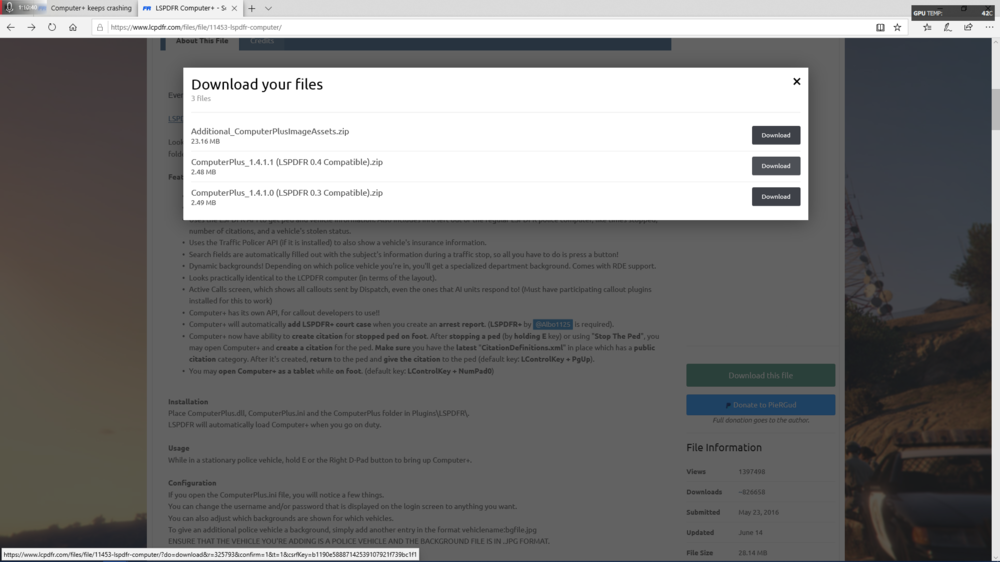
Its because you installed computer+ for the lspdfr .3 version, and not for .4. You have version 1.4.1.0, and need 1.4.1.1
-
LSPS has been opened sourced, anyone care to update it? https://github.com/Kompp/Los-Santos-Protection-Squad
-
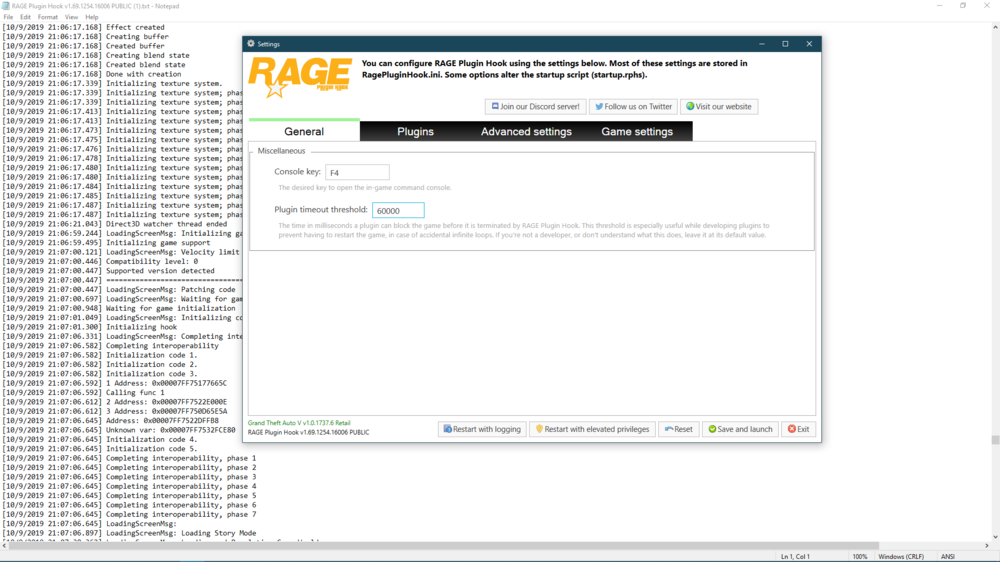
When you say start a patrol, do you mean load the plugin, or go on duty? If its starting the plugin you can try changing the threshold for rage settings to 60000, as the plugin is freezing when loading. Additionally you need some updates to the plugins for Bejoijo's stuff https://bejoijo256.wixsite.com/bejoijo And unrelated but will become an issue since you have jurisdiction+, you need to delete the agency_eup file from lspdfr>data>custom

.thumb.png.a39fb9822e8198111f7ba388089dd1a4.png)

