




UnknownBastion
Community Team
-
Joined
-
Last visited
Everything posted by UnknownBastion
-
No problem! 🙂
-
No problem! 🙂
-
Once you find the original in the path I listed, drag and drop it to desktop. Then follow the next path I listed and then drag and drop it back in.
-
Hello, So the couple of things you can try are: 1. Install VisualV. 2. Change the following lines in your visualsettings.dat (can be found in mods/update/update.rpf/common/data via OpenIV) car.defaultlight.day.emissive.on 1700.00 car.defaultlight.night.emissive.on 1100.00 Hope This Helps! 🙂
-
Hello, To get the original vehicles.meta, go here via OpenIV: update\update.rpf\common\data\levels\gta5 Then copy the file to your desktop. Next, go here: mods\update\update.rpf\common\data\levels\gta5 And drag and drop the original file from the desktop to there. The only thing you want to edit in the vehicles.meta is the handlingID. As for the audio changer, you could find the lines that need to be changed and replace them out with those specific lines in the meta. Hope This Helps! 🙂
-
And did you rename the mods folder like I asked and try again? Also, I would do what Charlie says as well.
-
Hello, Couple of things: 1. I wouldnt use Traffic Policer, it is outdated and Ultimate Backup does the same thing. 2. Show me where you installed Ultimate Backup and Yet Another Partner Mod. Thanks! 🙂
-
Hello, That is the incorrect log. The correct one is a txt file in your Main Directory and is either called RagePluginHook or RagePluginHook.log. Thanks! 🙂
-
Fair enough.
-
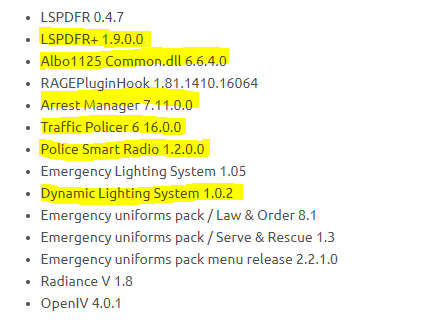
Hello, Below, the items in yellow are either outdated or potentially not needed. For Arrest Manager, Traffic Policer, and PSR, I suggest using Ultimate Backup and StopThePed instead. Those are updated and do all the same features. You also only need ELS or DLS. I recommend ELS. Hope This Helps! 🙂
-
Hello, Unfortunately, there is no crash message. What you can try doing is going into the CommandLine.txt and remove everything. Then add -windowed and then save and exit. Then try again. Thanks! 🙂
-
No problem! Glad I could assist! 🙂
-
Awesome!
-
Hmmm....weird. Try going to one of the PD stations in the game and going on-duty as LSPD there. Then see if the issue persists.
-
Okay. And what department are you playing as? And where did you go on-duty at?
-
Are you able to do anything else after that, or does nothing work? Also, what department are you playing as? And where did you go on-duty at?
-
Hello, I can tell you that several of those plugins are outdated. The outdated ones are: 1. Computer+ (Use alternative Compulite) 2. Traffic Policer. (However, the ini can be adjusted to make it correct.) 3. Arrest Manager 4. PoliceSmartRadio Hope This Helps! 🙂
-
Hello, So you are saying that after a couple of traffic stops, you are unable to pull people over? If so, please post your RPH Crash Log. Thanks! 🙂
-
Did you make sure to rename your mods to _mods? If so, and it still didnt work, screenshot your Main Directory. Thanks! 🙂
-
Most likely,it just looked a little stretched but it was probably just the upload. Idk. As for Game Warden, it just looks a little weird. Guess Im just not a fan of the wording.
-
Currently receiving help in our Discord. 🙂
-
Nope the log doesnt say anything. I was talking about the OpenAllInteriors and UltimateBackup not being installed.
-
Hmmm...alright....the only thing I can see is that maybe you are missing dependencies for UnitedCallouts. Requirements • LSPDFR 0.4.7 (or higher) • UltimateBackup (not a requirement) Download here • Open All Interiors (not a requirement) Download here • RagePluginHook 1.78 (or higher) Download here • A legal copy of GTA5 (Retail or Steam) Hope This Helps! 🙂
-
Hmm....alright....do you have any replace vehicles installed?
-
Hello, Try renaming your mods to _mods and see if the issue persists. Thanks! 🙂


