




UnknownBastion
Community Team
-
Joined
-
Last visited
Everything posted by UnknownBastion
-
Hello, That issue shouldn't really matter, but if you want to fix it you can go to your CommandLine.txt. From there, remove everything and then add -windowed and then save and exit. Then try launching. Hope This Helps! 🙂
-
I believe it is in the current version of LSPDFR. However, Im not exactly sure how to get it enabled more. The only thing I can think of is either the backup.xml or agency.xml. I believe it is the agency.xml so you might want to look around there.
-
Thats good. So do you have any more issues you need sorted?
-
Use the manual one. Download that, then drag and drop it into your Main Directory. Auto one can have issues sometimes.
-
Are you using the automatic download for LSPDFR?
-
Relatable. xD
-
No problem! Sorry that that was the best I could find...your crash message is very unique.
-
For the Jay Lagna.ls, try moving it to your desktop and then launching again and going on-duty. As for the above input string issue, you would just have to do process-of-elimination to find out which plugin is causing it.
-
Yeah, I asked around and they pointed out this line: [9/17/2020 8:16:12 PM.695] LSPD First Response: System.FormatException: Input string was not in a correct format. This indicated that either a setting or keybinding was made wrong. They also pointed this out: Failed to decrypt file:D:/SteamLibrary/steamapps/common/Grand Theft Auto V/lspdfr/chars/Jay Lagna.ls Im currently asking more about that second entry. Edit: for the Jay Lagna.ls, try moving it to your desktop and then launching again and going on-duty. As for the above input string issue, you would just have to do process-of-elimination to find out which plugin is causing it.
-
Hello, So apparently either a keybinding or settings was not inputted correctly. Did you mess with any of those recently? Thanks! 🙂
-
The log you sent says you didnt change the threshold. Also, can you screenshot the keys.ini for lspdfr? Thanks! 🙂
-
All good! 🙂
-
Hello, Try removing XScanner and see if it crashes. Since XScanner is outdated by a lot. Thanks! 🙂
-
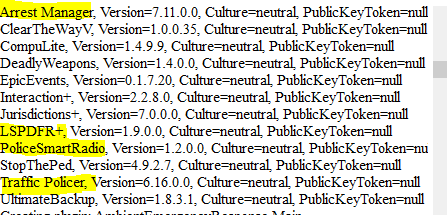
Hello, First, remove everything in yellow in the picture below as they are outdated. Second, you may want to change the Plugin Timeout Threshold in your RPH Settings Menu: How to access your Rage Settings Menu: => To access your RagePluginHook settings, hold Shift straight after launching RagePluginHook. => Alternatively, press the little silver cog icon when you see the RagePluginHook splash screen after launching. Changing Your Plugin Timeout Threshold: => In the first tab of the RPH Settings, find the bar titled "Plugin Timeout Threshold" and change it to 60,000. Thirdly, try going on-duty via the PD Station and see if it crashes. It isn't ideal to use ForceDuty with the newer version of LSPDFR. Hope This Helps! 🙂
-
Potentially....it would just be down to see on what side that would be integrated, Twitch or LSPDFR.
-
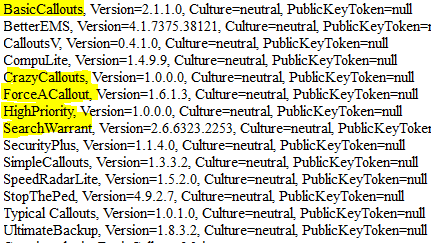
Hello, First, remove all the items in yellow below as they are outdated. Second, try going to the station to go on-duty and see if it crashes. Thanks! 🙂
-
No problem! 🙂
-
Not to my knowledge.
-
An option maybe would be nice. I just wonder how many streamers would use it and how certain names could be restricted. Possibly the requirement of donating to have your name added.
-
No problem! Glad to assist! 🙂
-
I honestly don't think so, since a lot of LSPDFR streamers look for realism over interaction with their community. The question is...who makes the filter? Twitch or the Plugin Dev? And even more, how would it work with a large audience?
-
Patchday20ng is not the most recent one, you should be using patchday22ng to install them. Hope This Helps! 🙂
-
I suggest going into the keys.ini in the lspdfr/data folder and changing the keybinding for opening the menu to None. Hope This Helps! 🙂
-
Please screenshot the entry you made in the dispatch.meta so that I can verify you did it correctly. Thanks! 🙂
-
Hello, Couple of things: 1. Try launching GTA 5 first and when the lights and sirens come on, tab out and launch RPH. 2. Make sure you have completed the Prologue up until the point where you can free-roam with Franklin. 3. Make sure you have your GTA 5 Main Directory added to the exceptions list for your anti-virus. Then try re-downloading and installing RPH. 4. Go into the CommandLine.txt in the Main Directory and remove everything and add -windowed and then save and exit. Then try launching. Hope This Helps! 🙂


