




UnknownBastion
Community Team
-
Joined
-
Last visited
Everything posted by UnknownBastion
-
No problem! Happy to help! 🙂
-
No problem! Always happy to help new people! 🙂
-
Show me where you installed it. Also, go into OpenIV and go to Tools and then ASI Manager and screenshot the window that opens. Thanks! 🙂
-
If you look in the xml for Ultimate Backup, there is a string you need that has to do with Liveries. That is what you use to add specific liveries. Its formatted just like the VehicleModels string you posted above.
-
Hello, Remove the following: 1. Code Red Callouts 2. Assorted Callouts 3. Arrest Manager 4. Traffic Policer Then retry. Thanks! 🙂
-
Is it a game crash?
-
.png.15177f0003222bf762c10cbcdbb545a9.png) Ah okay. That is what I thought. Super cool screenshot! 🙂
Ah okay. That is what I thought. Super cool screenshot! 🙂 -
No problem! Glad I could help! 🙂
-
Send the log again.
-
No problem! Glad to assist! 🙂
-
Yes.
-
Try just inside the lspdfr folder.
-
Sweet! Glad I could help! 🙂
-
Its in lspdfr/data.
-
Hello, Go into your lspdfr.ini and add this line: Ambient.DisableAmbientGameCopSpawnBlock = true Then save and exit and try again. Hope This Helps! 🙂
-
Hello, Oh boy, have I got a lot for you, so hold on tight! Remove the stuff in red beneath. Outdated. Also, go into your CommandLine.txt in the Main Directory and remove everything and add -windowed and then save and exit. Also also, do this: How to access your Rage Settings Menu: => To access your RagePluginHook settings, hold Shift straight after launching RagePluginHook. => Alternatively, press the little silver cog icon when you see the RagePluginHook splash screen after launching. Changing Your Plugin Timeout Threshold: => In the first tab of the RPH Settings, find the bar titled "Plugin Timeout Threshold" and change it to 60,000. Hope This Helps! 🙂
-
Hello, That is the incorrect log. The correct one can be found in the Main Directory and is a txt file called either RagePluginHook or RagePluginHook.log. Please upload the file and not just copy and paste the text. Thanks! 🙂
-
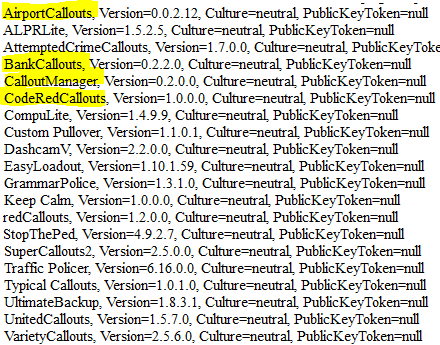
Hello, Couple of things. First, is it a game crash or LSPDFR crash? Your title says game but paragraph says lspdfr. Also, remove the things listed below in yellow. They are outdated. Thanks! 🙂
-
Love that! Reminder me, is that an addon or a pre-existing plane?
-
All good! 🙂
-
Okay. And where did you install the vehicles to?
-
Hello, Go into OpenIV and go to Tools and then ASI Manager and screenshot what opens. Thanks! 🙂
-
Hello, Make sure to add the GTA 5 Main Directory to the exceptions list in your anti-virus and then re-install RPH. Thanks! 🙂
-
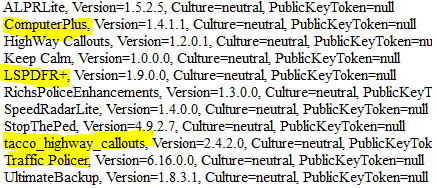
Hello, So, you have some outdated callouts and plugins, they are listed below in yellow. Also, does the crash happen when you launch GTA 5 normally? Thanks!
-
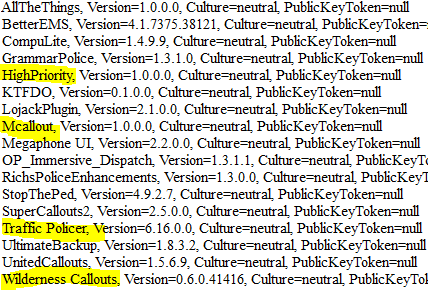
Hello, First, welcome to the forum! Hope you enjoy your stay! Second, remove the Plugins in yellow below as they are outdated. Then try again. Thanks! 🙂


.png.15177f0003222bf762c10cbcdbb545a9.png)
