




Everything posted by Yasd
-
Post the Ragepluginhook.log from the main gta folder
-
Hello! you have a mods folder issue, therefore rename the mods folder to _mods
-
Automatic Siren Cutout is no longer maintained. You can still keep it as long as you dont have problems 👍🏽
-
Pls post the Ragepluginhook.log from the main gta folder right after this problem occurs. @Charlie686
-
A ped became invalid. There is nothing on your side that you can do.
-
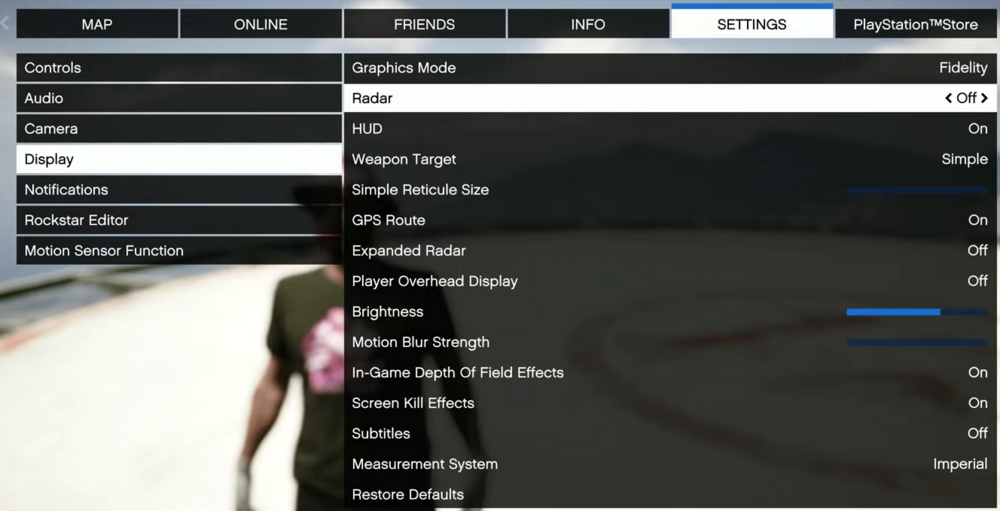
At least for the map you can hide it, adjustable under: settings - display - radar - off
-
You need to be careful when using GameFiber.Wait(), because what you are doing is pausing the whole lspdfr plugin. When pressing End while the plugin is frozen/ paused, it won't end.
-
This topic has been moved to the appropriate forum. Please post in the correct location in the future.
-
Pls remove AssortedCallouts, ComputerPlus & TrafficPolicer, those are outdated & caused the crash. You can either use the versions updated by Aschtar or use plugins that are up-to-date and have the same features. ComputerPlus -> CompuLite AssortedCallouts -> any other callout pack, f.e. SuperCallouts, 686Callouts, MCCallouts, YobbinCallouts etc. TrafficPolicer -> StopThePed, already installed
-
You need to verify your gta files and for lspdfr download the latest version and replace all files.
-
You need to update both gta & lspdfr to the newest versions.
-
This is the working link: https://www.microsoft.com/en-US/download/details.aspx?id=26999
-
Download the latest version of SuperCallouts and replace all files. PyroCommon.dll has to be in the main gta folder.
-
You have to set it to 0.0f, not 0 or 0.0, the f is important.
-
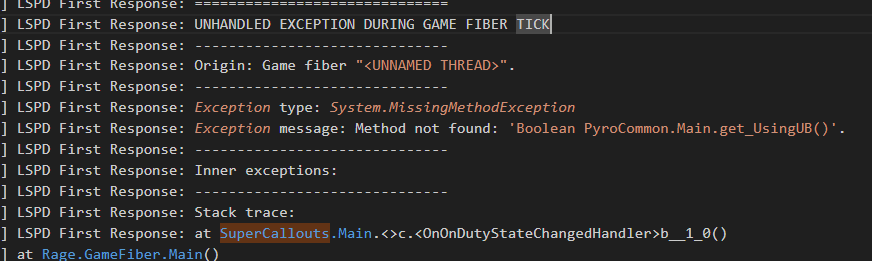
its an error from SuperCallouts, you propably deleted a bool in the .ini or set it wrong. if you're unsure, just reinstall the plugin SuperCallouts, make sure to update it to the newest version 3.9.6.0 ->
-
Failed to parse value for WorldEvents.IntervalMultiplier to disable world events, set it to 0.0f in the lspdfr.ini Your topic has been moved to LSPDFR 0.4 Support. Please post in the correct location in the future.
-
You're missing IPT.common from CalloutInterface Requested value '-' was not found. You have set a minus in PoliceSmartRadio where it shouldn't be. I recommend to remove the plugin anyway, since its outdated & may cause crashes, the same with TrafficPolicer
-
Einfach vorher ein Backup machen
-
Post the log again
-
SIeht mir nach mods Ordner aus einfach mods ordner zu _mods umbenennen
-
Looks like an issue with the audio files, have you changed anything there? Otherwise I would reinstall the audio folder. Go to the lspdfr download & open the lspdfr/audio, replace that file in gtav/lspdfr/audio
-
Start from scratch or disable some of your vehicles
-
Install/ replace RageNativeUI in the main gta folder. https://github.com/alexguirre/RAGENativeUI/releases PoliceSmartRadio & Traffic Policer are outdated, remove or replace them from this site: https://github.com/Aschtar?tab=repositories
-
Are you sure you renamed the mods folder to _mods? Do you use LennysModsLoader? Have you modded your game files without an mods folder?
-
Install the nightly ScripthookVDotNet.asi, otherwise remove it.





