Yasd
Community Team
-
Joined
-
Last visited
Everything posted by Yasd
-
I dont have that problem. Try to remove all STopthePed related and reinstall.
-
You dont have the lastest version of RPH. No crash in your log. Go into the Rage Settings -> Game Settings -> Command Line Switches. Look for "Force Windowed mode." Check it. Then, reinstall DirectX & restart your Computer after. If you use some kind of visual mod, delete it. Also, remove your GPU driver (nVidia or Radeon) and do a clean reinstall. That usually works.
-
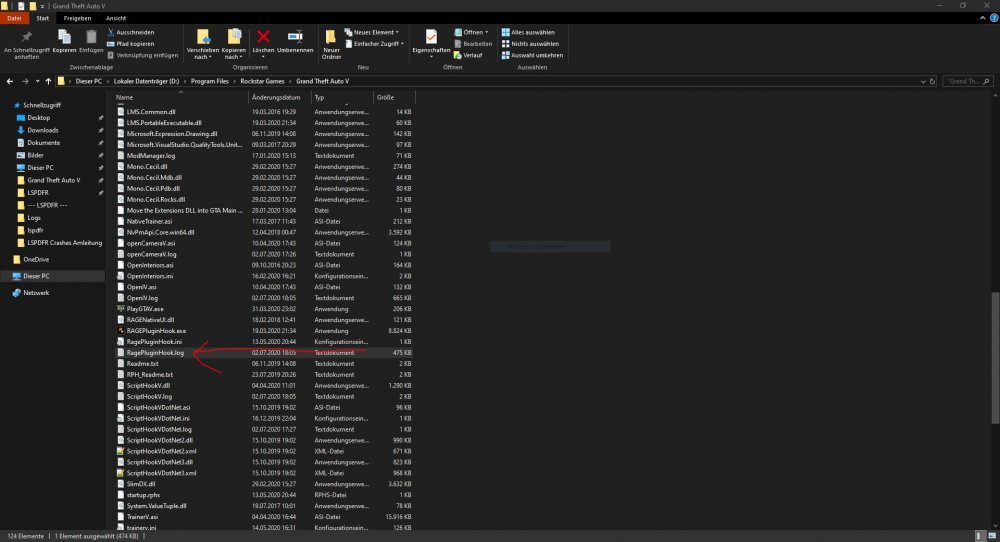
Its in the main directory called "Ragepluginhook.log".
-
This function comes with UltimateBackup. You can try to edit or replace the audio file. But good luck finding it 😄
-
Its actually Ctrl + P
-
When using LSPDFR ambient chase, you have to hold B till the pursuit gets called in. Then you also have the option to call backup for your pursuit
-
Method not found: 'Void Stealth.Common.Natives.Functions.CallByHash(UInt64, Rage.Native.NativeArgument[])'. Do you have KeepCalm installed? Remove that.
-
Problem mit SmartRadio, man kann die Fehlermeldung nur halb lesen. Poste dein Ragepluginhook.log. Entweder du entfernst SmartRadio oder du willst das Problem lösen.
-
es geht nicht
-
Heutige Jugend + netter Vater. Kann geschlossen werden.
-
@UnerlaubtHD er hat gefragt ob ihm jemand helfen kann, und nicht, ob er dir helfen kann...
-
Jemand stellt eine Frage, du gibst ihm ne Antwort und fragst ob er dir mit den Autos helfen kann... -.- .-. Das ist normal
-
Es gibt auf der offiziellen Seite keine Möglichkeit, eine alte LSPDFR Version herunterzuladen. Du kannst deine Ragepluginhook.log posten.
-
Poste dein Ragepluginhook.logich helfe dir poste ragepluginhook.logankoppeln automatisch und abkoppeln mit hfinds raus... es ist standardmäßig E... du brauchst stoptheped... dann dein stp menu öffnen und coroner anfordern...Remove LSPDFR+.i got that problem, too. but i successfully disabled it in the lspdfr.ini. just copy and paste it. Main.PreloadAllModels = false Networking.DisableServerCommunication = false Networking.DisableDiscordRichPresence = false Main.DisableAmbientScriptHooks = True AmbientSpawn.MaxCopsInArea = 0 WorldEvents.IntervalMultiplier = 0.0f WorldEvents.MaxNumberOfEvents = 0 Callouts.Multiplier = 250 Chase.CopsCanCommandeerVehicles = false Callouts.DisableBigRadar = false Ambient.DisableAmbientGameCopSpawnBlock = true Chase.DisableTrafficDensityAdjustments = true Chase.ExhaustionInterval = 25000 Chase.ExhaustionDuration = 30000 AmbientSpawn.DisableRandomUnits = true Chase.DisableAmbientAI = true PoliceStation.DisableAmbientSpawn = true Ambient.DisablePlayerFlashlightOverride = True Ambient.DisableEscapedSuspectEncounter = true Main.DisableGameBlipHiding = true AmbientSpawn.DisableRandomUnits=true I think the fat ones are the ones for disabling ambient spawns. If its not working just copy and paste everything.remove the plugins, so you can make sure its not the plugins. there is no error in your log.Could not load type 'System.ValueTuple`2' from assembly 'mscorlib, Version=4.0.0.0, Culture=neutral, PublicKeyToken=b77a5c561934e089'. maybe wrong file name? i have a file called System.ValueTuple without ´2 !!Hast du das alles installiert?