




Yasd
Community Team
-
Joined
-
Last visited
Everything posted by Yasd
-
Ergänzend gesagt, das Abseilen funktioniert nicht während einer Verfolgungsjagd (erkannbar an der blau-rot blinkenden Minimap), nur über UltimateBackup und Anforderung Code 3.
-
Ich stimme @Vielfaltzu, alternativ kannst Du in der StopThePed.ini das sogenannte RealisticWeapons ausschalten, dann bekommst du die NOOSE Waffen (wenn Du sie auswählst, sowie von @BetterCallSaul beschrieben) und der giveweapon Command funktioniert auch über die Konsole.
-
Hallo, du hast die folgende Fehlermeldung: WARNING! Plugin "LSPD First Response" was terminated because it caused the game to freeze (Freeze was caused by game fiber: Console Command Fiber For "ForceDuty"). Das ist ein 0815 Problem und steht in jedem FAQ. Lösung ist die Ladezeit auf 60000 (maximal) zu stellen. Zum Thema Fehlersuche: Im Log ganz unten, wenn ein Crash aufgetreten ist, ist dort eine Fehlermeldung zu finden, sowie auch hier der Fall.
-
So what exactly is that error? In your log there is no error.
-
Pls post your new Ragepluginhook.log!
-
Yeah i know, i play LSPDFR for years now and i dont't know why it is like that.
-
Please post your new Ragepluginhook.log again!
-
Windows brings an antivirus onboard. Tutorial how to add an exception: https://support.microsoft.com/en-us/windows/add-an-exclusion-to-windows-security-811816c0-4dfd-af4a-47e4-c301afe13b26
-
There is a difference between Standalone-Plugins and Plugins like Callouts. Standalone-Plugins are placed under C:\Program Files\Rockstar Games\Grand Theft Auto V\Plugins. Plugins like Callouts are placed under C:\Program Files\Rockstar Games\Grand Theft Auto V\Plugins\LSPDFR. This is not that hard, Youtube Tutorials are available for everybody for free...🤩
-
Remove BasicParkingTickets. Check if you have RageNativeUI.
-
Thats normal... it is like that.
-
Post your Ragepluginhook.log ...
-
Post your Ragepluginhook.log ...
-
First, set the plugin timeout to max -> 60000 Second, add an exception in your antivirus, if this does not help, also in firewall.
-
Überprüf mal, ob du die Datei Albo1125.Common im Hauptverzeichnis installiert hast.
-
I have this bug when I join random lspdfr events, i cant arrest the suspect/s.
-
post your ragepluginhook.log
-
You need to add an exception to your antivirus / windows defender. if that does not help, deactivate firewall
-
Oha, richtiges insider wissen, props
-
Dieser Anzeige Bug mit Taste Z zum Annehmen habe ich auch, warum ist das so?
-
So you cant just hit yes or no to continue?
-
Welches Fahrzeug hast du installiert? Und unter welchem Dateipfad? Meistens ist eine Readme Datei dabei, da steht unter welchem Dateipfad du die installieren musst.
-
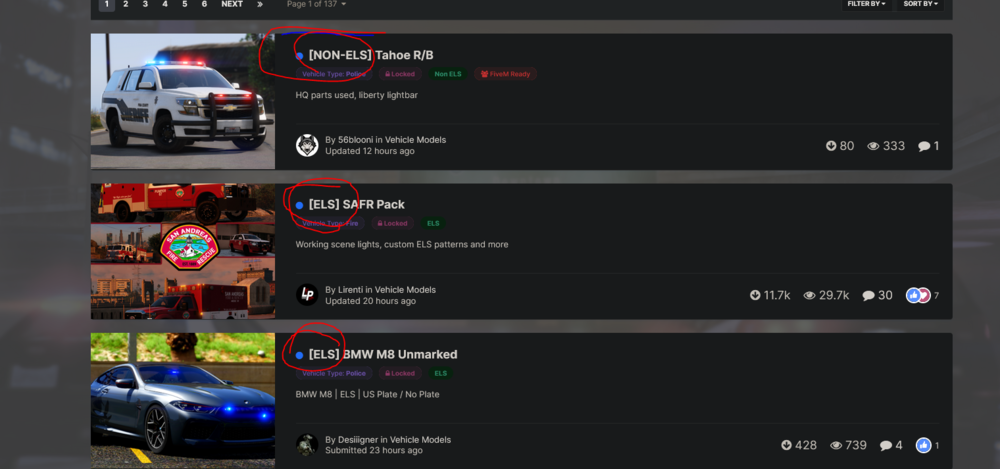
Die Fahrzeuge müssen auch ELS-kompatibel sein, das steht immer dabei!
-
Poste dein Ragepluginhook.log.
-
Versuche, deinen PC neuzustarten und mach eine Ausnahme bei deinem Antivirenprogramm, falls das nix hilft, Windows Defender deaktivieren.



