




Yasd
Community Team
-
Joined
-
Last visited
-
Currently
Viewing Topic: Entering the "Locker Rooms" isn't working
Everything posted by Yasd
-
yes
-
post your ragepluginhook.log and your stoptheped.ini
-
yes
-
you need to update to the newest gta and lspdfr version, last included newest rph.
-
https://de.gta5-mods.com/scripts/watch-your-death
-
To open the "pat Down" menu, you double tab "E" by default, to open the menu with no one nearby, you hit the "G" button, also configure-able in the .ini From the Stoptheped.ini // Main Key of this plugin. You have to PRESS IT TWICE to stop the ped StopPedKey=E StopPedModifierKey=None // Key to open the Context Menu for Peds and Vehicles ContextMenuKey=G ContextMenuModifierKey=None
-
You installed the Callouts -> CountyCalls RegularCallouts StopThePed Ultimate Backup ->wrong they belong to GTAV/Plugins/LSPDFR Pls post your Ragepluginhook.log from the main gta folder.
-
Post your Ragepluginhook.log from main gta folder and a screenshot of the error messages.
-
Your game is at an older version as your scripthook or the other way around.
-
Update RageNativeUI.
-
Simply update RageNativeUI. Thats the reason for the crash, also update StopThePed.
-
have you installed openinteriors? look at the plugin page for the requirements.
-
you have an error in your lspdfr.ini for: WorldEvents.IntervalMultiplier
-
Update LSPDFR.
-
update ultimatebackup. no crash in your log.
-
english forum! Most users have been able to remove the error by switching the in-game DirectX version to 10 or 10.1.
-
-
-
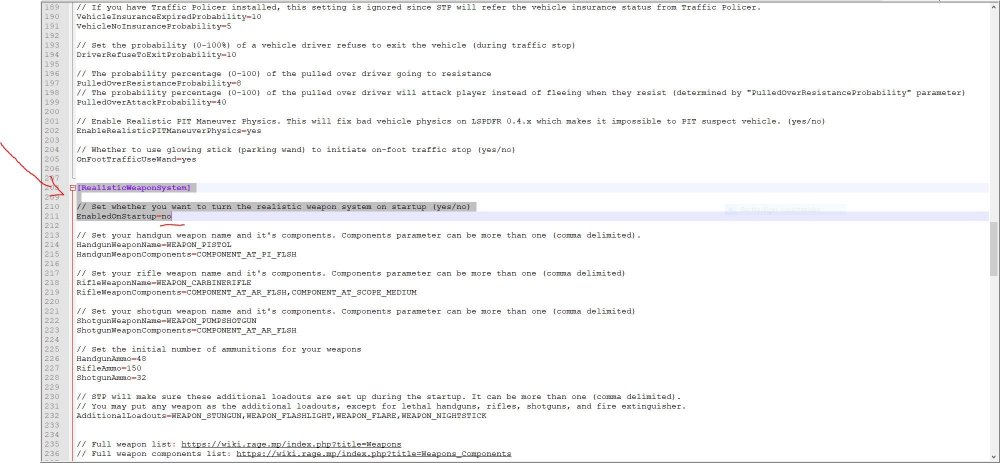
go to C:\Program Files\Rockstar Games\Grand Theft Auto V\plugins\LSPDFR and open StopThePed.ini search for realisticweaponsystem; and make sure -> EnabledonStartup=no Ready!!😄👍🏽
-
go to gta main folder -> right click -> properties -> and make sure all hooks are there.

-
Your game crashes to: Failed to decrypt file:lspdfr/chars/Ricardo Crutchfield.ls Maybe remove that file temporarily.
-
Update RageNativeUI.
-
You need to be at a certain point from missions to play lspdfr without problems. I recommend to install a 100% savegame https://de.gta5-mods.com/misc/100-save-game
-
english forum, english language post your ragepluginhook.log.
-
i dont know how you meant that, but you do not have it installed.



