




Yasd
Community Team
-
Joined
-
Last visited
-
Currently
Viewing Topic: Content available for LSPDFR Enhanced
Everything posted by Yasd
-
post your ragepluginhook.log from the main gta folder👍🏽
-
https://de.gta5-mods.com/misc/100-save-game To play LSPDFR, you need to be at a minimum mission. Install that savegame. Чтобы играть в LSPDFR, вам нужно выполнить минимальную миссию. Установите это сохранение.
-
with reinstall i meant Microsoft .NET Framework 4.6.2 Runtime, or higher. Microsoft Visual C++ 2010 SP1 Redistributable Package (x64) Visual C++ Redistributable for Visual Studio 2015 (x64) as i said, Im not familiar with that error, so sorry.
-
what exactly is the problem now? the lights on the vehicles are not working? or the console for els is not opening?
-
rename mods folder to _mods
-
post your ragepluginhook.log from the main gta folder.👍🏽🥰
-
do you have scripthookv installed? its a requirement to run els. https://www.dev-c.com/gtav/scripthookv/
-
the error says reinstall, try that. Im not familiar with that error, so sorry.
-
You have to remove ComputerPlus and Traffic Policer, they are outdated and might crash your game. Simply rename gtav/plugins/lspdfr to _lspdfr, so no callouts are loaded and try again.
-
post your whole ragepluginhook.log Cannot load an invalid weapon asset Rage.WeaponAsset.LoadAndWait Rage.PedInventory.GiveFlashlight have you changed anything in your weapons loadout?
-
reinstall els then start gta and test it otherwise post asiloader.log again
-
Lets start with the basics. To run Ragepluginhook, you need requirements. Requirements for regular users A legal copy of Grand Theft Auto V or other supported game. Either of the following operating systems: Windows 7 with Service Pack 1 Windows 8 Windows 8.1 Windows 10 Microsoft .NET Framework 4.6.2 Runtime, or higher. Microsoft Visual C++ 2010 SP1 Redistributable Package (x64) Visual C++ Redistributable for Visual Studio 2015 (x64)
-
Update RageNativeUI. https://github.com/alexguirre/RAGENativeUI/releases
-
LSPD First Response: Max Callout Distance: 2000 you might extend this to 20000 f.e., this might be the reason, that the callouts are further away and get canceled.
-
Install RageNativeUI. https://github.com/alexguirre/RAGENativeUI/releases
-
wrong file. post your ragepluginhook.log from the main gta folder
-
post your ragepluginhook.log from the main folder.
-
ok, good. i wonder everytime a callout comes in, the log tells another callout is running and aborts it. i dont know how to help other than you might make a video ingame, where you go to a police station and try to go on duty.
-
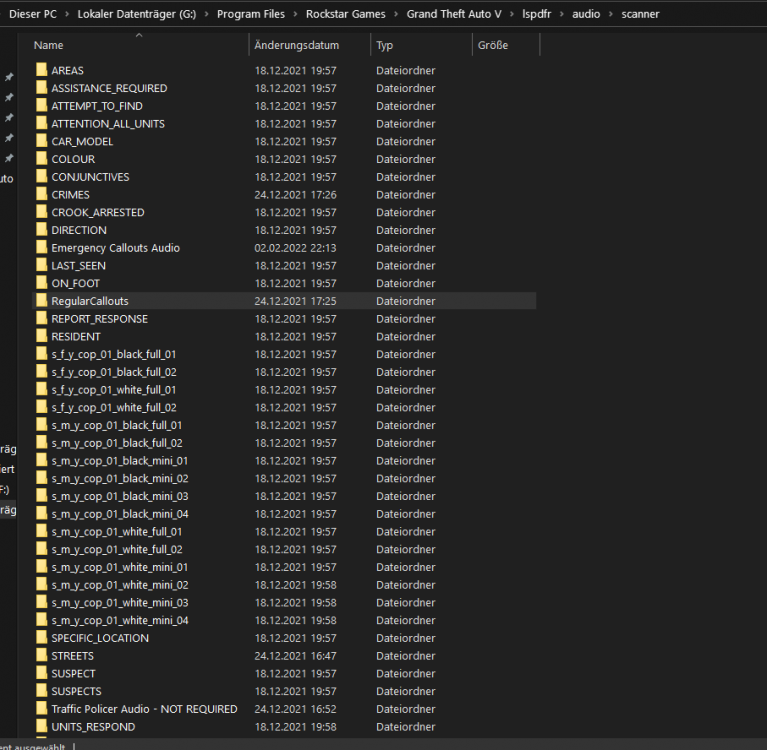
D:/SteamLibrary/steamapps/common/Grand Theft Auto V/lspdfr/data/custom/stations_sahp.xml Have you changed anything in that file? it caused the game to crash.pls add the whole gta folder as an exception in antivirus. if you have an antivirus installed, add it there, if not, add it to default win antivirus, tutorial: https://support.microsoft.com/en-us/windows/add-an-exclusion-to-windows-security-811816c0-4dfd-af4a-47e4-c301afe13b26Only the plugins in the folder GTAV/plugins appear, so what you see, is correct.Reading your log, its always the same: Callout came in; Error message, that the audio file is not found StartCallout: There's already a callout running. Aborting... LSPD First Response: EndCurrentCallout: Finishing... First lets check if audio files are there: Open and check: G:\Program Files\Rockstar Games\Grand Theft Auto V\lspdfr\audio\scanner
 Speed Radar Lite might have thisLooks like you know what you are talking about. Pls take my job supporting, i dont know what im talking about💘 That actually hurt a bit. Lets make love not war 😍


