




Yasd
Community Team
-
Joined
-
Last visited
Everything posted by Yasd
-
try to temporarily remove all files out if \Grand Theft Auto V\lspdfr\chars If you start gta alone without lspdfr, are you spawning at the same location? At this location, is there a little story mods sequence or sth? That always causes problems.
-
Could this be a problem with LSPDFR sync @Cyan?
-
Hello, the latest Ragepluginhook comes with the latest LSPDFR download. Only use the RPH version that comes with that, the RPH version on the official RPH website is outdated!
-
Gta doesn’t touch the mods folder when "updating" or with other words -verify Can you post the file commandline.txt and ragepluginhook.log from the main gta folder? And also a screenshot of the path from that file in openiv?
-
I guess the vest is conflicting with clothes that are beneath it. maybe make the vest bigger or remove the tshirt … Just a guess
-
-
What exactly does vfs.dll do?
-
 Hi, to the barricated suspects callout: after the bomb explodes, is there even a way out of the building? i have never ever found a way out?
- 83 comments
- 6 reviews
-
- rph
- lspdfr callout
- legacy
- rph
-
Tagged with:
-
Post your ragepluginhook.log from the main gta folder, the file name should be exactly like this.
-
To further help you you can post a screenshot of that box or better a video, driving on duty with a police vehicle trying to catch speeders. Maybe it’s just a setting mistake.Can you post a screenshot of that error? can you please post your ragepluginhook.log from the main gta folder, too?Looks like this check is from coastal calloutsDo you get any message? Or just Desktop crash?Validating dependency: RageNativeUI [10/12/2022 11:28:32 PM.040] LSPD First Response: File "RageNativeUI.dll" exists: True [10/12/2022 11:28:32 PM.041] LSPD First Response: Version was not at least 1.8.2, found 1.8.1 [10/12/2022 11:28:32 PM.041] LSPD First Response: Found problems: dependency RageNativeUI (RageNativeUI.dll) The ragenativecrash only appears with version 1.6…? @ DarkvyperMaybe post a screenshot of the main directory, els folder and inside the packdefault folder, I’m not giving up on you😝So you have installed ELS.asi, ELS.ini, the ELS folder, and AdvancedHookV.dll inside your main GTA V game directory. you have installed scripthookv and dinput8 in the main directory you have reinstalled asiloader from openiv and then restarted your pcto load your scripts folder you need the ScriptHookVDotNet1,2,3, do you have that in the main directory? There are also logs from ScripthookVDotNet, if you might wanna post them. if you have updated the mods folder: Things you will loose: any changes to .meta files, any changes to visualsettings.dat (includes Radiance V and better brighter ELS, and graphic mods), Gameconfig, changes to dlclist.xml. Now to use your add on folders you will need to add the lines to dlclist.xml again (Yes even for EUP and SUP) <Item>dlcpacks:/name of the dlc folder/</Item> and add a custom gameconfig.xml. Your game should probably work at this point but you will need to edit/replace your metas again if you were using custom ones previously (vehicle.meta, handling.meta, carvariation.meta, weapons.meta) . This is from the LSPDFR-TS server. for your mods folder: you need the new gameconfig, heap adjuster, packfile limit adjuster everyting in mods /update/update.rpf is gone after the mods folder update!Open OpenIV, go to the ASI loaders, uninstall them, close OpenIV, Open OpenIV again, go to the ASI loaders, then install them again, close OpenIV, then restart the computer. Follow those steps. fromYou have many outdated and incompatible callouts, remove them: AirportCallouts AssortedCallouts BetterEMS CalloutManager CodeRedCallouts ComputerPlus CrazyCallouts GangCallouts HighProrityCallouts MetroCallouts3 WildernessCallouts you can’t just install any callouts and then wonder yourself why it isn’t working. On every plug-in site there is a date when it was last updated and for which lspdfr version it’s compatible. It has to be updated in 2021 or 2022 and minimum compatible to lspdfr 0.4.7.In your log there is a crash because of outdated ragenativeui. I guess you already fixed it by updating it. have you installed scripthookv and dinput8.dll, that comes with it?Have you installed these? Have you installed a gameconfig heap adjuster and packfile limit adjuster?
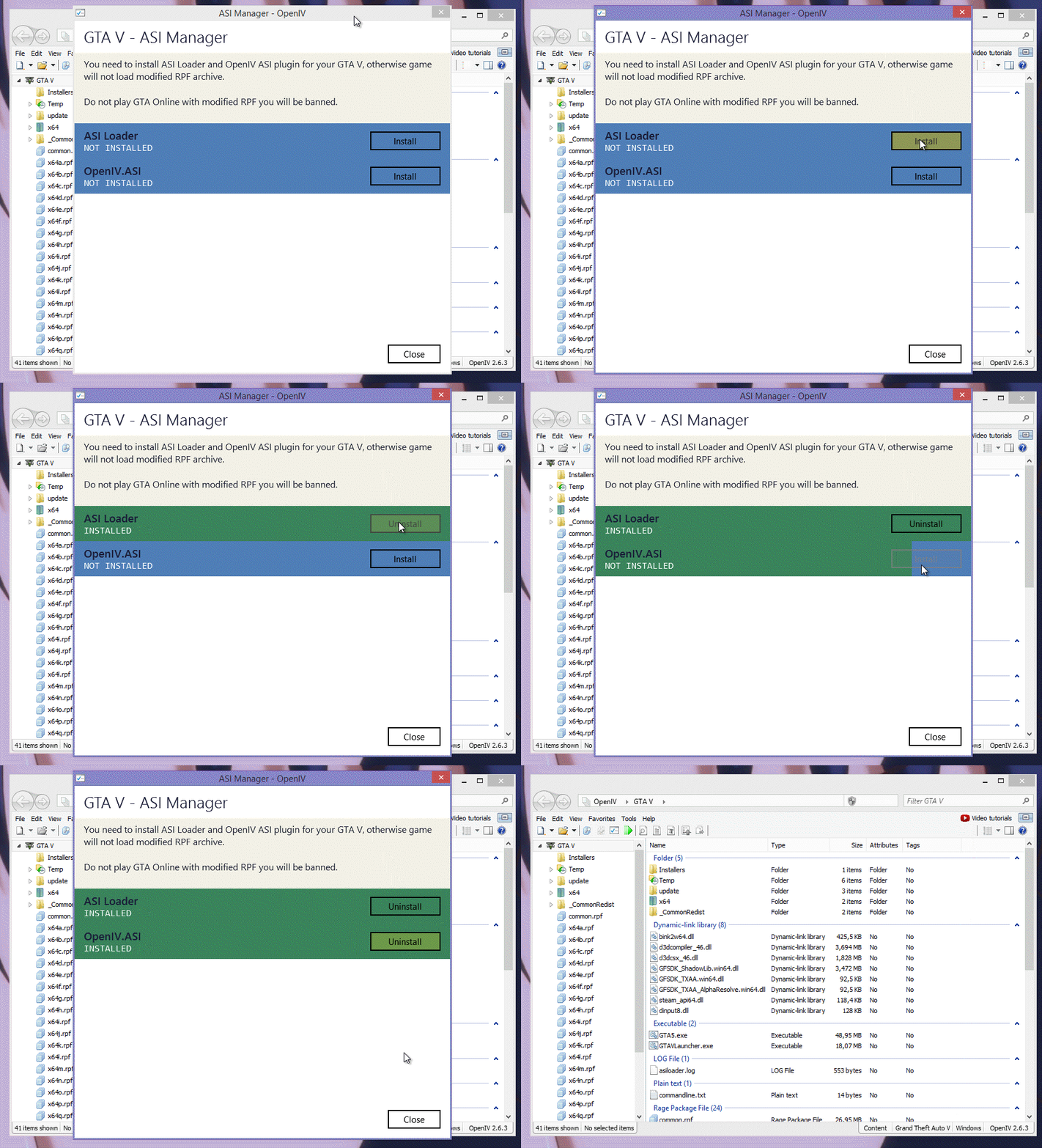 Have you added a new file for the vehicle in the dlclist.xml file?Disable disable the autoload of lspdfr in the rph settings. Try to start gta first, as soon as you are ingame start rph and then manually load lspdfr.Post the ragepluginhook.log again pls👍


