




Yasd
Community Team
-
Joined
-
Last visited
Everything posted by Yasd
-
Remove scripthookv to disable all .asi files Test it again If it's still spawning remove all Scripthookvdotnet files and try again (this disables all scripts in the scripts folder)
-
You must have only one folder, pls delete the other one
-
Ok, pls remove TrainerV temporarily and check if the adder still spawns.
-
wird bereits im anderen thread beantwortet...
-
Installiere / update ragenativeui im gta hauptordner: https://github.com/alexguirre/RAGENativeUI/releases
-
those are the reuqirenments: https://ragepluginhook.net/Requirements.aspx
-
thats the only option i can give you.
-
Rename mods folder to _mods and update Ragenativeui in the main gta folder https://github.com/alexguirre/RAGENativeUI/releases
-
Error while hiding ambient game blips Disable ambient events, by adding those lines to your lspdfr.ini: Main.DisableGameBlipHiding = true
-
Easy Hook comes with LSPDFR, pls reinstall it
-
Pls post the log again
-
By the way, the author (A Stranger) updated the links, theyre working now.
-
Yeah, youre right, here are working links: https://ragepluginhook.net/Requirements.aspx
-
Hi there! Seems like you have an outdated RageNativeUI, update it in the main gta folder! https://github.com/alexguirre/RAGENativeUI/releases Hope it had helped! 😉
-
Exception message: Type 'SlimDX.Result' in Assembly 'SlimDX, Version=4.0.13.43, Culture=neutral, PublicKeyToken=b1b0c32fd1ffe4f9' is not marked as serializable. You still have the SlimDX error, I only can pass on the above linked faq.
-
Exception message: Could not load file or assembly 'Newtonsoft.Json, Version=13.0.0.0 [Section136Callouts] Installed version of dependency Newtonsoft.Json.dll is not expected. Expected version: 13.0.0.0. Actual version: 6.0.4.17603. The pack will most likely run fine, but do expect the odd bug and/or issue with using unexpected versions. Take the Newtonsoft.json from Section136Callouts, its requiring a newer version which comes with that.
-
I'd like to add CalloutManager is outdated, so pls remove it.
-
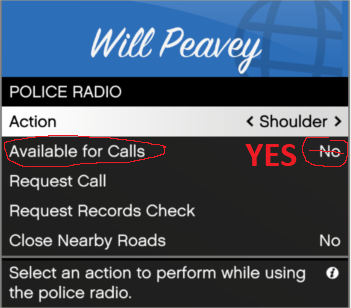
Hi! Zu deinem unter die Map durchfallen Problem: Einen direkten Fix kann ich dir nicht geben, aber ein Umgehen. Wenn du mit deinem LSPDFR Character geladen bist, kannst Du M drücken für das LSPDFR Menü. Da kann man irgendwo den Spawnpunkt einstellen, wenn Du ins Spiel kommst. Hier würde sich natürlich eine Polizeistation anbieten. Zu dem Problem mit ForceDuty kann ich dir helfen. Starte LSPDFR und versuche on Duty zu gehen (das allererste Mal MUSST du on duty über eine Polizeistation gehen, nicht mit FORCEDUTY!); danach musst du sicher stellen (siehe Bild), dass du Einsätze empfängst. Du kommst dorthin mit M -> Police Radio -> Available for calls -> auf "Yes" stellen! Wenn Du Probleme hast, poste dein Ragepluginhook.log, das kann ich mir mal ansehen.
-
Pls remove CalloutManager, its outdated and causes problems. A "Callout Manager" is included in Grammar Police Callout Interface, which you can install. Your crash: Exception message: Type 'SlimDX.Result' [...] is not marked as serializable. Pls read the faq article, it describes the error: https://docs.google.com/document/d/1Hp2Qco0qsgKfohkhjYWUxTr2OF7NSCkp8uSZwWz6rRQ/edit#heading=h.ga53kl28476
-
Ok, 1. the crash says sth with the key "UP" is not valid & it came from PoliceSmartRadio. Have you changed a key in the .ini? 2. You are using outdated plugins, those would be: PoliceSmartRadio & TrafficPolicer A user named Aschtar updated them and made them compatible, pls install those versions: https://github.com/Aschtar?tab=repositories
-
-
https://docs.google.com/document/d/1Hp2Qco0qsgKfohkhjYWUxTr2OF7NSCkp8uSZwWz6rRQ/edit?pli=1
-
Benutzt du LML (Lennys mod loader)? Wenn ja, vfs.dll in _vfs.dll umbenennen Was du auch probieren kannst: Den Automatik Lademodus von LSPDFR deaktivieren, indem du in PRH den Hkaen herausmachst. Starte nur GTA und sobald du im Spiel bist, RPH starten und LSPDFR laden. Checke auch das FAQ ab Seite 3 ab: https://docs.google.com/document/d/1Hp2Qco0qsgKfohkhjYWUxTr2OF7NSCkp8uSZwWz6rRQ/edit?pli=1 In den ersten Seiten, die ich dir raten würde, wird beschrieben, GeForceOverlay etc. zu deaktivieren und auch, wie du den GTA Ordner Schreib- und Lesezugriffe für User gibst. Ansonsten LSPDFR mal neu drüber installieren...
-
Yup, you can also check the gtav requirements, those are nearly the same as lspdfr
-
Wrong forum but not that bad Post the ragepluginhook.log from the main gta folder



