


Antix70
Members
-
Joined
-
Last visited
Everything posted by Antix70
-
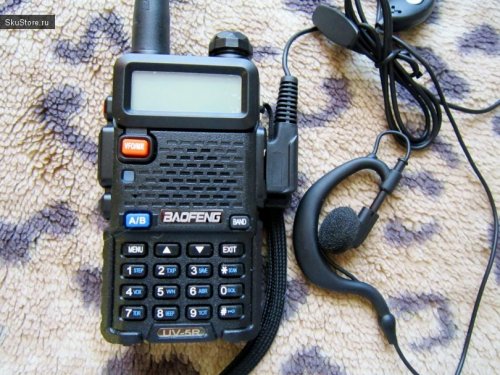 Police don't use chinese baofeng ham radio civilian hardware. They use Motorola APX/XTS, Harris Electronics, Bendix-King, or Kenwood. But by far the most popular is Motorola because of their digital trunking/P25 Encryption, which the Baofeng's are not capable of.
- 6 comments
- 1 review
-
-

- 1
-
-
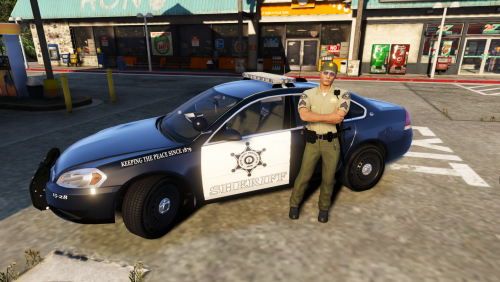 Having spent close to seven years building these vehicles for SDSO, it's going to be super cool seeing them in game! Nice work! Edit: They don't have any marked impala's though, so if you could find a caprice to fit your texture to, that'd look pretty cool. If you have any questions about the equipment we used to build their cars, feel free to ask!
- 3 comments
- 2 reviews
-
-
 Haven't seen the police vehicle being the suspect vehicles yet, but I was way up in Grapeseed, and I got a callout to the Terrorist take over of the train station in Pillbox Hill, and one other callout down in the city while I was in Sandy Shores. Something's not checking jurisdictions? Do I have any good thing to say, you ask? Hell yeah! I played for three hours last night and not a single PYIC all night! (Might have been caused by not having Computer+ installed because I don't use it, but I installed it anyway. And I see that you will have a fix for this upcoming, but I don't think you're the only callout maker suffering from this issue)
- 136 comments
- 42 reviews
-
Really like these callouts! Cheep's pretty good at watching comments for bugs/etc, and fixes show up almost as soon as he's aware of the problem!
- 136 comments
- 42 reviews
-
-
- 1
-
-
 It's kinda hard to see if LSPDFR+ is actually loaded because its mostly stuff you can't see. Try pressing F9 while on-duty, if the Court System screen shows up, it's loaded.
- 1,178 comments
- 137 reviews
-
-
Starting on my way to a callout I had just accepted. I'm going to install computer+, even though I'll never use it, to see if that helps
- 1,178 comments
- 137 reviews
-
-
@Albo1125 Is this crashlog related to one of your plugins? RagePluginHook.log
- 1,178 comments
- 137 reviews
-
Ok, so I got the PYIC (Press Y, Instant Crash) thing again today... I notice that in my log, and some others logs from early on, that it's referencing directory paths that are native to YOUR (Cheep's) machine, and not my own? Is that relevant? Shouldn't it be looking for files where they're stored on my machine? Maybe this means nothing, but I noticed it in the log. Have a look. Two crashes here: After the first one happened, I ReloadAllPlugins and ForceDuty, and as soon as that finished loading, I PYIC again with the first callout. Log Attached. RagePluginHook.log
- 136 comments
- 42 reviews
-
-
Thanks! I'll try that.
-
So far, I've had immediate crashes of LSPDFR the moment I hit Y to accept these calls: Officer hit panic button Vandalism and Moneytruck Robbery Attached Log.. RagePluginHook.log
- 136 comments
- 42 reviews
-
-
 I am also getting an LSPDFR crash when I press Y for Highway Accident Attaching log. RagePluginHook.log
- 221 comments
- 63 reviews
-
So I'm pretty new to the GTA 5 mods/additions world, and I'm old (almost 50, (oi, hurts to type that)), so maybe there's an easier way that I'm just not seeing. But when I download a vehicle from the vehicle mods section, there's no way of knowing, until I open the file up, which slot it's intended for. For example, I'm looking for a replacement to the unmarked granger, which is FBI2 if I'm not mistaken, but there's no indicator on any of the file listings which slot it's built for. And I suck at trying to make them work in slots they don't belong by renaming things, already re-installed the game a couple times to clear up that mess. I assume these kinds of indicators are possible, such is the case with ELS and NON-ELS, some folks list that in the title, but there's also an indicator on the file's page on the right side. So it would be cool if the vehicle models that were included in the file were indicated in some shape of form. Or am I missing something blatantly obvious somewhere?
-
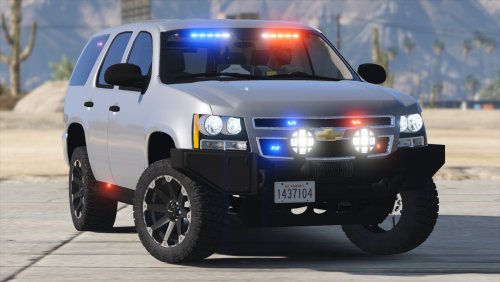
.thumb.jpg.930b3b93c7c75c01f46faeecf9341ab2.jpg) Appears to be Kern County Sheriff markings. Very cool to me, since I used to build these cars for this department 🙂
Appears to be Kern County Sheriff markings. Very cool to me, since I used to build these cars for this department 🙂- 66 comments
- 41 reviews
-
I have noticed with several vehicles by different creators that when the vehicle moves to a dirty state, certain things disappear under an opaque texture. For example, on the Los_Santos_County_Sheriff_Pack_V1, in the FBI2 Tahoe, the windows around the vehicle become solid, and you can no longer see the interior light bars and side lighting. On the Challenger Hellcat, the rear running lights disappear behind this texture, on the Chargers, it's the solid LED running light that encompasses the rear lights. If I open the LSPDFR console, and "WASH" it, the window become see-through again, and all the lighting that disappeared shows up again, at least until the vehicle becomes dirty again. It's driving me bonkers. Any ideas?
-
I agree, I inadvertently spawn a pair of really upset ladies in a supercar behind me by pressing page-up, and they quickly took me out. Need to undo some of the Trainers keys
-
Yeah, running Simple Trainer. Pressing it outside of the vehicle I notice it says Not In Vehicle or no Saved Vehicle.
-
Some of the Callouts require you to press END to end the call, but doing so causes the horn to pulse (honk every 3/4 second)and the parking lights to flash. The GPS flashes red/blue and I get an instant wanted star, even though I'm on duty.
-
 Why does the 2015 Chevy Tahoe (police2) have a police3.ytd file in it? It's causing the vehicle to have very strange textures.
- 210 comments
- 59 reviews
-
-
- 1
-
-
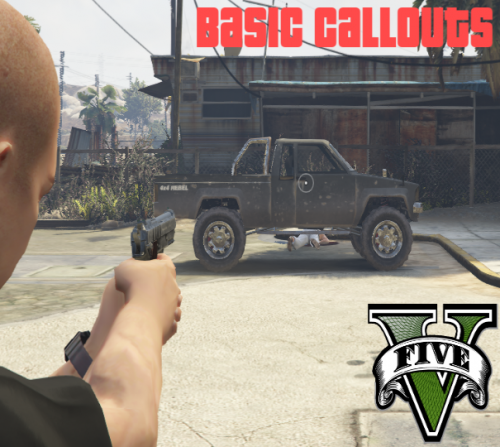 I suppose if the callout is too far, I can choose to ignore it. But it being out of jurisdiction is a touch on the unrealistic side for the sticklers. Either way, two thumbs up for these callouts.
- 58 comments
- 12 reviews
-
-
- 1
-
-
Great job on the callouts, I like these simple calls as well. Question: Is it just me, or are some of these callouts clear on the other side of the map? I was taking care of one callout in downtown Los Santos, and got a 911 abuse call in Sandy Shores. Is this intentional?
- 58 comments
- 12 reviews
-
-
- 1
-

.thumb.jpg.930b3b93c7c75c01f46faeecf9341ab2.jpg)
